



 More Products
 Compare














我的荣耀 开启荣耀之旅



 Disagree Terms
 Log out




Small Camera Changes after Magic UI 4 Update


 Last reply :
Hey everyone,
The Camera is a frequently used feature for me and also for many of you. The Magic UI 4 update brings us many adjustments for a more friendly user experience.
These adjustments may affect your ordinary habits on camera operations. Then, what adjustments or changes are made on Magic UI 4? Let’s have a look now!
How to Take High-Pixel Photos in EMUI 11 ?
Before the update, there were a RAW switch and high-pixel option (such as 40 MP) in the viewfinder when in Pro mode. The different settings of them allow users to take the following types of images: High-pixel RAW images, regular RAW images, high-pixel JPG images, and regular JPG images.
After the update, the RAW switch and high-pixel option have been merged and displayed as the JPG switch, which has three options: RAW results in high-pixel RAW images, JPG-L results in high-pixel JPG images, and JPG results in regular JPG images.
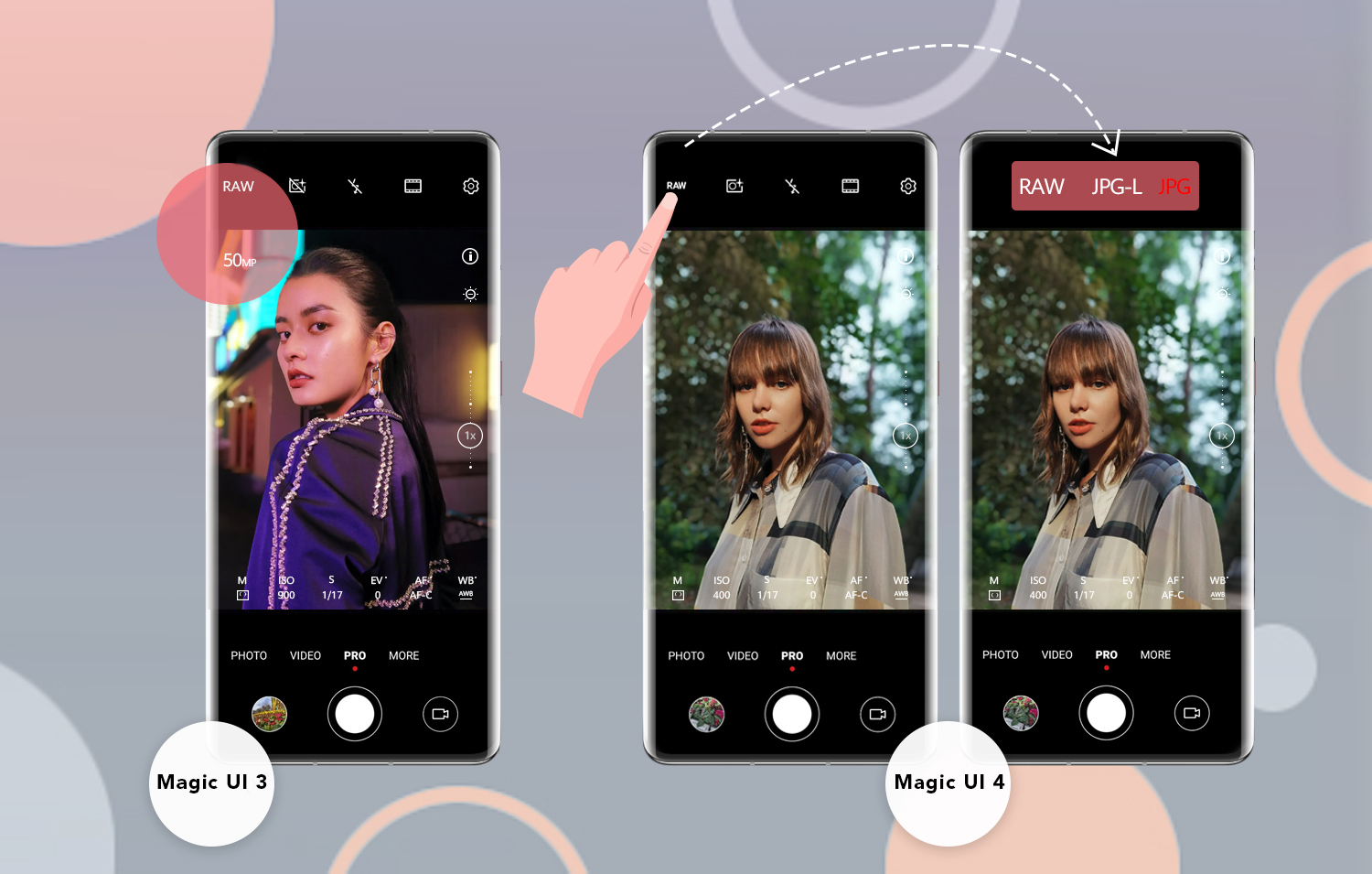
Note that a zoomed image taken in RAW mode will be a regular RAW image. You need to select the RAW option again in order to take high-pixel RAW images.
Why are the exposure icon and focus frame persistent on the video recording viewfinder in EMUI 11?
To help you view and adjust the exposure and focus in real time when recording a video, the exposure icon and focus frame will remain on the viewfinder if you touch the focus icon before or during video recording, after updating to Magic UI 4. This will not affect your videos, and please do not be concerned.
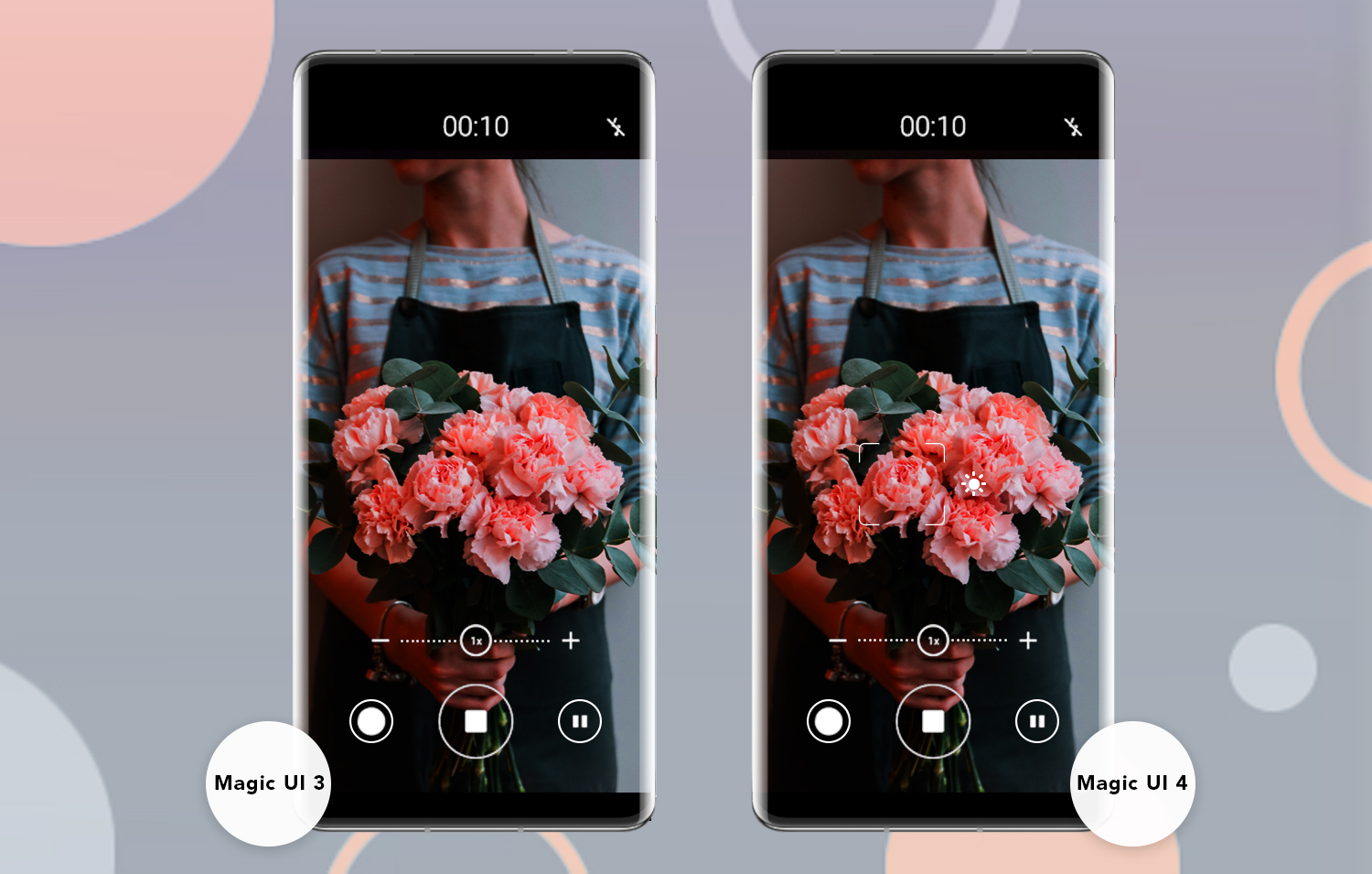
(Note: The figures are for illustration purposes only. The support for the feature varies depending on the device model.)
Want to learn more about Magic UI 4? Make sure to follow me!
What do you think about these changes?


- Posts
- Following
- Followers
- Energy
-

Revolt
-
+ Follow

-
- 131 Posts
- 23 Following
- 252 Followers
- 8524 Energy






- Posts
- photo
- video

Hey everyone,
The Camera is a frequently used feature for me and also for many of you. The Magic UI 4 update brings us many adjustments for a more friendly user experience.
These adjustments may affect your ordinary habits on camera operations. Then, what adjustments or changes are made on Magic UI 4? Let’s have a look now!
How to Take High-Pixel Photos in EMUI 11 ?
Before the update, there were a RAW switch and high-pixel option (such as 40 MP) in the viewfinder when in Pro mode. The different settings of them allow users to take the following types of images: High-pixel RAW images, regular RAW images, high-pixel JPG images, and regular JPG images.
After the update, the RAW switch and high-pixel option have been merged and displayed as the JPG switch, which has three options: RAW results in high-pixel RAW images, JPG-L results in high-pixel JPG images, and JPG results in regular JPG images.
Note that a zoomed image taken in RAW mode will be a regular RAW image. You need to select the RAW option again in order to take high-pixel RAW images.
Why are the exposure icon and focus frame persistent on the video recording viewfinder in EMUI 11?
To help you view and adjust the exposure and focus in real time when recording a video, the exposure icon and focus frame will remain on the viewfinder if you touch the focus icon before or during video recording, after updating to Magic UI 4. This will not affect your videos, and please do not be concerned.
(Note: The figures are for illustration purposes only. The support for the feature varies depending on the device model.)
Want to learn more about Magic UI 4? Make sure to follow me!
What do you think about these changes?