



 More Products
 Compare














我的荣耀 开启荣耀之旅



 Disagree Terms
 Log out




[Router 3] Stop It puts the HONOR Router 3 to the test


 Last reply :
Honor Router 3 Review
Hello everyone in the Honor UK Club.
For those catching up, this is technically my second look at the Honor Router 3. For the first look, see my initial postings about this amazing little device
here:
https://community.hihonor.com/uk/topicdetail/%5BHonor-Router-3%5D-Unboxing-and-Impressions-of-the-Router-3/topicId_21531/
In addition, as promised, I will not be using jargon, or figures, or other things that are better covered by the official posts here
https://community.hihonor.com/uk/topicdetail/%5BNews%5D-HONOR-Launches-First-Wi-Fi-6-Plus-HONOR-Router-3-Packing-the-Latest-Gigahome-Wi-Fi-6-Chipset!/topicId_21491/
or the amazing review by @Sasco here:
https://community.hihonor.com/uk/topicdetail/Sasco-Takes-a-Look-at-the-HONOR-Router-3:-Should-You-Upgrade-Now?/topicId_22959/
No, this will be a story of how the Honor Router 3 has changed my internal network, and has made WI-Fi from something to be worried about, to something that has brought the digital home together with the Honor Router 3 at the heart of it.
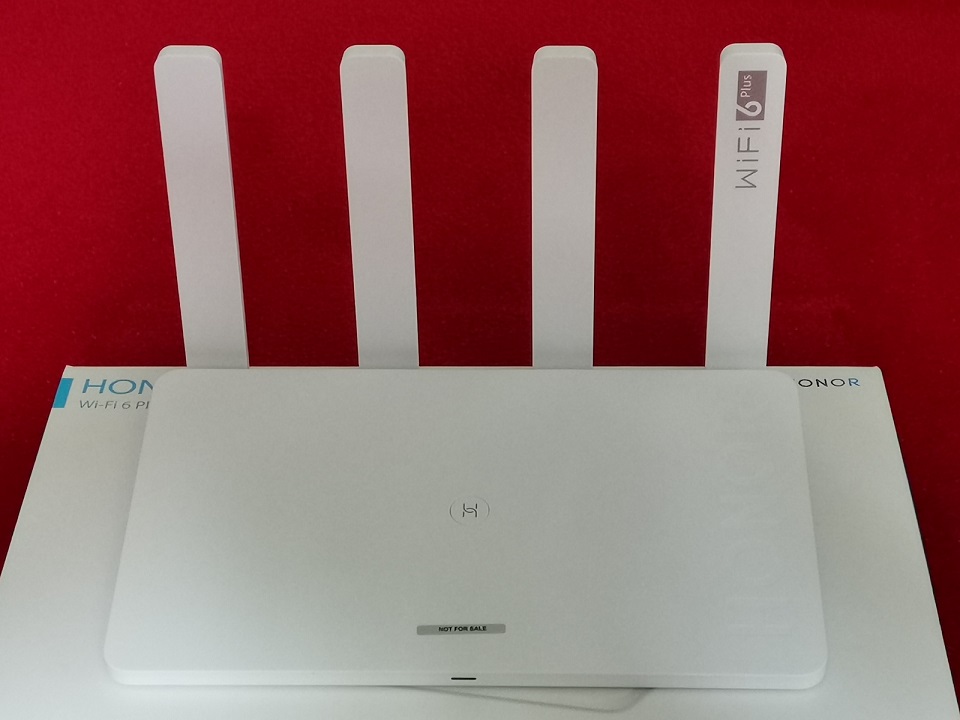
Firstly, a little background. My internet is provided by Sky. This is an integrated solution with the * and Internet, and the Sky Q boxes which include the Sky Q Hub for the internet, main * box and a Mini box that connects via Wi-Fi for the * to be broadcast from the Sky Q * box to that and to mobile devices using the home network.
The system is designed to be used with the Sky Q Hub at the heart of the Wi-Fi mesh created, and is advertised as reliable, fast broadband in the home. The one good thing about the mesh is signal strength, shame the rest of it isn’t so good. The amount of times I heard the dreaded “The internet is broken” because the Sky Q Hub would fall to bits under the load.
In order to assist with this, I purchased a Netgear R6260 router to connect via Powerline Ethernet upstairs, connect to my PC, * and Xbox via Ethernet and be a secondary WI-FI device for getting my devices to spread the load and avoid the horrors of Wi-FI fails.
Shame it didn’t work out so well. While it did help with this issue, it brought up new issues. I have a total of 6 “castable” devices so I can watch YouTube and Netflix etc via casting. The ability to watch a film on my Honor 20 Pro, and then continue on my * using casting is invaluable. However, having 2 active routers means that connecting to one makes the other devices not visible to the other. And for reasons beyond me, trying to integrate the two ended in disaster where the network would just fall apart entirely. So I had a situation where if I was on the “wrong” WiFI, I wouldn’t be able to cast to my Chromecast, to Sky * boxes, or my Sky Go app wouldn’t connect to my phones.
Enter the Honor Router 3.

This is now my Network map, the initial intention of buying the Netgear is now a reality. DHCP is fully turned off the Sky Q Hub and the Router 3 is now in charge of the network entirely.
And lo, it works. It just untitleddailyworksuntitleddaily.
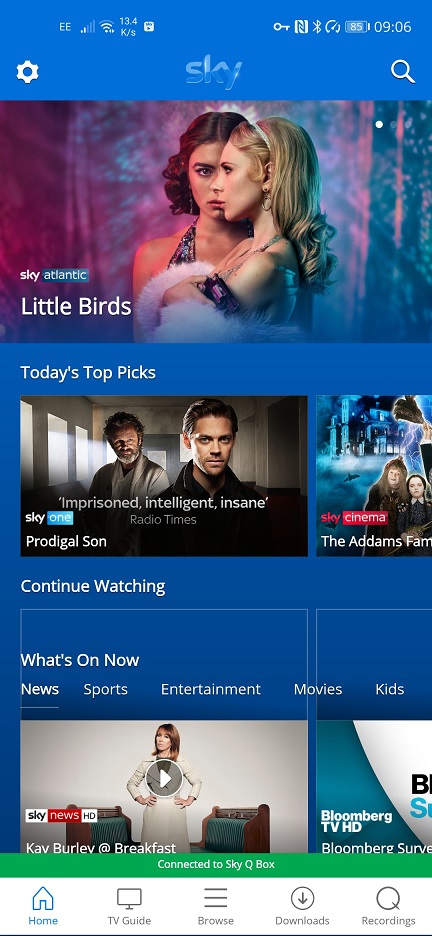
I don’t know how important this actually is. No more anxiety about Wi-FI being connected but the internet not working. No more wondering which network which device is on and the inability to see devices on the network for *. Sky Go actually allows me to see the following, which trust me, was such a difficult thing to achieve on the previous network setup it wasn't even funny. With just the Sky Q Hub, it would "work" but the network would failover with the device load. Or with the Netgear it would treat half the devices as a different network and not allow you to cast between networks.
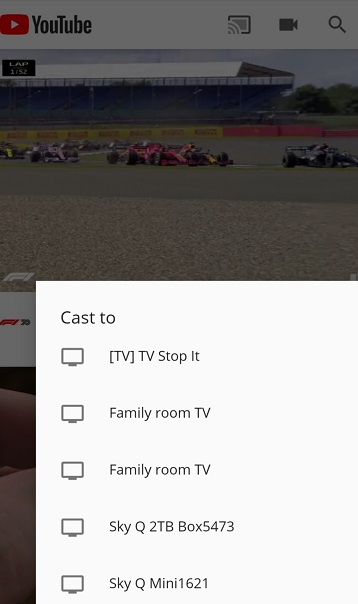
The ability to know that no matter what device I’m using, that I can connect via casting to whichever casting device I need to, is a complete change from anything my network has seen before. This is what Youtube untitleddailyshoulduntitleddaily see when I choose what to cast from, as evidenced on the Router 3. This simply didn't happen with my previous network setups.
Now network visibility and stability is great. But network quality is another. I’m sure any gamers here will have heard that Wi-FI is “Not for gaming”.
Well, they’re half right. Bad Wi-FI is bad for gaming. Good signal strength doesn’t mean your Wi-Fi quality is good. It is notoriously hard to judge too, because for music and video *, you get buffers which hide network jitter and micro-drops. Gaming * however is another issue. In a world where you can cast your PC to Mobile and Laptops via Steam In Home *, from your Xbox to PC and Mobile via the Xbox Game * App and via the Internet to your home via xCloud, Google Stadia and Geforce Now, these are tests of networking to their limits and both require internal networking to be in peak performance as well as your Internet connection for the case of Internet to home *.
I had promised no figures but here is one. Those who remember my initial thoughts saw the graph between my Steam PC and mobile. This picture is an example of the amazing network stability the Honor Router 3 creates in the home.
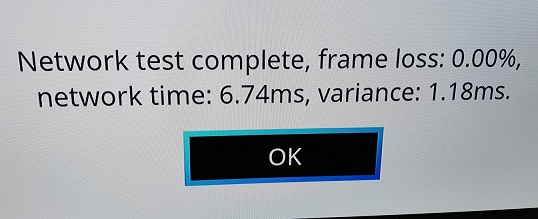
Without this stability, it doesn’t matter if you even had a 1gb Fibre line for services like Google Stadia, because your networking in the home would ruin it. For internal services like Steam Link for In Home *, this stability means you get a cleaner image, less lag, and no more of the dreaded “Network quality problems detected” pop-ups. My old Sky Q Hub and Netgear were so bad at this I thought Xbox to MagicBook * wasn’t actually possible because it was so unusable until I switched to the Router 3.
Network stability is also contingient on load management. A modern household will have multiple devices. The Internet of Things means everything from smart speakers, * set top boxes, * themselves, consoles, phones, computers, laptops all require a connection to the internet. All of these things demand time and resources from your router and this is what causes routers that claim to be "great for signal" like ISP routers to fail. They may have great antennas. They will not have a great processor for dealing with load. This is where the Gigahome 1.2Ghz Dual Core chipset, unique to Honor, comes into play. The Cortex A-53 based 64bit processor means it makes light work of device load, able to prioritise traffic better than you'd even think. I had a Skype call to listen into and was downloading at full speed. Usually this would make Skype fall apart because the QoS systems of the Sky Hub wouldn't put prio to VOIP traffic at full load. Not so with the Router 3.
This is a picture of how many devices my Honor Router 3 deals with, and while such a load would bring other routers to their knees just to manage them on the network, the Router 3 deals with them with aplomb.
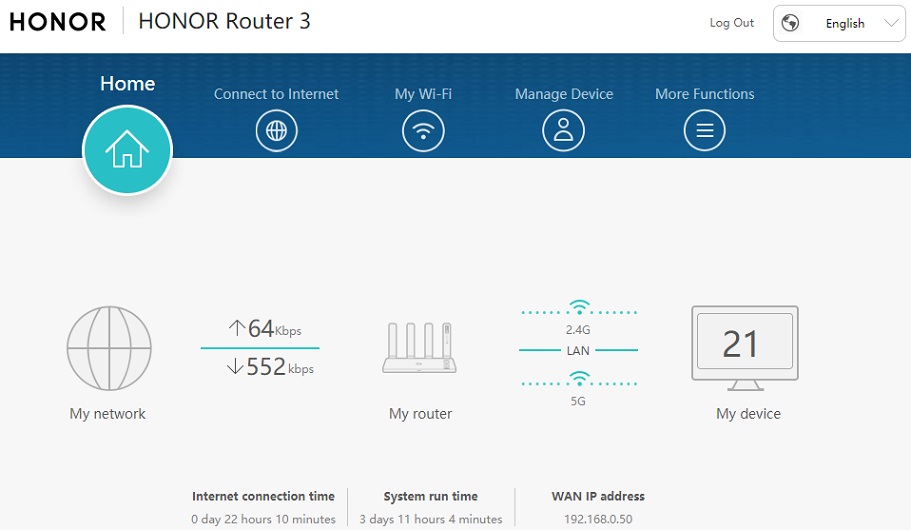
Finally, and YMMV with this one, but for IPTV services like Sky which uses internal networking for casting the Sky * from the main box to the Mini box and to devices in the home, not using the Sky Hub for routing even seems ti improve the connection between the Sky Q * box and the Sky Mini box, after a bit of fighting the system to convince it doesn’t need a Sky Q Hub to work!
So there you have it, my thoughts on the Router 3 as used in my home. Later on I will bring more to the table on the UI and how to make the most of the systems, but this is my real world usage case and how the Router 3 has changed how I treat networking in the home. Hopefully one day I’ll get a Wi-Fi 6 device so I can demonstrate what this thing can do at top speed, but even without this, it is a game changer for any home network.


- Posts
- Following
- Followers
- Energy
-
 StopIt
HONOR 50 Tester
StopIt
HONOR 50 Tester
-
+ Follow

-
- 103 Posts
- 245 Following
- 411 Followers
- 21470 Energy









- Posts
- photo
- video

Honor Router 3 Review
Hello everyone in the Honor UK Club.
For those catching up, this is technically my second look at the Honor Router 3. For the first look, see my initial postings about this amazing little device
here:
https://community.hihonor.com/uk/topicdetail/%5BHonor-Router-3%5D-Unboxing-and-Impressions-of-the-Router-3/topicId_21531/
In addition, as promised, I will not be using jargon, or figures, or other things that are better covered by the official posts here
https://community.hihonor.com/uk/topicdetail/%5BNews%5D-HONOR-Launches-First-Wi-Fi-6-Plus-HONOR-Router-3-Packing-the-Latest-Gigahome-Wi-Fi-6-Chipset!/topicId_21491/
or the amazing review by @Sasco here:
https://community.hihonor.com/uk/topicdetail/Sasco-Takes-a-Look-at-the-HONOR-Router-3:-Should-You-Upgrade-Now?/topicId_22959/
No, this will be a story of how the Honor Router 3 has changed my internal network, and has made WI-Fi from something to be worried about, to something that has brought the digital home together with the Honor Router 3 at the heart of it.
Firstly, a little background. My internet is provided by Sky. This is an integrated solution with the * and Internet, and the Sky Q boxes which include the Sky Q Hub for the internet, main * box and a Mini box that connects via Wi-Fi for the * to be broadcast from the Sky Q * box to that and to mobile devices using the home network.
The system is designed to be used with the Sky Q Hub at the heart of the Wi-Fi mesh created, and is advertised as reliable, fast broadband in the home. The one good thing about the mesh is signal strength, shame the rest of it isn’t so good. The amount of times I heard the dreaded “The internet is broken” because the Sky Q Hub would fall to bits under the load.
In order to assist with this, I purchased a Netgear R6260 router to connect via Powerline Ethernet upstairs, connect to my PC, * and Xbox via Ethernet and be a secondary WI-FI device for getting my devices to spread the load and avoid the horrors of Wi-FI fails.
Shame it didn’t work out so well. While it did help with this issue, it brought up new issues. I have a total of 6 “castable” devices so I can watch YouTube and Netflix etc via casting. The ability to watch a film on my Honor 20 Pro, and then continue on my * using casting is invaluable. However, having 2 active routers means that connecting to one makes the other devices not visible to the other. And for reasons beyond me, trying to integrate the two ended in disaster where the network would just fall apart entirely. So I had a situation where if I was on the “wrong” WiFI, I wouldn’t be able to cast to my Chromecast, to Sky * boxes, or my Sky Go app wouldn’t connect to my phones.
Enter the Honor Router 3.
This is now my Network map, the initial intention of buying the Netgear is now a reality. DHCP is fully turned off the Sky Q Hub and the Router 3 is now in charge of the network entirely.
And lo, it works. It just untitleddailyworksuntitleddaily.
I don’t know how important this actually is. No more anxiety about Wi-FI being connected but the internet not working. No more wondering which network which device is on and the inability to see devices on the network for *. Sky Go actually allows me to see the following, which trust me, was such a difficult thing to achieve on the previous network setup it wasn't even funny. With just the Sky Q Hub, it would "work" but the network would failover with the device load. Or with the Netgear it would treat half the devices as a different network and not allow you to cast between networks.
The ability to know that no matter what device I’m using, that I can connect via casting to whichever casting device I need to, is a complete change from anything my network has seen before. This is what Youtube untitleddailyshoulduntitleddaily see when I choose what to cast from, as evidenced on the Router 3. This simply didn't happen with my previous network setups.
Now network visibility and stability is great. But network quality is another. I’m sure any gamers here will have heard that Wi-FI is “Not for gaming”.
Well, they’re half right. Bad Wi-FI is bad for gaming. Good signal strength doesn’t mean your Wi-Fi quality is good. It is notoriously hard to judge too, because for music and video *, you get buffers which hide network jitter and micro-drops. Gaming * however is another issue. In a world where you can cast your PC to Mobile and Laptops via Steam In Home *, from your Xbox to PC and Mobile via the Xbox Game * App and via the Internet to your home via xCloud, Google Stadia and Geforce Now, these are tests of networking to their limits and both require internal networking to be in peak performance as well as your Internet connection for the case of Internet to home *.
I had promised no figures but here is one. Those who remember my initial thoughts saw the graph between my Steam PC and mobile. This picture is an example of the amazing network stability the Honor Router 3 creates in the home.
Without this stability, it doesn’t matter if you even had a 1gb Fibre line for services like Google Stadia, because your networking in the home would ruin it. For internal services like Steam Link for In Home *, this stability means you get a cleaner image, less lag, and no more of the dreaded “Network quality problems detected” pop-ups. My old Sky Q Hub and Netgear were so bad at this I thought Xbox to MagicBook * wasn’t actually possible because it was so unusable until I switched to the Router 3.
Network stability is also contingient on load management. A modern household will have multiple devices. The Internet of Things means everything from smart speakers, * set top boxes, * themselves, consoles, phones, computers, laptops all require a connection to the internet. All of these things demand time and resources from your router and this is what causes routers that claim to be "great for signal" like ISP routers to fail. They may have great antennas. They will not have a great processor for dealing with load. This is where the Gigahome 1.2Ghz Dual Core chipset, unique to Honor, comes into play. The Cortex A-53 based 64bit processor means it makes light work of device load, able to prioritise traffic better than you'd even think. I had a Skype call to listen into and was downloading at full speed. Usually this would make Skype fall apart because the QoS systems of the Sky Hub wouldn't put prio to VOIP traffic at full load. Not so with the Router 3.
This is a picture of how many devices my Honor Router 3 deals with, and while such a load would bring other routers to their knees just to manage them on the network, the Router 3 deals with them with aplomb.
Finally, and YMMV with this one, but for IPTV services like Sky which uses internal networking for casting the Sky * from the main box to the Mini box and to devices in the home, not using the Sky Hub for routing even seems ti improve the connection between the Sky Q * box and the Sky Mini box, after a bit of fighting the system to convince it doesn’t need a Sky Q Hub to work!
So there you have it, my thoughts on the Router 3 as used in my home. Later on I will bring more to the table on the UI and how to make the most of the systems, but this is my real world usage case and how the Router 3 has changed how I treat networking in the home. Hopefully one day I’ll get a Wi-Fi 6 device so I can demonstrate what this thing can do at top speed, but even without this, it is a game changer for any home network.