



 More Products
 Compare










我的荣耀 开启荣耀之旅



 Disagree Terms
 Log out




[Petal Search] Find Apps widget ,Your Gateway to A Million Apps!


 Last reply :
Dear HONOR Fans,
We’re a customer centric company, regardless of any challenges we may face.
We uphold the mission to provide our consumers with the best experience, and strive to develop an open ecosystems to fulfill this mission. We have recently made huge progress in our developments of the AppGallery, with over 1.5M developers and content providers currently working on the platform. Now we want to introduce another way—the Petal Search ‘Find Apps’ widget for HONOR users to get access to leading apps. 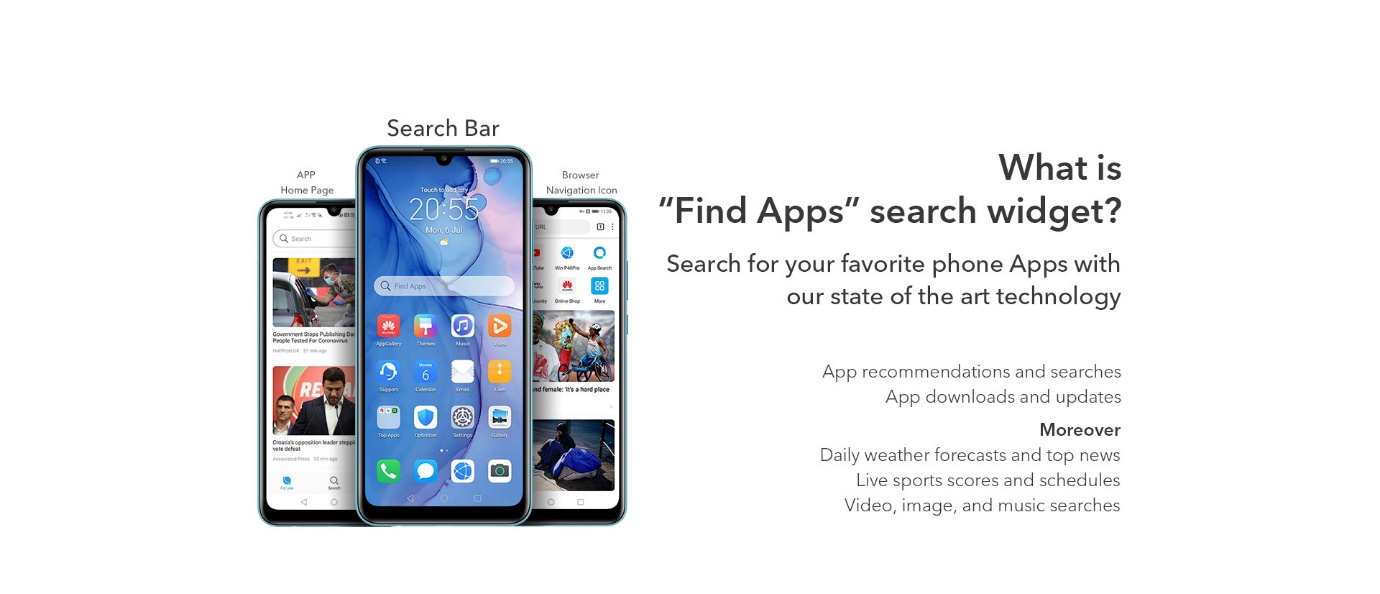
This new tool allows HONOR users (especially users of HONOR 9X PRO, HONOR 9A and more upcoming HMS devices) to get their favourite apps with ease.
It supports you in sourcing all of the apps that you need on your HONOR devices.
There are 3 ways you can get access to the apps that you need with the Petal Search.
The first way:
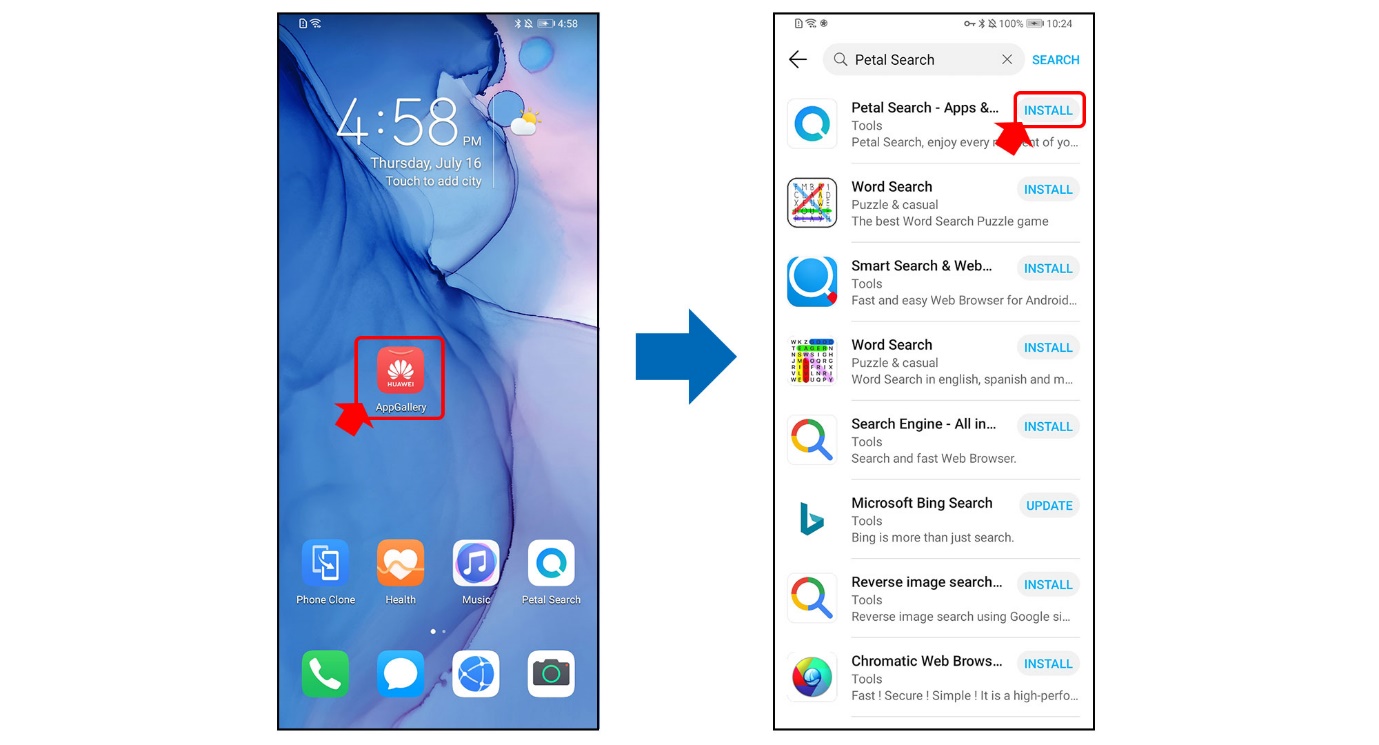
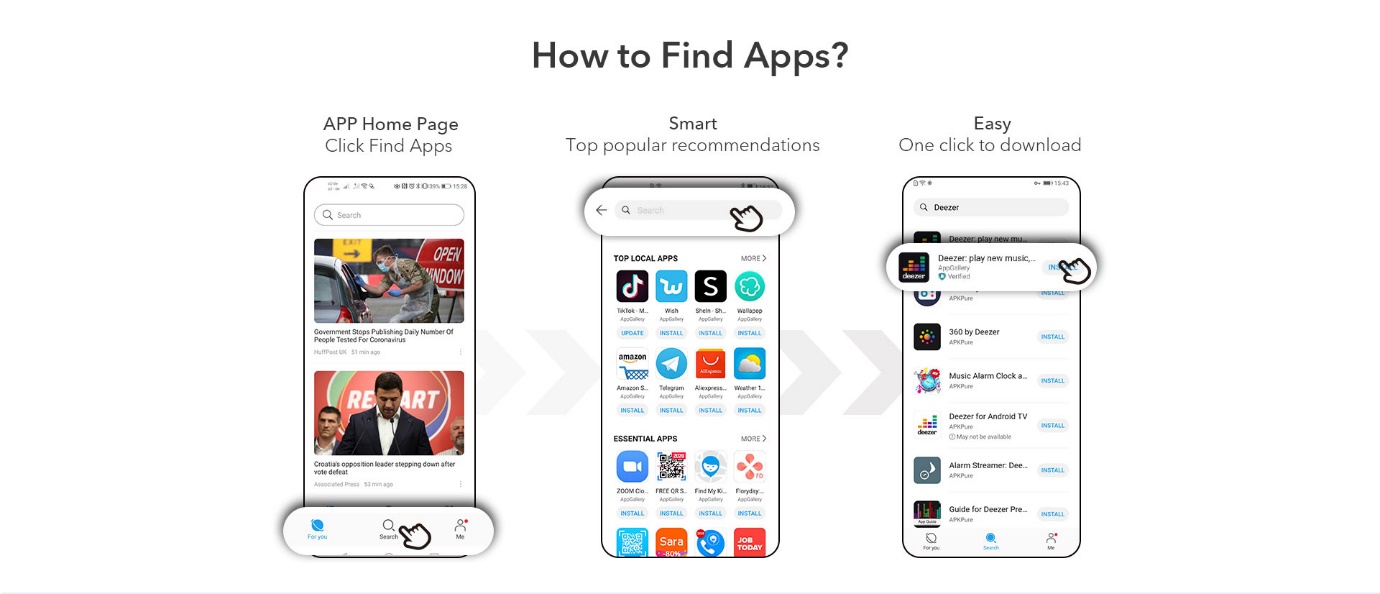
Download and install the Petal Search app from AppGallery, and then open the app to search for the app you need:
The second way:
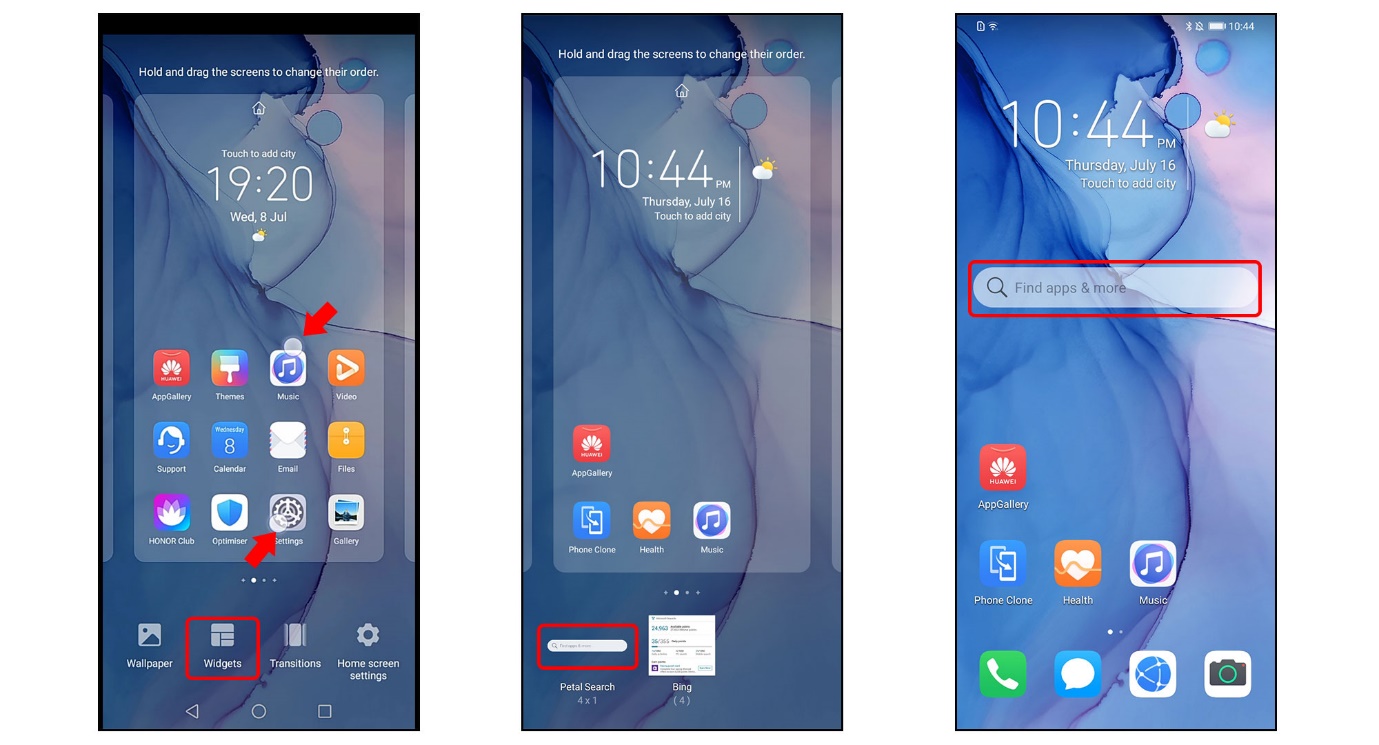
After you install the Petal Search app on your HONOR device, add the ‘Find Apps’ widget to your home screen for a quicker access to app installation.
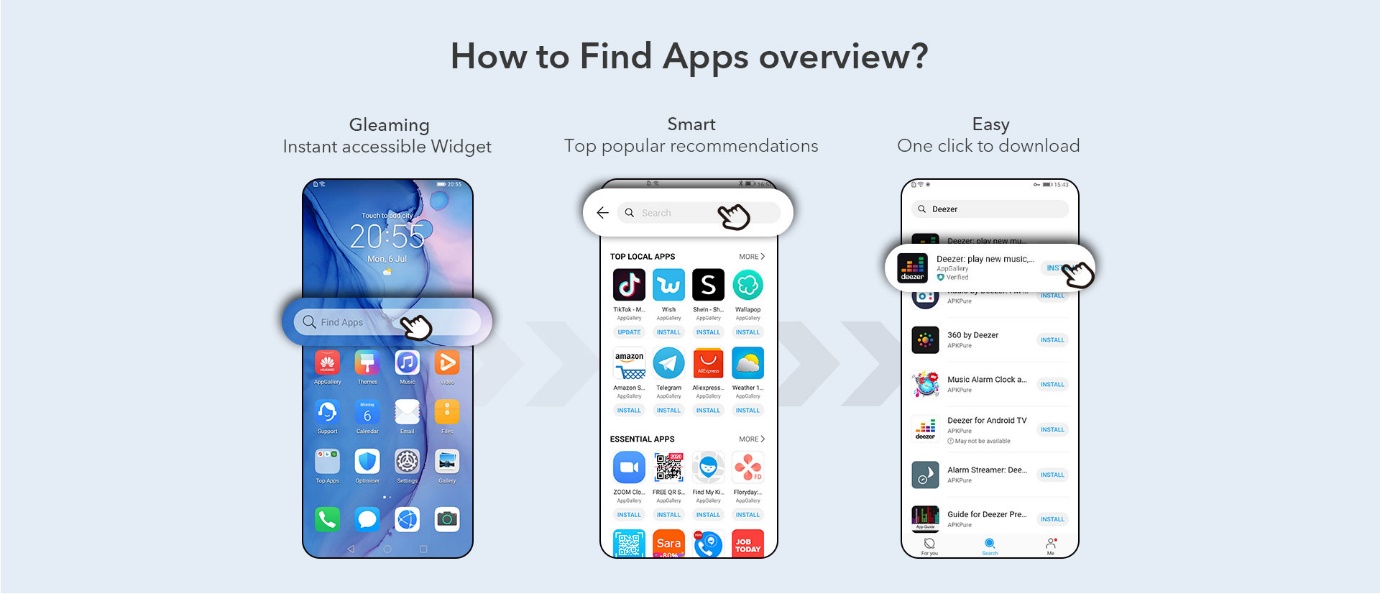
How to add ‘Petal Search-Find Apps’ widget to your home screen?
Step 1: Pinch the home screen inwards with 2 fingers
Step 2: Tap Widget
Step3: Swipe left to scroll through the available widgets and then tap and hold on the ‘Find Apps’ widget (Petal Search bar). Position it to the home screen.
The third way:
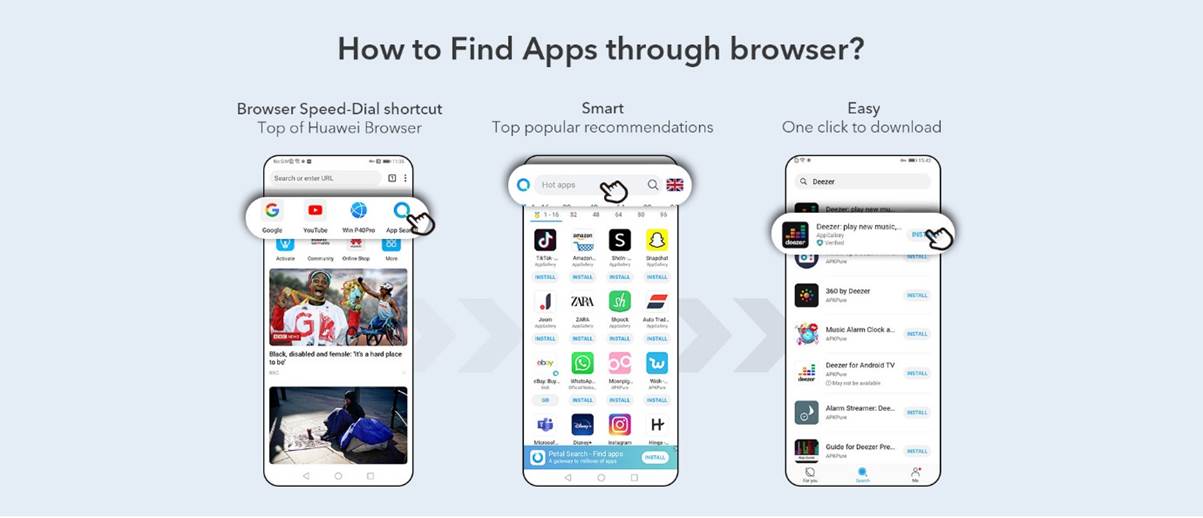
Use Petal Search to find apps via your HUAWEI Browser. You can simply find the Petal Search icon after you open your HUAWEI Browser.
WANT TO FIND OUT MORE?
Our fans have reviewed the Petal Search - Find Apps widget and you can find out more details about what they think here:
[App Share] Use Petal Search-Find Apps to get your favourite apps


- Posts
- Following
- Followers
- Energy
-

 Ava_HONOR_UK
Community Team
Ava_HONOR_UK
Community Team
-
+ Follow

-
- 108 Posts
- 89 Following
- 519 Followers
- 9166 Energy







- Posts
- photo
- video

Dear HONOR Fans,
We’re a customer centric company, regardless of any challenges we may face.
We uphold the mission to provide our consumers with the best experience, and strive to develop an open ecosystems to fulfill this mission. We have recently made huge progress in our developments of the AppGallery, with over 1.5M developers and content providers currently working on the platform. Now we want to introduce another way—the Petal Search ‘Find Apps’ widget for HONOR users to get access to leading apps.
This new tool allows HONOR users (especially users of HONOR 9X PRO, HONOR 9A and more upcoming HMS devices) to get their favourite apps with ease.
It supports you in sourcing all of the apps that you need on your HONOR devices.
There are 3 ways you can get access to the apps that you need with the Petal Search.
The first way:
Download and install the Petal Search app from AppGallery, and then open the app to search for the app you need:
The second way:
After you install the Petal Search app on your HONOR device, add the ‘Find Apps’ widget to your home screen for a quicker access to app installation.
How to add ‘Petal Search-Find Apps’ widget to your home screen?
Step 1: Pinch the home screen inwards with 2 fingers
Step 2: Tap Widget
Step3: Swipe left to scroll through the available widgets and then tap and hold on the ‘Find Apps’ widget (Petal Search bar). Position it to the home screen.
The third way:
Use Petal Search to find apps via your HUAWEI Browser. You can simply find the Petal Search icon after you open your HUAWEI Browser.
WANT TO FIND OUT MORE?
Our fans have reviewed the Petal Search - Find Apps widget and you can find out more details about what they think here:
[App Share] Use Petal Search-Find Apps to get your favourite apps