



 More Products
 Compare














我的荣耀 开启荣耀之旅



 Disagree Terms
 Log out




[NewUpdate] HONOR Band 5 offer you to Control Music from your wrist


 Last reply :
Hello Fans,
Featuring practical functions like the accurate sleep insight, calorie counting, step monitoring and multi-sports modes, the 30th September update of the HONOR band 5 will bring the remote music control function along with the SpO2 monitoring making it a more indispensable accessory for those looking for an all-in-one fitness tracker.
Once Band 5 is updated and Music Control is switched on via the Huawei Health app, customers can use Band 5 to instantly view and control their favorite music apps right from their wrist. Apps supported include Google Play Music, Spotify, YouTube, Shazam, Huawei music and many more. Remote music control is compatible only with smartphones running Android 5.0 and above.
After the upgrade, Huawei Health App will be running version 10.0.1.011 and Band 5 will be on version 1.1.0.93.
So, how to enable the antiuntitleddailyuntitleddailyuntitleddailyting music control function and control the music right from your wrist?
4 Simple Steps to Enable Remote Music Control function:
1. Enable the function in the Huawei Health app.
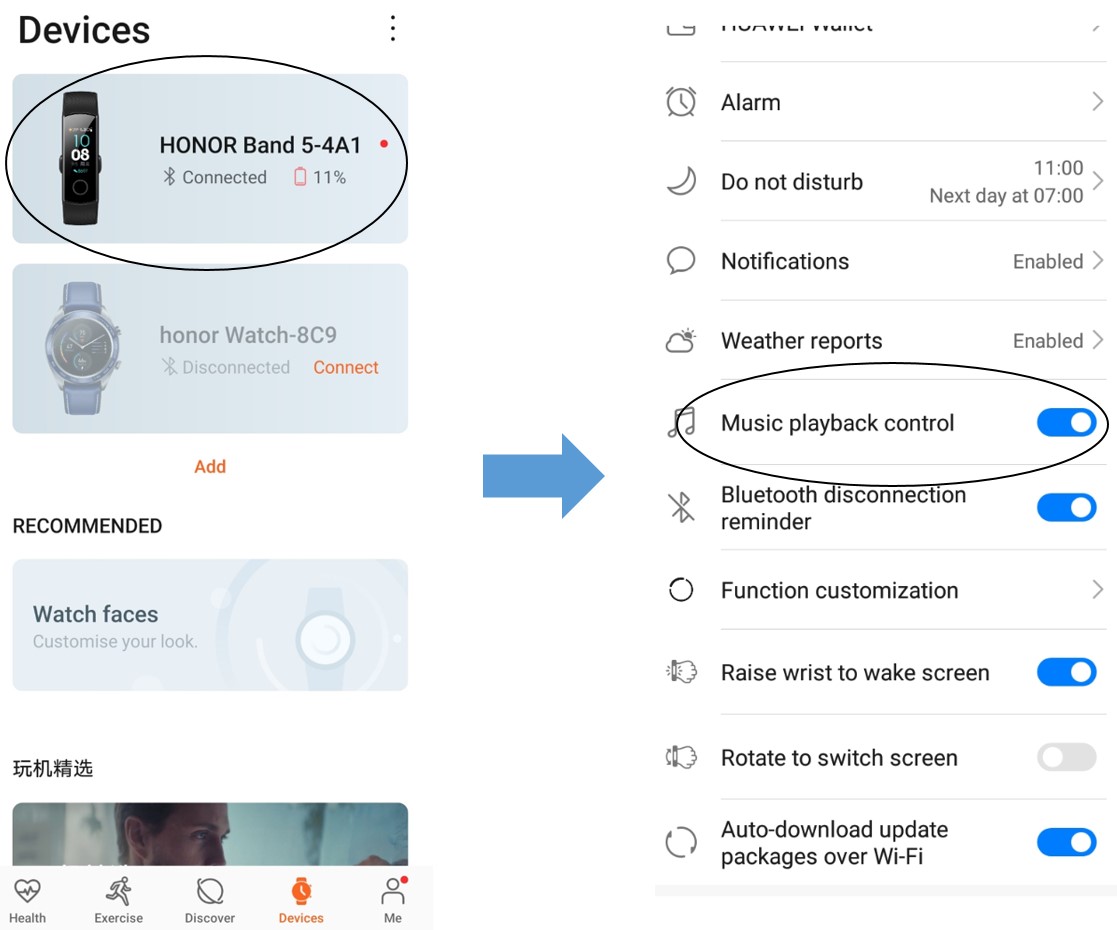
2. Slide through the interface of HONOR band 5 and tap the music control app.

3. Open up your favorite music app on your phone.
4. Control music with your band: Volume adjustment, Play, Pause, skip track and last track.
This is all for today. For any other questions please drop a comment below.
Cheers!
More about the HONOR Band 5:
HONOR Band 5 notification Problem


- Posts
- Following
- Followers
- Energy
-

Sebastian
-
+ Follow

-
- 139 Posts
- 390 Following
- 424 Followers
- 10125 Energy



- Posts
- photo
- video

Hello Fans,
Featuring practical functions like the accurate sleep insight, calorie counting, step monitoring and multi-sports modes, the 30th September update of the HONOR band 5 will bring the remote music control function along with the SpO2 monitoring making it a more indispensable accessory for those looking for an all-in-one fitness tracker.
Once Band 5 is updated and Music Control is switched on via the Huawei Health app, customers can use Band 5 to instantly view and control their favorite music apps right from their wrist. Apps supported include Google Play Music, Spotify, YouTube, Shazam, Huawei music and many more. Remote music control is compatible only with smartphones running Android 5.0 and above.
After the upgrade, Huawei Health App will be running version 10.0.1.011 and Band 5 will be on version 1.1.0.93.
So, how to enable the antiuntitleddailyuntitleddailyuntitleddailyting music control function and control the music right from your wrist?
4 Simple Steps to Enable Remote Music Control function:
1. Enable the function in the Huawei Health app.
2. Slide through the interface of HONOR band 5 and tap the music control app.
3. Open up your favorite music app on your phone.
4. Control music with your band: Volume adjustment, Play, Pause, skip track and last track.
This is all for today. For any other questions please drop a comment below.
Cheers!
More about the HONOR Band 5:
HONOR Band 5 FAQs
HONOR Band 5 not charging
HONOR Band 5 notification Problem
HONOR Band 5 Manual