



 More Products
 Compare














我的荣耀 开启荣耀之旅



 Disagree Terms
 Log out




[Magic UI 4 Tips] How do I turn on System haptics?


 Last reply :
Greetings, Friends'
I believe everything is fine with everyone;)
In this article - I'm going to share you all Magic UI 4.0 Tips on "How do I turn on System Haptics?" on your HONOR devices running Magic UI 4.0
Haptic Feedback
One of the innovations that has been done to make touchscreen use more practical is haptic feedback, which is a small vibration-based feedback that the smartphone provides to the person when they are using the touch screen display.
How could haptics improve the user experience on a smartphone?
The use of haptics is an essential part of the mobile experience. Every call you make, every text or email you receive, every touch you press on your keyboard, and more are all dependent on the haptics of your device. Since it offers feedback for each interaction, haptics can make you feel more connected to and efficient of your phone.
Let's take a look at on How to do it;
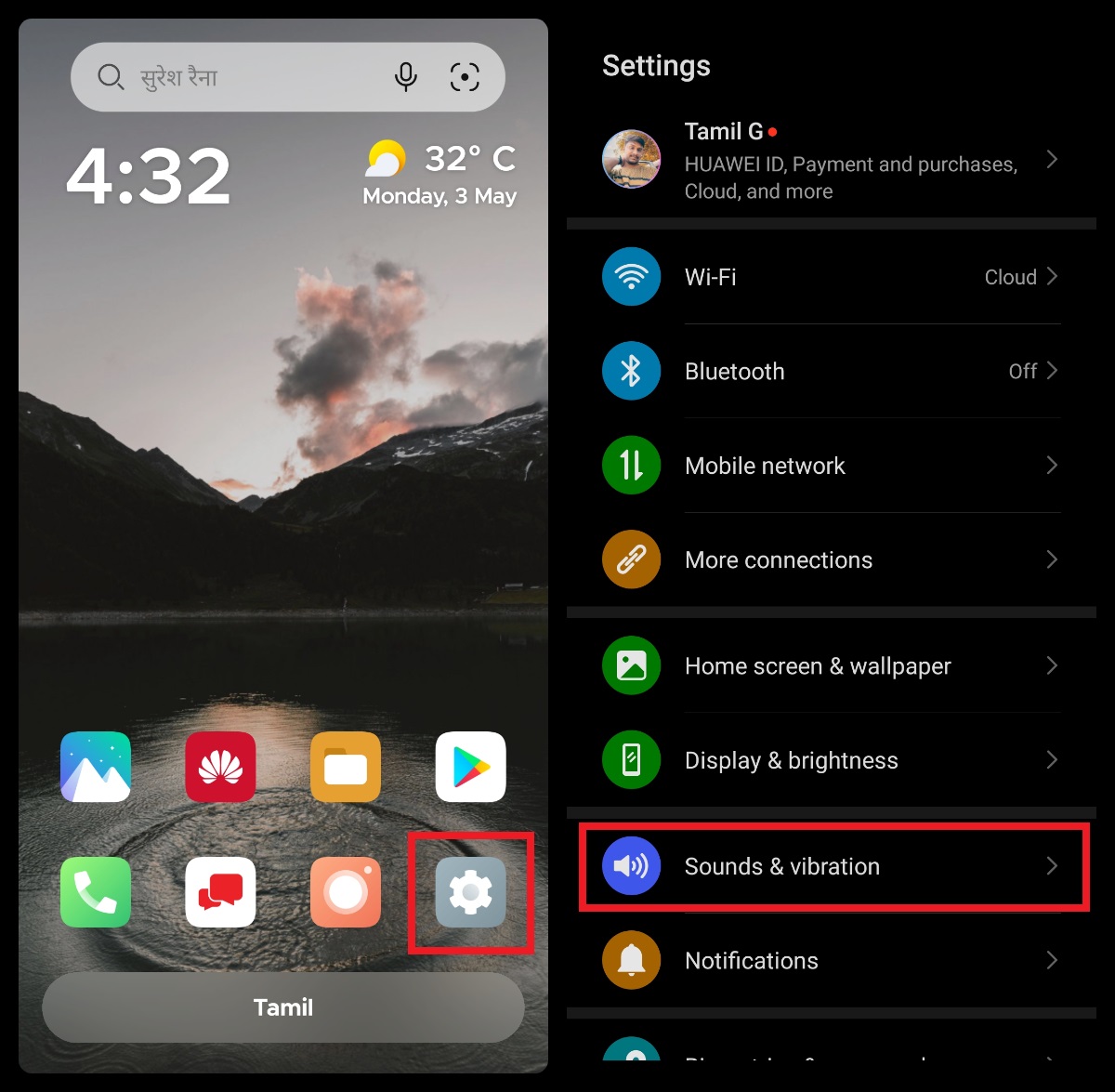
Step:1
Go to Settings > Sounds & vibration
Step:2
Under Sounds & vibration
Navigate to More settings > System haptics > Turn "On" toggle
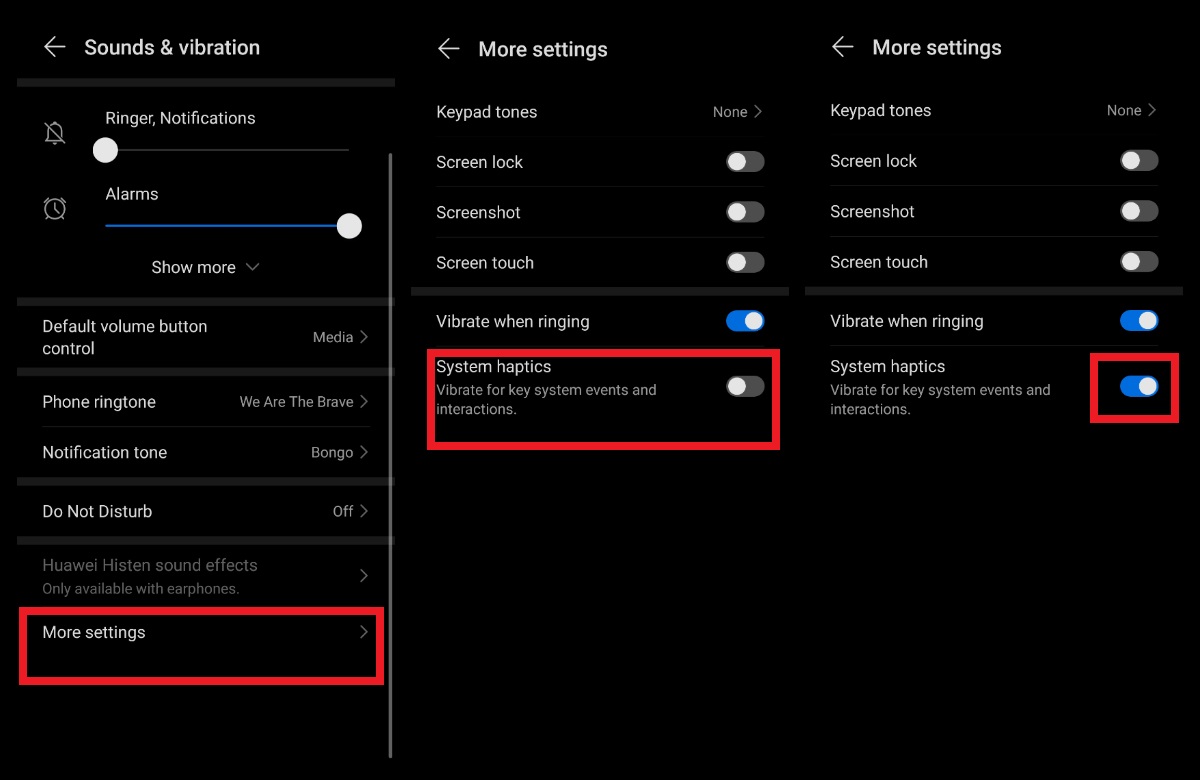
System haptics
Vibrate for the key system events and interactions
For your information:
The information in this article is focused on Magic UI 4.0

Thank you for taking the time to read my post; I believe you will find it informative;)


- Posts
- Following
- Followers
- Energy
-
 Tamil G
Moderator Intern
Tamil G
Moderator Intern
-
+ Follow

-
- 542 Posts
- 49 Following
- 881 Followers
- 39795 Energy

-
 New Comer
-
 Followers reach 50
-
 Followers reach 100
-
 Followers reach 200
-
 7 Days Check-in
-
 30 Days Check-in
-
 100 Days Check-in
-
 Moderator
-
 Halloween 2020
-
 HONOR STAR 2020
-
 New Year 2021
-
 Animal Photography
-
 Plant Photography
-
 Red Photography
-
 Survey Medal!
-
 Water Photography
-
 World Cycling & Running Day
-
 Product Photography
-
 Sky Photography
-
 Activity Photography Medal
-
 Autumn Photography
-
 Rain Photography
-
 HONOR 50: Best Shot!
-
 Monthly Photo Sharing #1 Landscape
-
 HONOR Magic4 Pro
-
 Monthly Photo Sharing #2 People
-
 Monthly Photo Sharing #3 Spring
-
 Monthly Photo Sharing #4 Animal



- Posts
- photo
- video

Greetings, Friends'
I believe everything is fine with everyone;)
In this article - I'm going to share you all Magic UI 4.0 Tips on "How do I turn on System Haptics?" on your HONOR devices running Magic UI 4.0
Haptic Feedback
One of the innovations that has been done to make touchscreen use more practical is haptic feedback, which is a small vibration-based feedback that the smartphone provides to the person when they are using the touch screen display.
How could haptics improve the user experience on a smartphone?
The use of haptics is an essential part of the mobile experience. Every call you make, every text or email you receive, every touch you press on your keyboard, and more are all dependent on the haptics of your device. Since it offers feedback for each interaction, haptics can make you feel more connected to and efficient of your phone.
Let's take a look at on How to do it;
Step:1
Go to Settings > Sounds & vibration
Step:2
Under Sounds & vibration
Navigate to More settings > System haptics > Turn "On" toggle
System haptics
Vibrate for the key system events and interactions
For your information:
The information in this article is focused on Magic UI 4.0
Thank you for taking the time to read my post; I believe you will find it informative;)