



 More Products
 Compare














我的荣耀 开启荣耀之旅



 Disagree Terms
 Log out




How to Install Google Play Store App and GMS on Huawei and Honor Smartphone in simple steps


 Last reply :
How to Install Google Play Store App and GMS on Huawei and Honor Smartphone in simple steps
Since Google Company stopped Huawei using its service called GMS (Google Mobile Service), the biggest issue that Huawei and Honor smartphone holders faced, would be the installation of Google Play Store with GMS.
To install Google Play Store with GMS, it is possible to use system mirror to restore the system of smartphone (Click Here to Learn More). But, that should be operated via external device, like USB drive. However, it is hard to find the device sometime. So today, I’m about to share the new way to install Google Play Store App with you via Googlefier.

An image of Googlefier App
By the way, I want to share the video with you first, and I think most of you have watched this video, but the operating steps are too much fast. So, I will explain the operating methods later. Before we start, don’t forget to subscribe this account and like this content, if it is helpful for you. Thank you!
Click here if you are unable to watch this video
What is Googlefier?
Googlefier is free App developed by bender_007, a number of XDA Forum developer, and it is used to install GMS and series of Google Mobile Service Apps, including Google Play Store App.

Simple way to install Google Play Store App and GMS by Googlefier
Hot to download Googlefier?
It is very easy to download the Googlefier, Just click here to download Googlefier AKP.
* If you could not download through above link, it is also possible to Click here to download.
System Requirement
Before you start to install Google Mobile Service via Googlefier, you should make sure that Huawei smartphone or Honor smartphone Operating system is EMUI 10 (So if the version is above EMUI 10, it is requested to downgrade to EMUI 10; and if the version is below EMUI 10, it is requested to upgrade to EMUI 10), if not, Googlefier will not work well. And also, Huawei or Honor smartphone release date should be before April 2020, if not, Googlefier may not work (like Huawei Mate 40, and Honor 10X lite).
Methods to install Google Play Store with GMS
After you installed Googlefier and opened this app, if the operating system of your smartphone is not EMUI 10 you, they will reminder you to upgrade or downgrade the operating system to EUMI 10. However, you also can click “Never Mind, Let me in” like what in the following image to continue, but the Googlefier may not work well.

An image of hint on Googlefier
When you entered Googlefier, you need to set the date of the year to 2019 or earlier. However, it can not be 2020. So just follow the methods below.
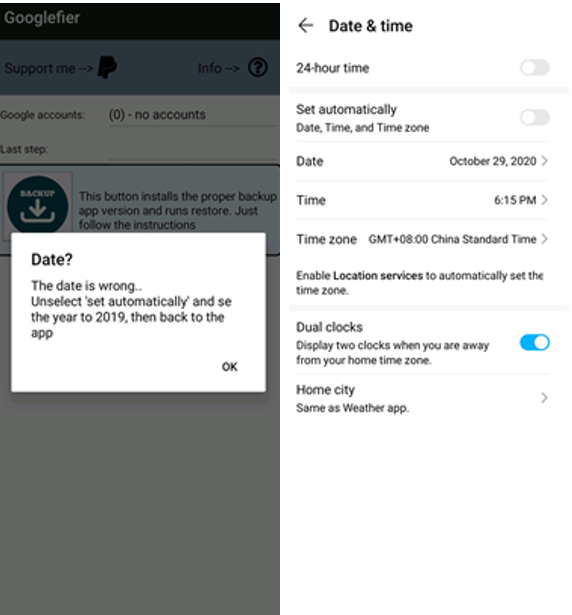
An image of date setting
Once you have done the last method, you just need to press the “Backup” button to back up.
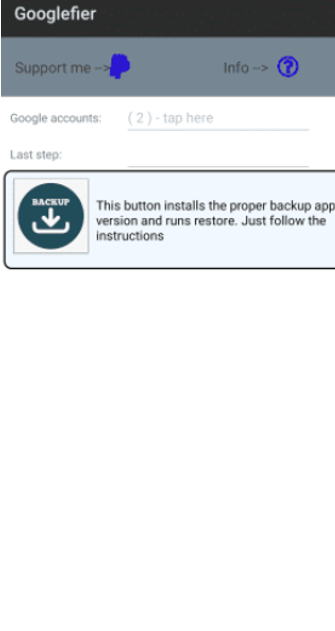
An image of first method to install Google Play Store via Googlefier
After back up, just follow the methods in the following one by one. The series of GMS App including Google Play Store will be automatically installed. And then you just need to restart your smartphone and enter Google Play Store App to enjoy your favorite Apps.
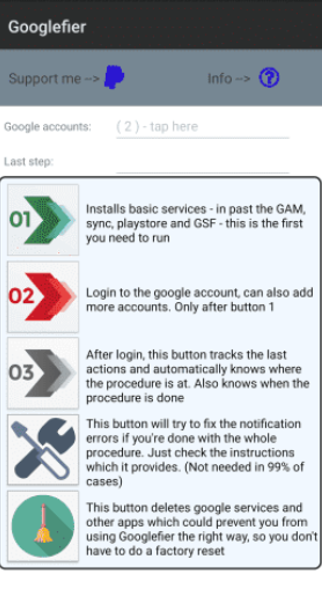
An image of methods to install Google Play Store via Googlefier
Did you successfully installed Google Play Store App via Googlefier? Feel free to share the result on comment.






- Posts
- photo
- video

How to Install Google Play Store App and GMS on Huawei and Honor Smartphone in simple steps
Since Google Company stopped Huawei using its service called GMS (Google Mobile Service), the biggest issue that Huawei and Honor smartphone holders faced, would be the installation of Google Play Store with GMS.
To install Google Play Store with GMS, it is possible to use system mirror to restore the system of smartphone (Click Here to Learn More). But, that should be operated via external device, like USB drive. However, it is hard to find the device sometime. So today, I’m about to share the new way to install Google Play Store App with you via Googlefier.
An image of Googlefier App
By the way, I want to share the video with you first, and I think most of you have watched this video, but the operating steps are too much fast. So, I will explain the operating methods later. Before we start, don’t forget to subscribe this account and like this content, if it is helpful for you. Thank you!
Click here if you are unable to watch this video
What is Googlefier?
Googlefier is free App developed by bender_007, a number of XDA Forum developer, and it is used to install GMS and series of Google Mobile Service Apps, including Google Play Store App.
Simple way to install Google Play Store App and GMS by Googlefier
Hot to download Googlefier?
It is very easy to download the Googlefier, Just click here to download Googlefier AKP.
* If you could not download through above link, it is also possible to Click here to download.
System Requirement
Before you start to install Google Mobile Service via Googlefier, you should make sure that Huawei smartphone or Honor smartphone Operating system is EMUI 10 (So if the version is above EMUI 10, it is requested to downgrade to EMUI 10; and if the version is below EMUI 10, it is requested to upgrade to EMUI 10), if not, Googlefier will not work well. And also, Huawei or Honor smartphone release date should be before April 2020, if not, Googlefier may not work (like Huawei Mate 40, and Honor 10X lite).
Methods to install Google Play Store with GMS
After you installed Googlefier and opened this app, if the operating system of your smartphone is not EMUI 10 you, they will reminder you to upgrade or downgrade the operating system to EUMI 10. However, you also can click “Never Mind, Let me in” like what in the following image to continue, but the Googlefier may not work well.
An image of hint on Googlefier
When you entered Googlefier, you need to set the date of the year to 2019 or earlier. However, it can not be 2020. So just follow the methods below.
An image of date setting
Once you have done the last method, you just need to press the “Backup” button to back up.
An image of first method to install Google Play Store via Googlefier
After back up, just follow the methods in the following one by one. The series of GMS App including Google Play Store will be automatically installed. And then you just need to restart your smartphone and enter Google Play Store App to enjoy your favorite Apps.
An image of methods to install Google Play Store via Googlefier
Did you successfully installed Google Play Store App via Googlefier? Feel free to share the result on comment.