



 More Products
 Compare














我的荣耀 开启荣耀之旅



 Disagree Terms
 Log out




HONOR Band 6 Healthing Monitoring Feature Explained


 Last reply :
With the development of technology, the health data that smart wearable devices can monitor has become more abundant and accurate. The HONOR Band 6 as the latest model from HONOR, has become more and more “understanding you” with the support of excellent and reliable algorithms. It provides more professional advice for health and helps you better manage your body.
So how to use the health function of Honor Band 6? Let me show you that.
1. HONOR Band 6 - Heart rate monitoring
Manual heart rate measurement:
Click heart rate on the bracelet menu page to perform a single heart rate measurement. When continuous heart rate measurement is turned on, the heart rate curve is displayed, and if the continuous heart rate measurement switch is not turned on, the single measurement result is displayed.
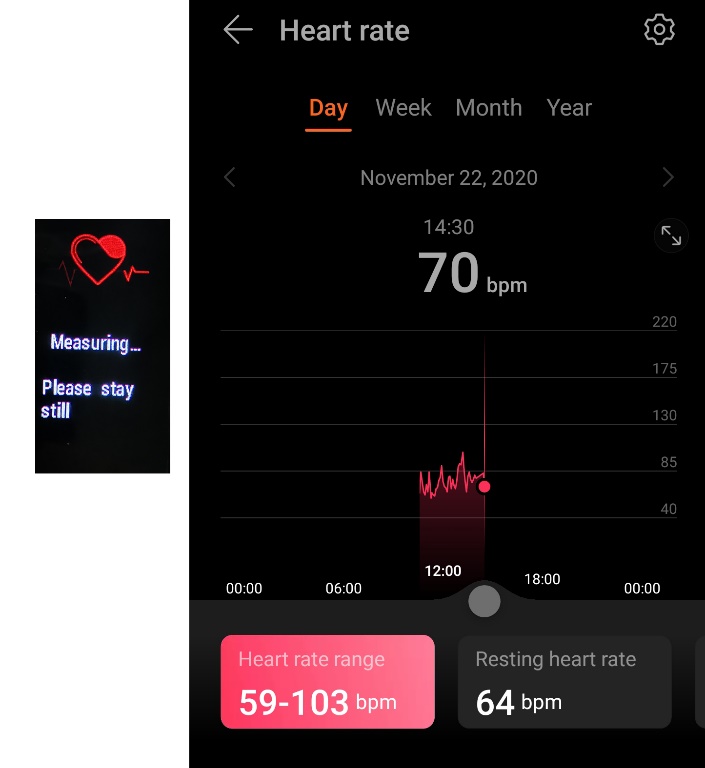
An image of heart rate measuring on the HONOR Band 6
Continuous heart rate measurement:
The "Continuous heart rate measurement" switch can be turned on, which is on the device management page of the Sports Health App, and the detection frequency can be adjusted according to the exercise status, and the heart rate can be monitored intelligently for 24 hours.
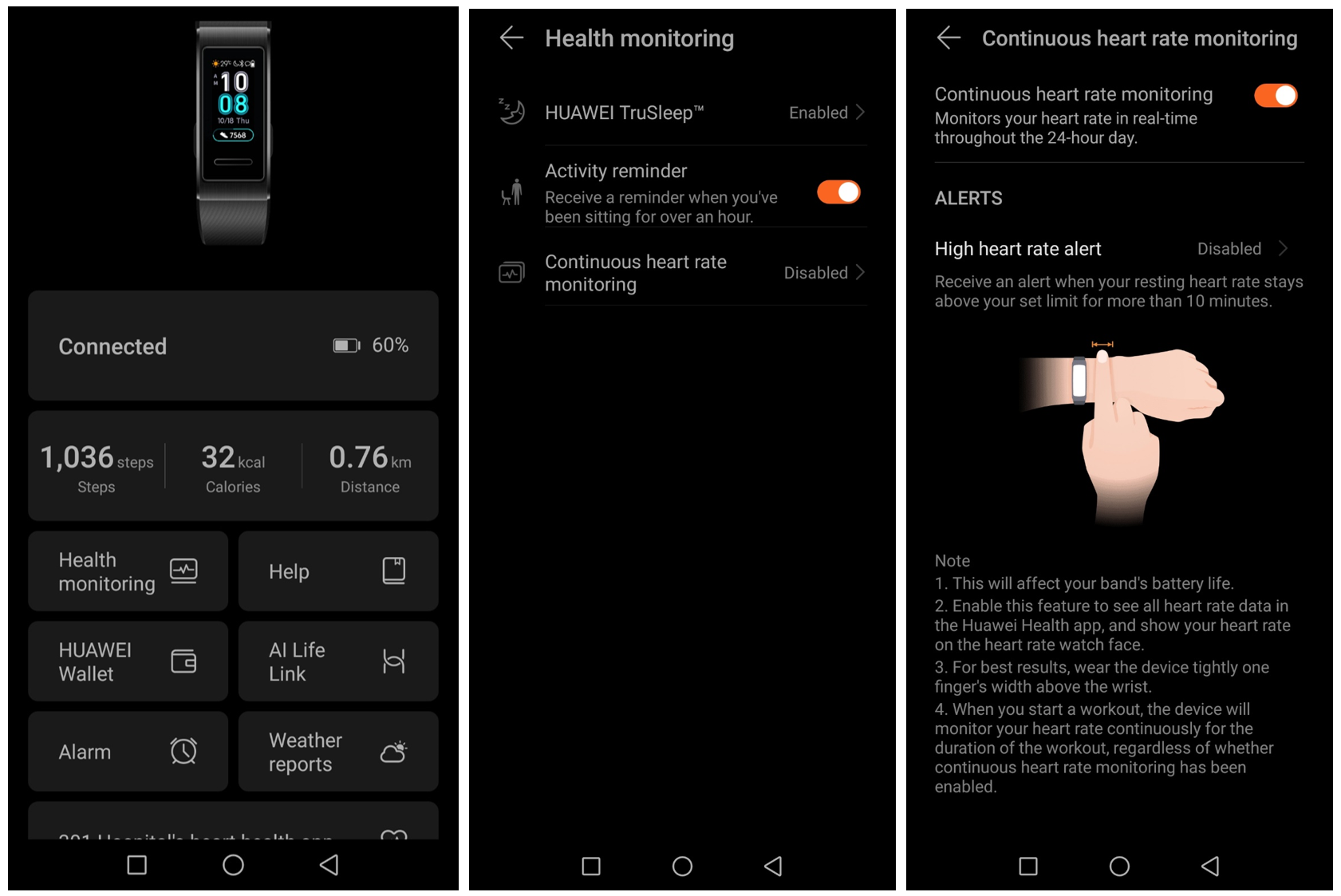
An image indicates how to enable continuous heart rate monitoring on the HONOR Band 6
Use tips:
1. Heart rate warning is only effective during exercise, and daily heart rate monitoring will not generate heart rate warning.
2. A single heart rate measurement value cannot be synchronized to the Sports Health App.
2. HONOR Band 6- Blood oxygen saturation
Manual measurement of blood oxygen saturation: Click blood oxygen saturation on the bracelet menu page to perform a single blood oxygen saturation measurement. Blood oxygen saturation currently only supports manual single measurement.
Viewing blood oxygen saturation history: Enter the blood oxygen saturation section on the homepage of the Sports Health App to view the blood oxygen saturation history. The App shows an inverted histogram.
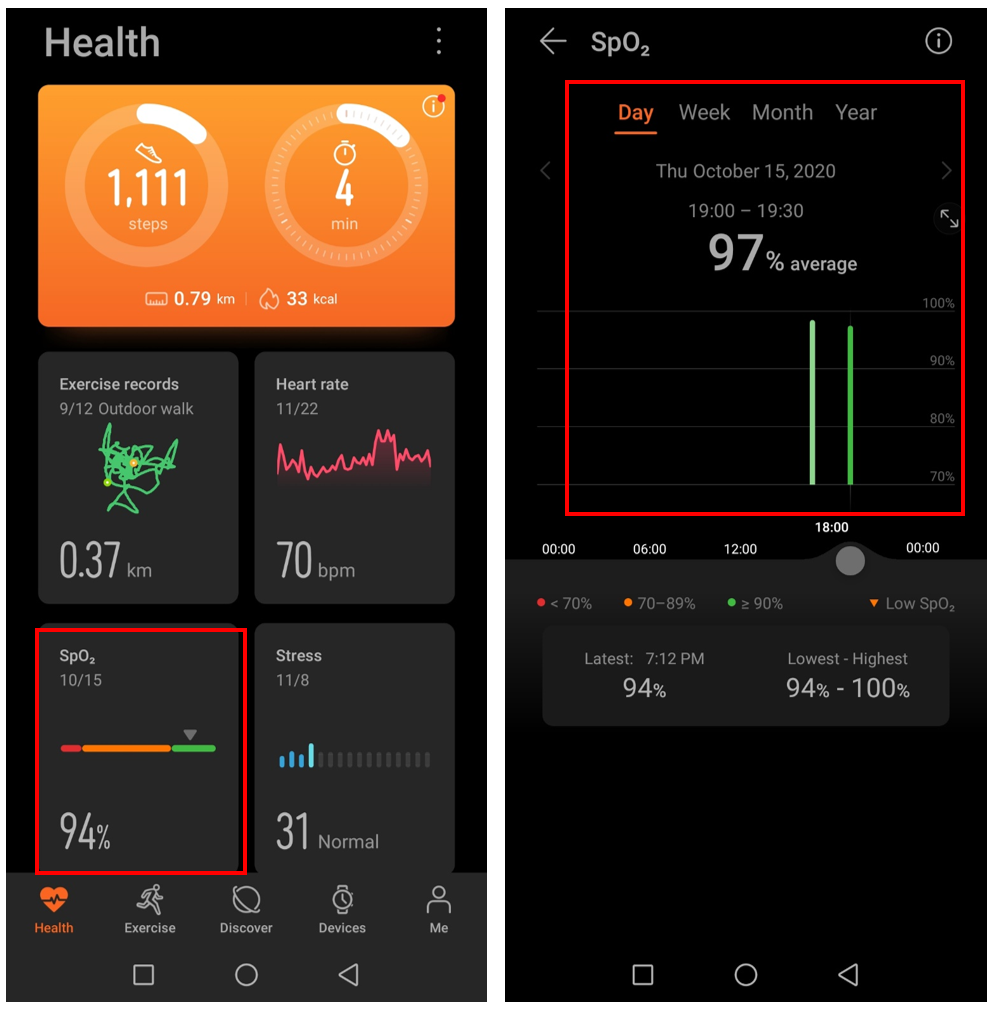
An image indicates how to view SpO2 records
Use tips:
During the blood oxygen measurement, please wear the wristband as tightly as possible, keep the screen up and your arms still.
3. Sleep monitoring on the HONOR Band 6
On the sports health App device management page, you can turn on the "Scientific Sleep" switch, and turn it off to normal sleep monitoring. You can view the sleep duration directly on the bracelet, and you can view detailed sleep information in the Huawei Sports Health App.
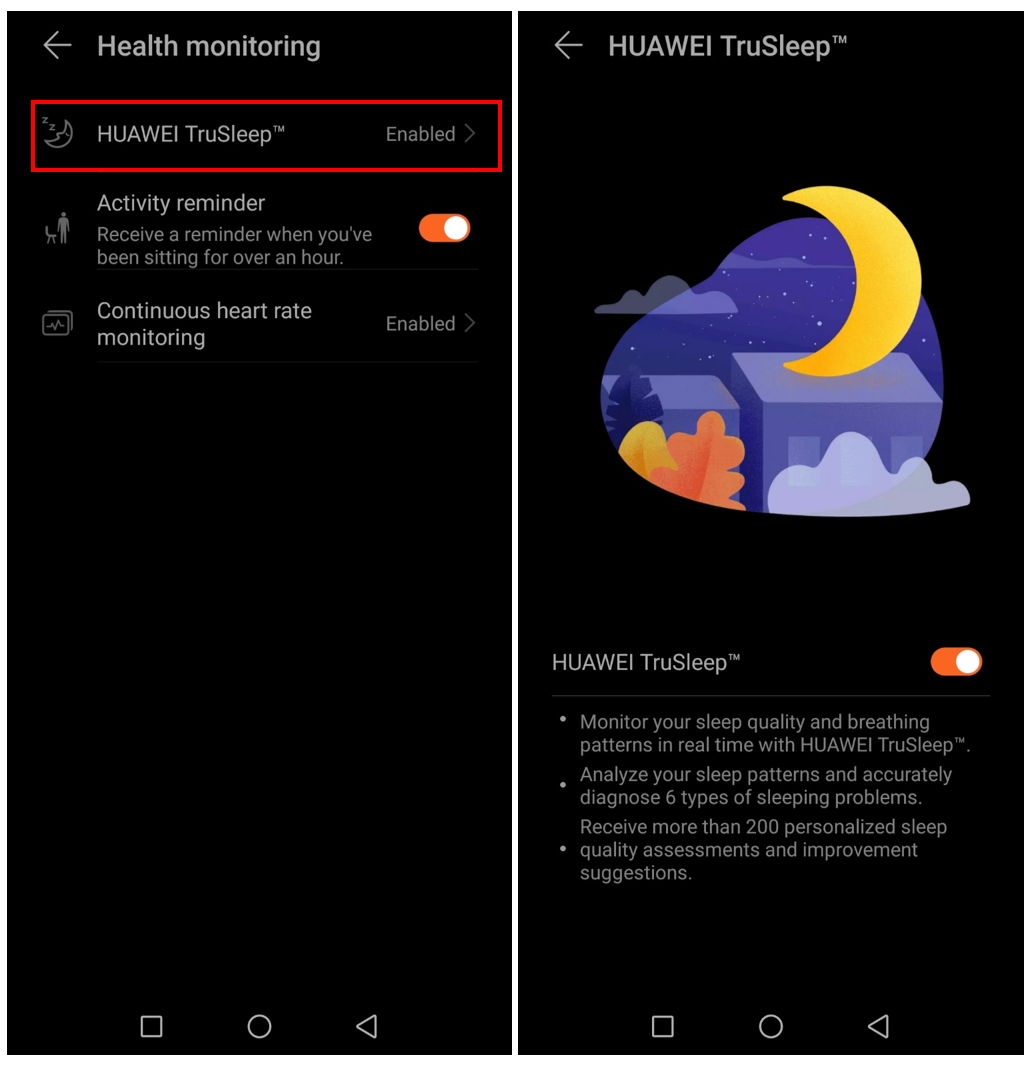
An image of sleep monitoring on the HONOR Band 6
View sleep data on the bracelet: Click the sleep application on the bracelet to view sleep data.
View the sleep data of the Sports Health App: On the homepage of the Sports Health App, click the sleep section to view the detailed sleep data. The data presented on the App for scientific sleep and normal sleep is different.
Scientific sleep: includes deep sleep, light sleep, rapid eye movement, and wakefulness analysis.
Ordinary sleep: includes only deep sleep, light sleep, and wakefulness analysis. There is no rapid eye movement analysis and sleep score.
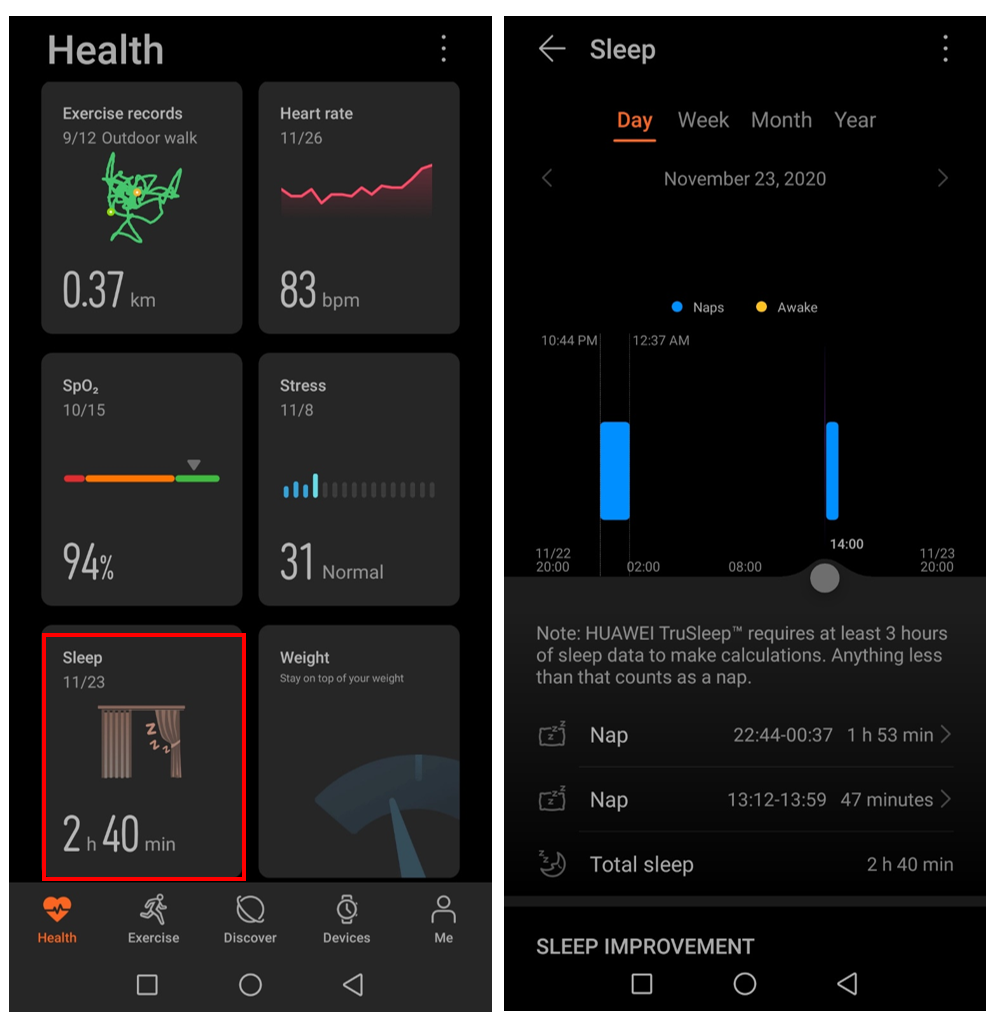
An image shows sleep monitoring on the HONOR Band 6
Atrial fibrillation, premature heartbeats, and sleep apnea function all require the bracelet to be connected to the Heart Health Research App and join the project for measurement. It supports two measurement methods: manual single measurement and intelligent timely measurement (automatic measurement).
Click to join the project and turn on the intelligent timely measurement switch to perform automatic measurement.
If you do not use it for a long time, you can enter the project and click the plus sign at the top right to exit the project
4. Stress & breathing on the HONOR Band 6
Single pressure measurement
Make sure the HONOR Band 6 is connected to the mobile phone normally. Press "Pressure Test" on the HONOR Band 6 detailed page of the Huawei Sports Health App and a single pressure measurement will be performed. The measurement period is 1 minute. The measurement results are only displayed on the Sports Health App.
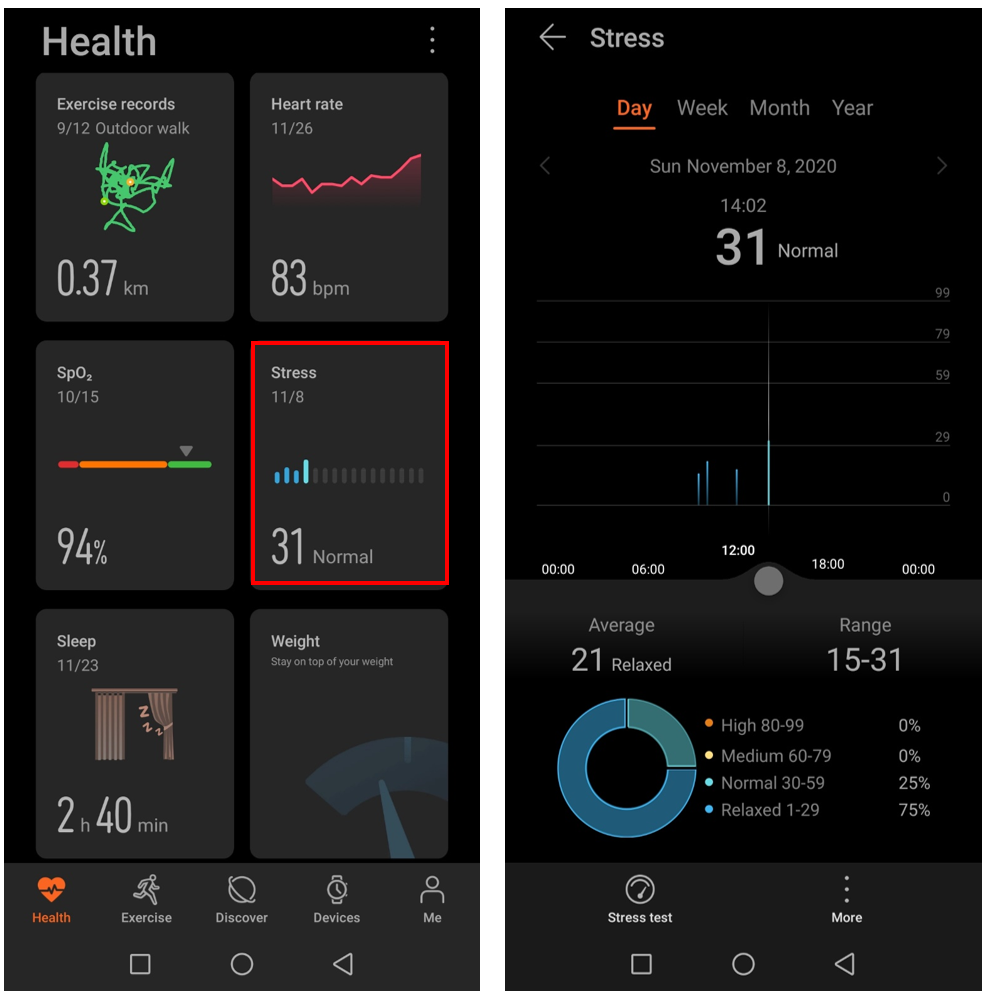
An image indicates stress monitoring on the HONOR Band 6
Automatic pressure measurement
Turn on the "Automatic Pressure Detection" switch on the Huawei Sports Health App. The HONOR Band 6 will automatically measure pressure periodically and you can view that in the HONOR Band 6 detailed page on the HUAWEI health app.
Use tips:
1. The automatic pressure measurement cycle is 30 minutes
2. Pressure measurement is not supported during exercise
5. Breath training on the HONOR Band 6
Turn on the Breath training: Find and hit Breath Training on the screen of the HONOR Band 6 to start breathing training. Then tap to set breathing rhythm and breathing time. Then you can follow the instructions on the screen of the HONOR Band 6 to inhale and exhale.
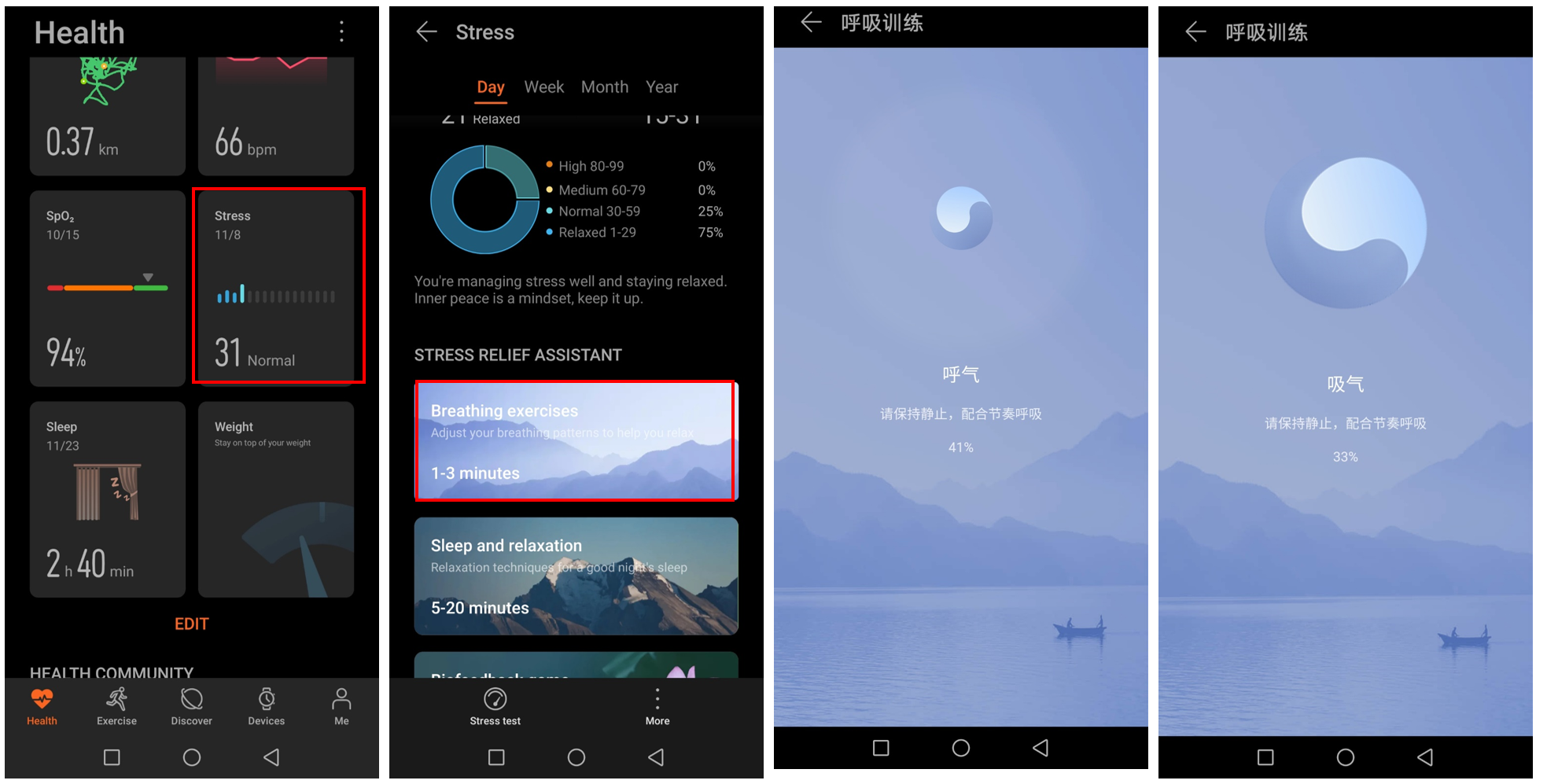
An image indicates breathing training on the HONOR Band 6
Turn on the breath training on the HUAWEI Health app: Make sure the HONOR Band 6 is connected to the mobile phone normally, and you can press "breathing training" on the stress section of the HUAWEI health app to set the breathing duration and breathing rhythm according to your own needs and start breathing training.
Have you learned how to use so many health functions? Which is your most frequently used feature if you buy HONOR Band 6?
More articles you may have interest in:
HONOR Band 6 Frequently Asked Questions Answered
How to Pair HONOR Band 6 with a Smartphone
HONOR Band 6 Change or Customize Watch Face


- Posts
- Following
- Followers
- Energy
-

TipsExpert
-
+ Follow

-
- 13 Posts
- 1 Following
- 16 Followers
- 369 Energy



- Posts
- photo
- video

With the development of technology, the health data that smart wearable devices can monitor has become more abundant and accurate. The HONOR Band 6 as the latest model from HONOR, has become more and more “understanding you” with the support of excellent and reliable algorithms. It provides more professional advice for health and helps you better manage your body.
So how to use the health function of Honor Band 6? Let me show you that.
1. HONOR Band 6 - Heart rate monitoring
Manual heart rate measurement:
Click heart rate on the bracelet menu page to perform a single heart rate measurement. When continuous heart rate measurement is turned on, the heart rate curve is displayed, and if the continuous heart rate measurement switch is not turned on, the single measurement result is displayed.
An image of heart rate measuring on the HONOR Band 6
Continuous heart rate measurement:
The "Continuous heart rate measurement" switch can be turned on, which is on the device management page of the Sports Health App, and the detection frequency can be adjusted according to the exercise status, and the heart rate can be monitored intelligently for 24 hours.
An image indicates how to enable continuous heart rate monitoring on the HONOR Band 6
Use tips:
1. Heart rate warning is only effective during exercise, and daily heart rate monitoring will not generate heart rate warning.
2. A single heart rate measurement value cannot be synchronized to the Sports Health App.
2. HONOR Band 6- Blood oxygen saturation
Manual measurement of blood oxygen saturation: Click blood oxygen saturation on the bracelet menu page to perform a single blood oxygen saturation measurement. Blood oxygen saturation currently only supports manual single measurement.
Viewing blood oxygen saturation history: Enter the blood oxygen saturation section on the homepage of the Sports Health App to view the blood oxygen saturation history. The App shows an inverted histogram.
An image indicates how to view SpO2 records
Use tips:
During the blood oxygen measurement, please wear the wristband as tightly as possible, keep the screen up and your arms still.
3. Sleep monitoring on the HONOR Band 6
On the sports health App device management page, you can turn on the "Scientific Sleep" switch, and turn it off to normal sleep monitoring. You can view the sleep duration directly on the bracelet, and you can view detailed sleep information in the Huawei Sports Health App.
An image of sleep monitoring on the HONOR Band 6
View sleep data on the bracelet: Click the sleep application on the bracelet to view sleep data.
View the sleep data of the Sports Health App: On the homepage of the Sports Health App, click the sleep section to view the detailed sleep data. The data presented on the App for scientific sleep and normal sleep is different.
Scientific sleep: includes deep sleep, light sleep, rapid eye movement, and wakefulness analysis.
Ordinary sleep: includes only deep sleep, light sleep, and wakefulness analysis. There is no rapid eye movement analysis and sleep score.
An image shows sleep monitoring on the HONOR Band 6
Atrial fibrillation, premature heartbeats, and sleep apnea function all require the bracelet to be connected to the Heart Health Research App and join the project for measurement. It supports two measurement methods: manual single measurement and intelligent timely measurement (automatic measurement).
Click to join the project and turn on the intelligent timely measurement switch to perform automatic measurement.
If you do not use it for a long time, you can enter the project and click the plus sign at the top right to exit the project
4. Stress & breathing on the HONOR Band 6
Single pressure measurement
Make sure the HONOR Band 6 is connected to the mobile phone normally. Press "Pressure Test" on the HONOR Band 6 detailed page of the Huawei Sports Health App and a single pressure measurement will be performed. The measurement period is 1 minute. The measurement results are only displayed on the Sports Health App.
An image indicates stress monitoring on the HONOR Band 6
Automatic pressure measurement
Turn on the "Automatic Pressure Detection" switch on the Huawei Sports Health App. The HONOR Band 6 will automatically measure pressure periodically and you can view that in the HONOR Band 6 detailed page on the HUAWEI health app.
Use tips:
1. The automatic pressure measurement cycle is 30 minutes
2. Pressure measurement is not supported during exercise
5. Breath training on the HONOR Band 6
Turn on the Breath training: Find and hit Breath Training on the screen of the HONOR Band 6 to start breathing training. Then tap to set breathing rhythm and breathing time. Then you can follow the instructions on the screen of the HONOR Band 6 to inhale and exhale.
An image indicates breathing training on the HONOR Band 6
Turn on the breath training on the HUAWEI Health app: Make sure the HONOR Band 6 is connected to the mobile phone normally, and you can press "breathing training" on the stress section of the HUAWEI health app to set the breathing duration and breathing rhythm according to your own needs and start breathing training.
Have you learned how to use so many health functions? Which is your most frequently used feature if you buy HONOR Band 6?
More articles you may have interest in:
HONOR Band 6 Frequently Asked Questions Answered
HONOR Band 6 User Guide
HONOR Band 6 In-depth Review
How to Pair HONOR Band 6 with a Smartphone
HONOR Band 6 Change or Customize Watch Face
HONOR Band 6 Notifications
HONOR Band 6 workout modes