



 More Products
 Compare














我的荣耀 开启荣耀之旅



 Disagree Terms
 Log out




[Help Assistance] Colors look weird in my pictures | Chapter-4


 Last reply :
Hello HONOR Fans'
Hope you all had a great Weekend ;)
I'm back with Chapter-4 of Help Assistance Article of about "Colors look weird in my pictures"?
Let's check out;
Verify whether the viewfinder is the only screen which tends to have problems with color shading or distortion.
Scenario 1:
With the exception of the camera interface, all applications on your phone are pigment.
Quick Fix:
#1 Go to Settings > Display & brightness > Colour mode & temperature
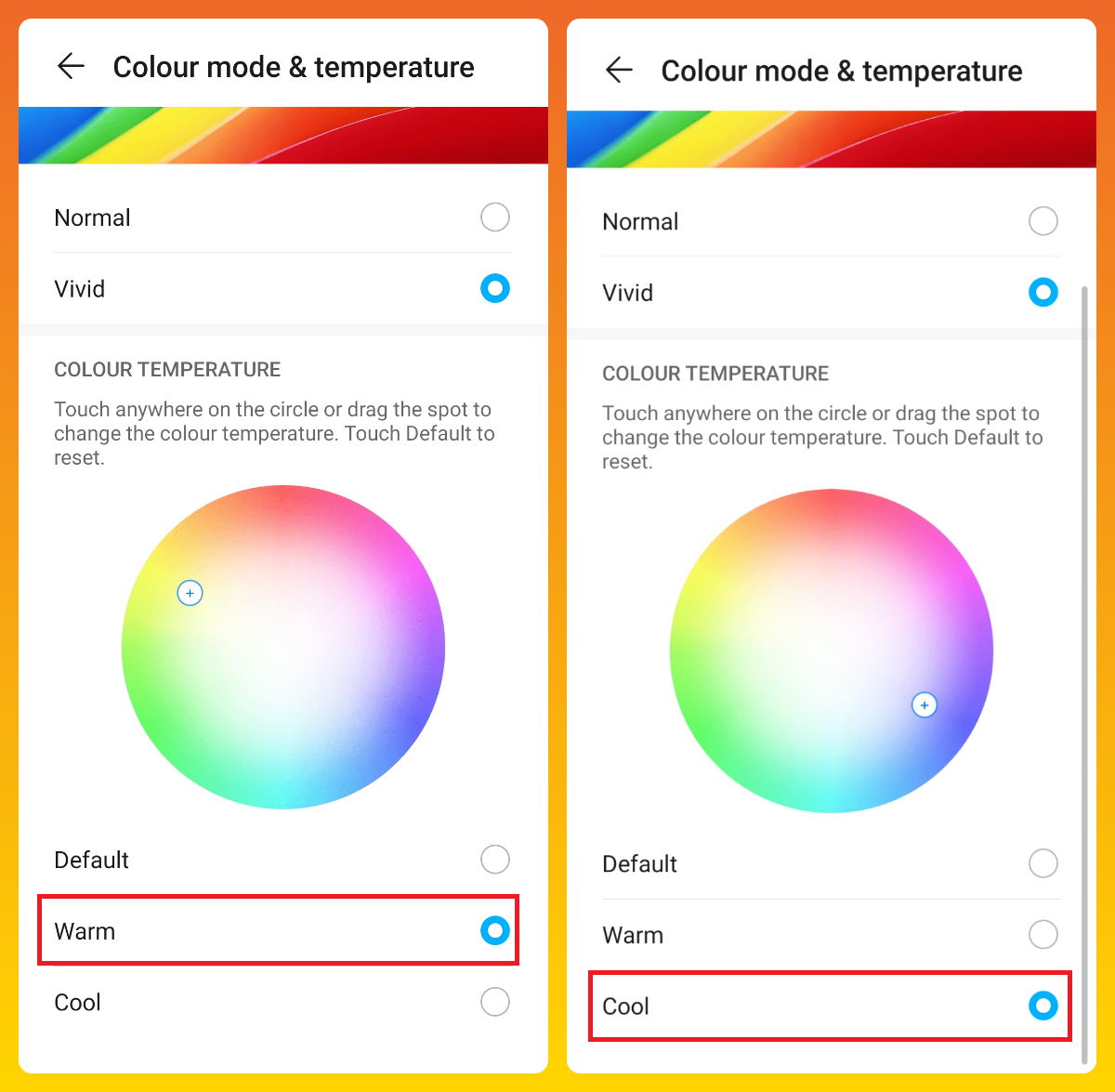
If your pictures still feel tender in color, uncheck Default
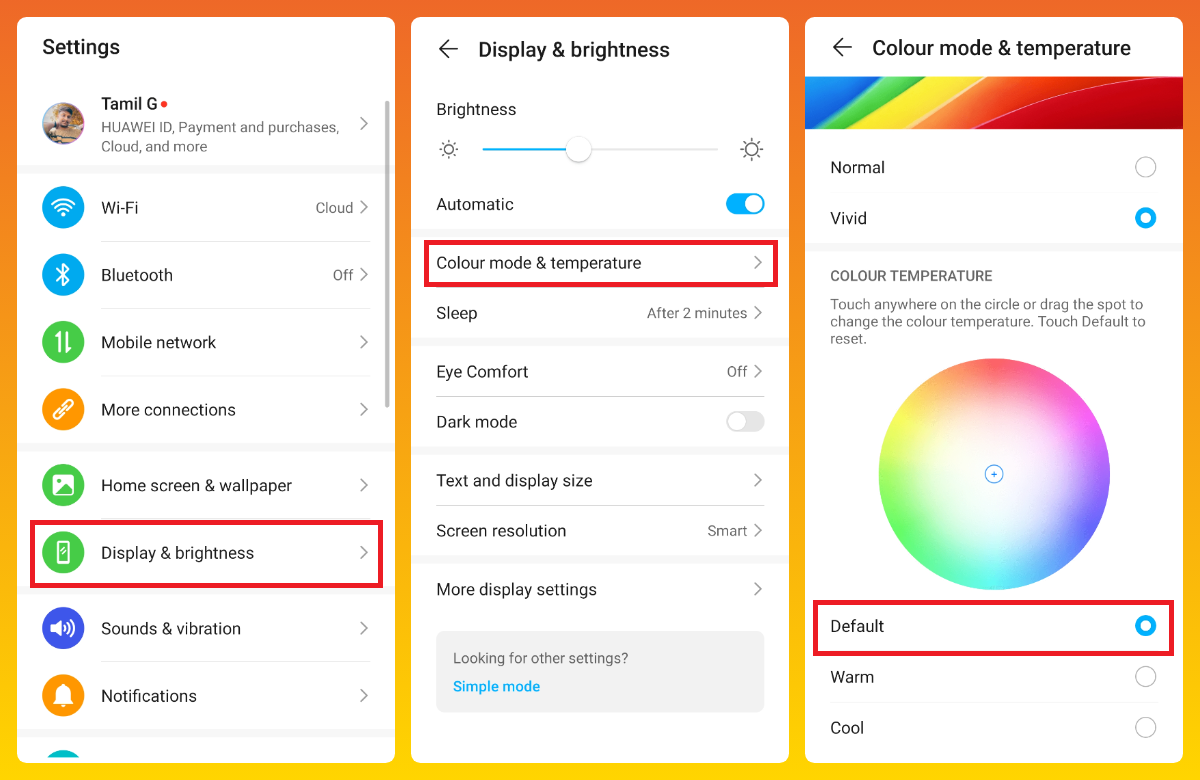
After which drag and drop the slider to set the color temperature to cooler or warmer as desired.
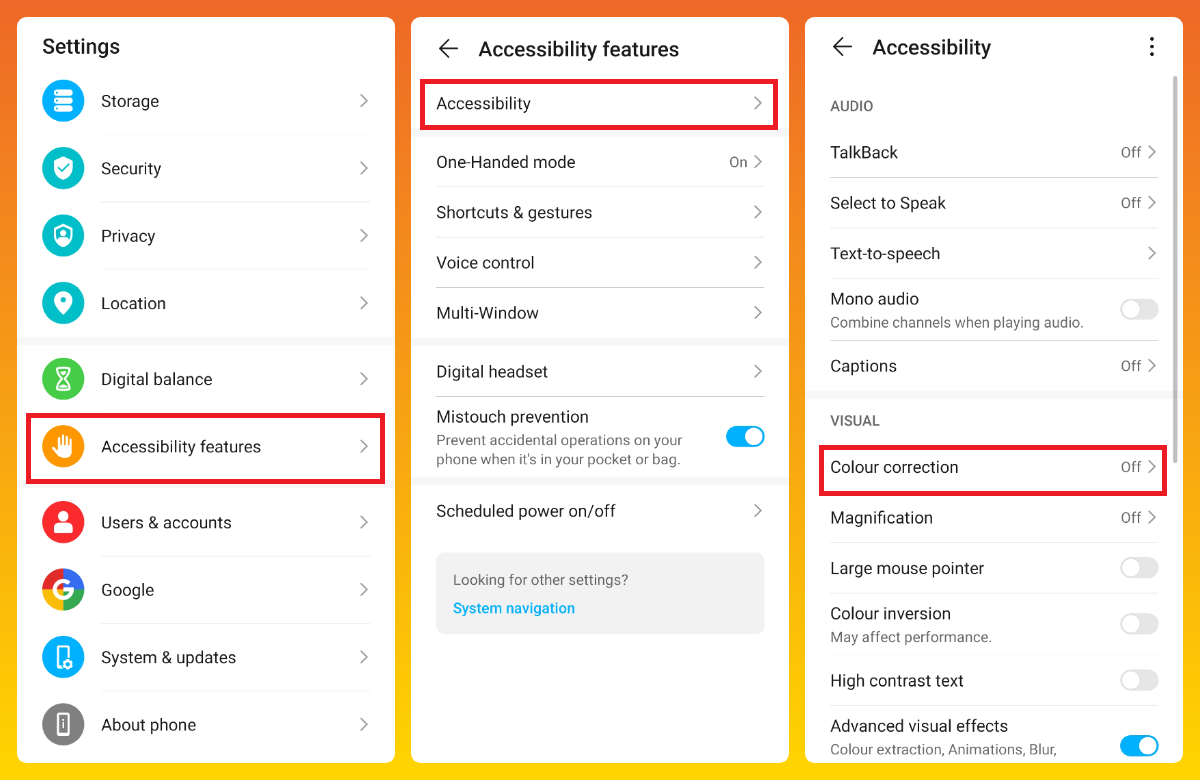
#2 Go to Settings > Accessibility features > Colour correction
Make sure you have Color Correction enabled. These settings are intended for users with impaired visual perception.
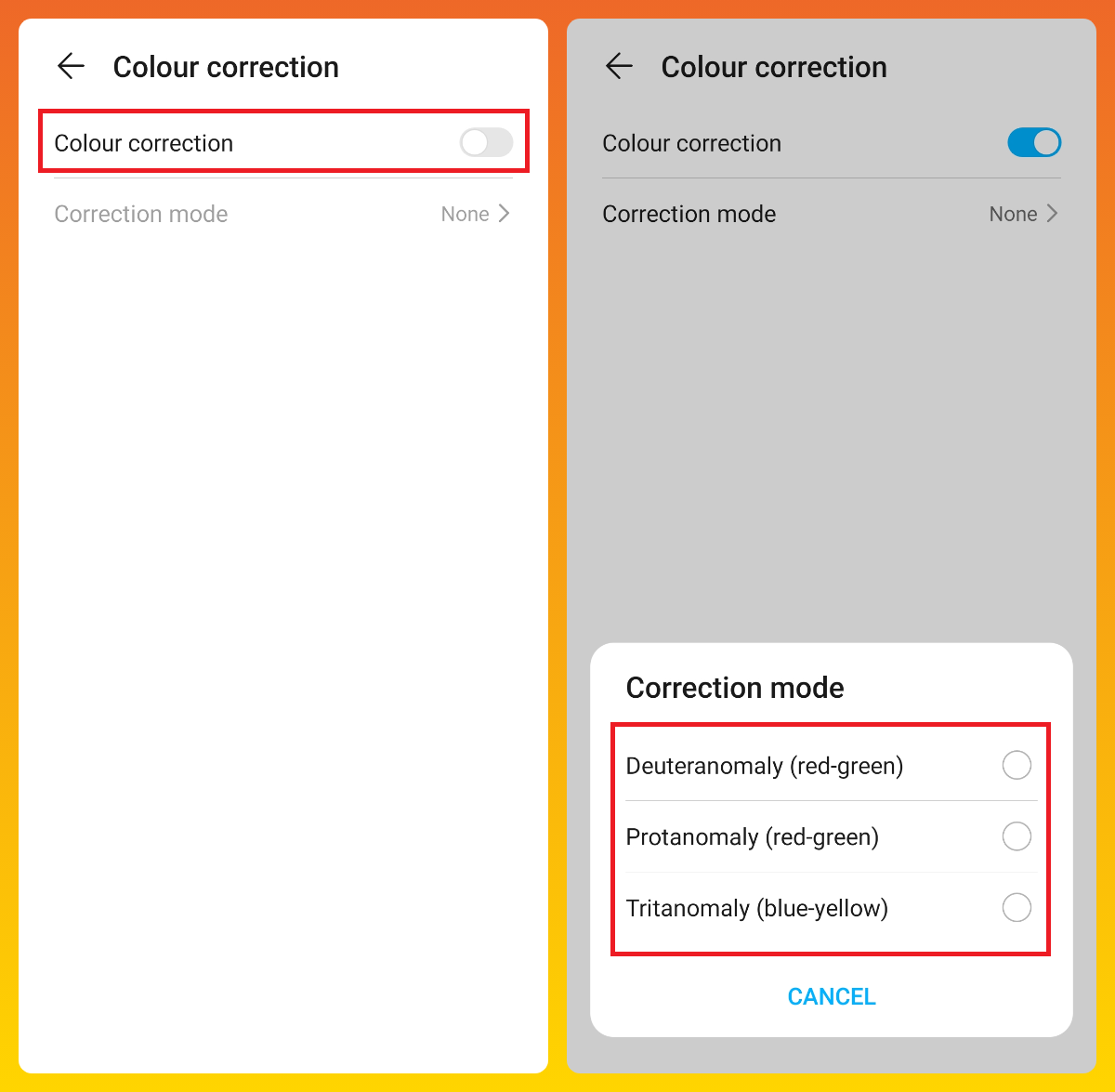
Note:
Allowing this feature will impact the efficiency of your device considerably.
Scenario 2:
It seems that all other screens have natural colors. A color cast is only on the Camera's viewfinder screen or pictures.
Quick Fix:
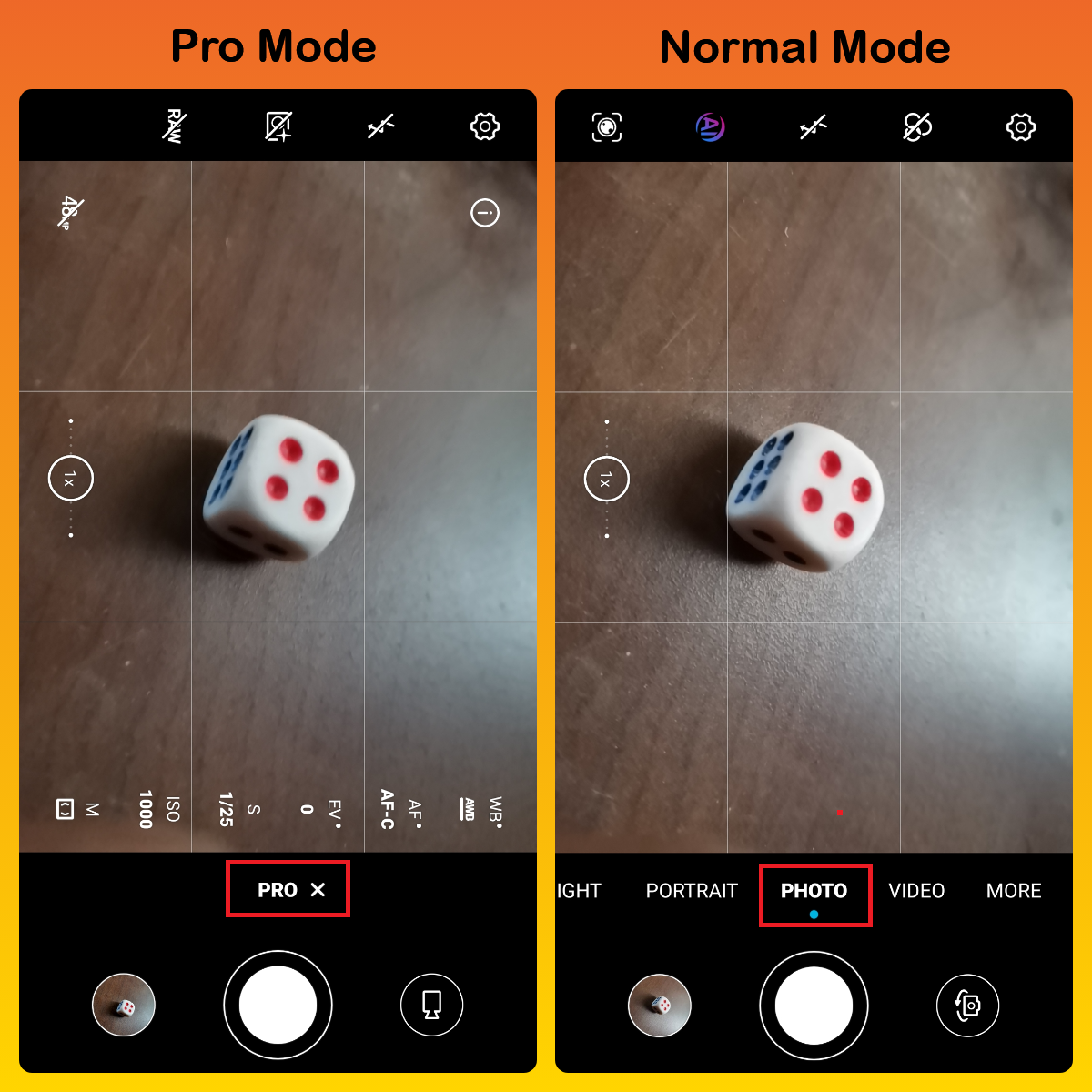
#1 Confirm if you are taking pictures using Pro mode. Many key attributes are enabled by Pro mode, which can end up making the photography effect distinct from the original image. Switch to the normal camera mode if you are never exposed to it.
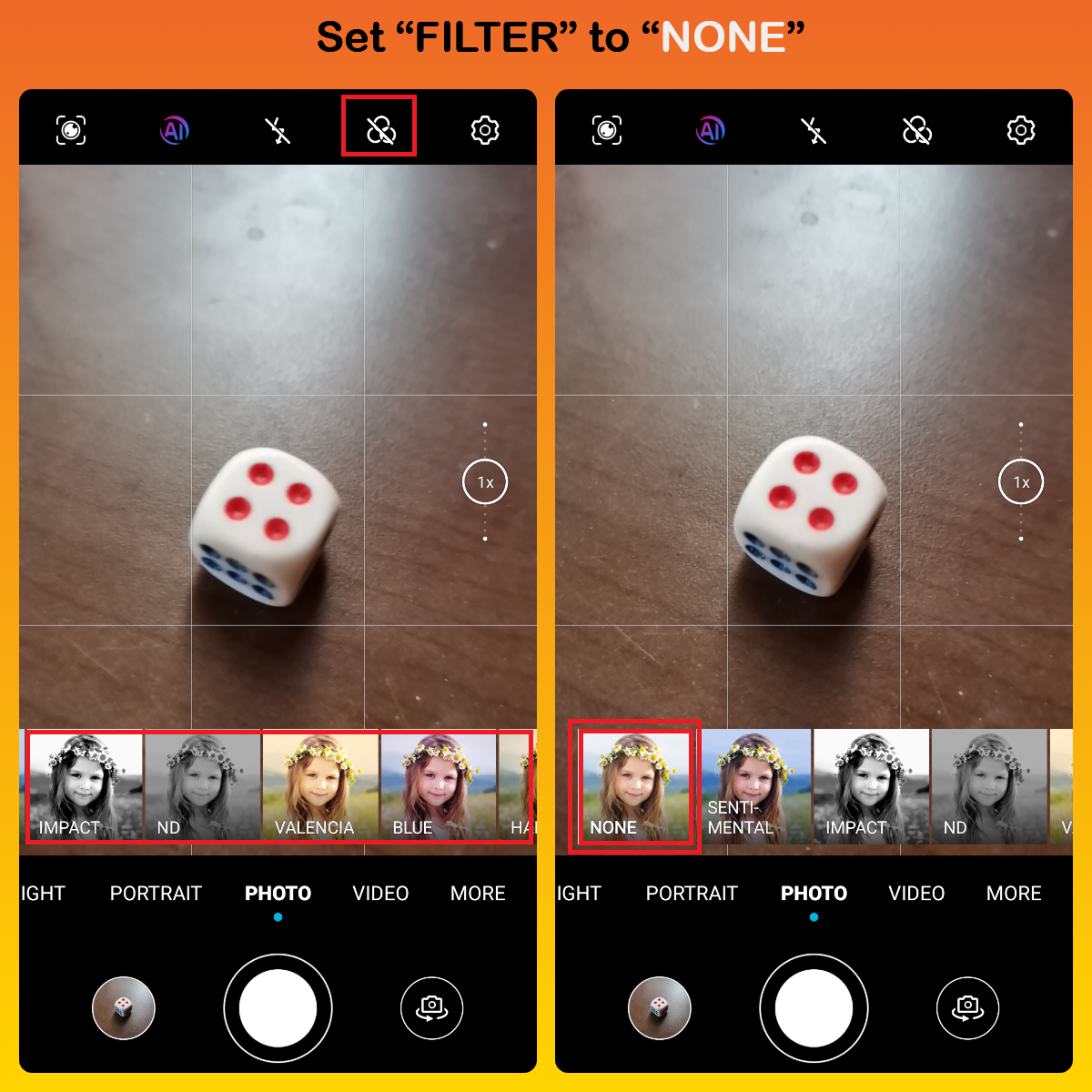
#2 At the top of the viewfinder screen, click the Filter icon and add the color filters. Various colour filters can generate various results. To take pictures with usual colors, choose none.

That's it for today - I hope you all find this post useful
Thank you for reading ;)


- Posts
- Following
- Followers
- Energy
-
 Tamil G
Moderator Intern
Tamil G
Moderator Intern
-
+ Follow

-
- 542 Posts
- 49 Following
- 881 Followers
- 39795 Energy

-
 New Comer
-
 Followers reach 50
-
 Followers reach 100
-
 Followers reach 200
-
 7 Days Check-in
-
 30 Days Check-in
-
 100 Days Check-in
-
 Moderator
-
 Halloween 2020
-
 HONOR STAR 2020
-
 New Year 2021
-
 Animal Photography
-
 Plant Photography
-
 Red Photography
-
 Survey Medal!
-
 Water Photography
-
 World Cycling & Running Day
-
 Product Photography
-
 Sky Photography
-
 Activity Photography Medal
-
 Autumn Photography
-
 Rain Photography
-
 HONOR 50: Best Shot!
-
 Monthly Photo Sharing #1 Landscape
-
 HONOR Magic4 Pro
-
 Monthly Photo Sharing #2 People
-
 Monthly Photo Sharing #3 Spring
-
 Monthly Photo Sharing #4 Animal



- Posts
- photo
- video

Hello HONOR Fans'
Hope you all had a great Weekend ;)
I'm back with Chapter-4 of Help Assistance Article of about "Colors look weird in my pictures"?
Let's check out;
Verify whether the viewfinder is the only screen which tends to have problems with color shading or distortion.
Scenario 1:
With the exception of the camera interface, all applications on your phone are pigment.
Quick Fix:
#1 Go to Settings > Display & brightness > Colour mode & temperature
If your pictures still feel tender in color, uncheck Default
After which drag and drop the slider to set the color temperature to cooler or warmer as desired.
#2 Go to Settings > Accessibility features > Colour correction
Make sure you have Color Correction enabled. These settings are intended for users with impaired visual perception.
Note:
Allowing this feature will impact the efficiency of your device considerably.
Scenario 2:
It seems that all other screens have natural colors. A color cast is only on the Camera's viewfinder screen or pictures.
Quick Fix:
#1 Confirm if you are taking pictures using Pro mode. Many key attributes are enabled by Pro mode, which can end up making the photography effect distinct from the original image. Switch to the normal camera mode if you are never exposed to it.
#2 At the top of the viewfinder screen, click the Filter icon and add the color filters. Various colour filters can generate various results. To take pictures with usual colors, choose none.
That's it for today - I hope you all find this post useful
Thank you for reading ;)