



 More Products
 Compare














我的荣耀 开启荣耀之旅



 Disagree Terms
 Log out




[Guide] How to give a quick response to your text messages?


 Last reply :
Hello Everyone,
Hope everyone is doing great after the amazing launch event. Today I going to share a trick to quickly reply to the text messages without having much effort.
Smart Reply & Suggestions:
Whenever you get a text message pop up on the notification bar, but you are busy in some other work or maybe you are unable to type the message then this trick would be very helpful for you. “Smart Reply & Suggestions” helps in quick response to the text message by just simply tapping on the suggested reply also it is an inbuilt feature.
So let’s start:
Step 1: Open your default message application
Step 2: At the upper right corner, you can see 3 dots tap on it
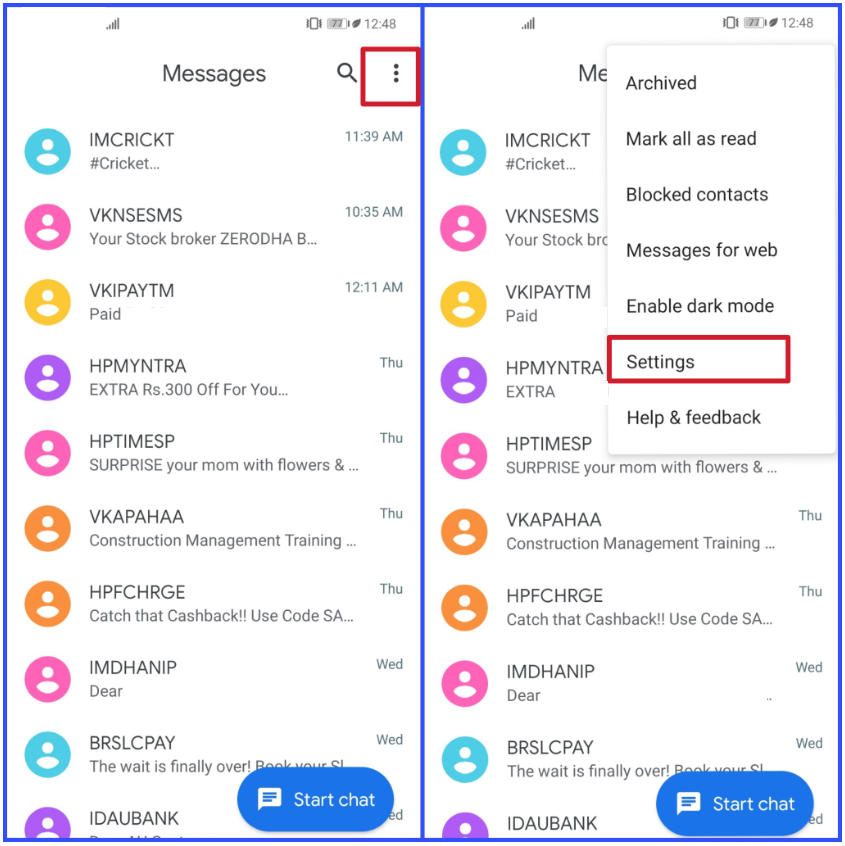
Step 3: You can see Settings, open it
Step 4: After opening settings, you can see the first option “General” open it
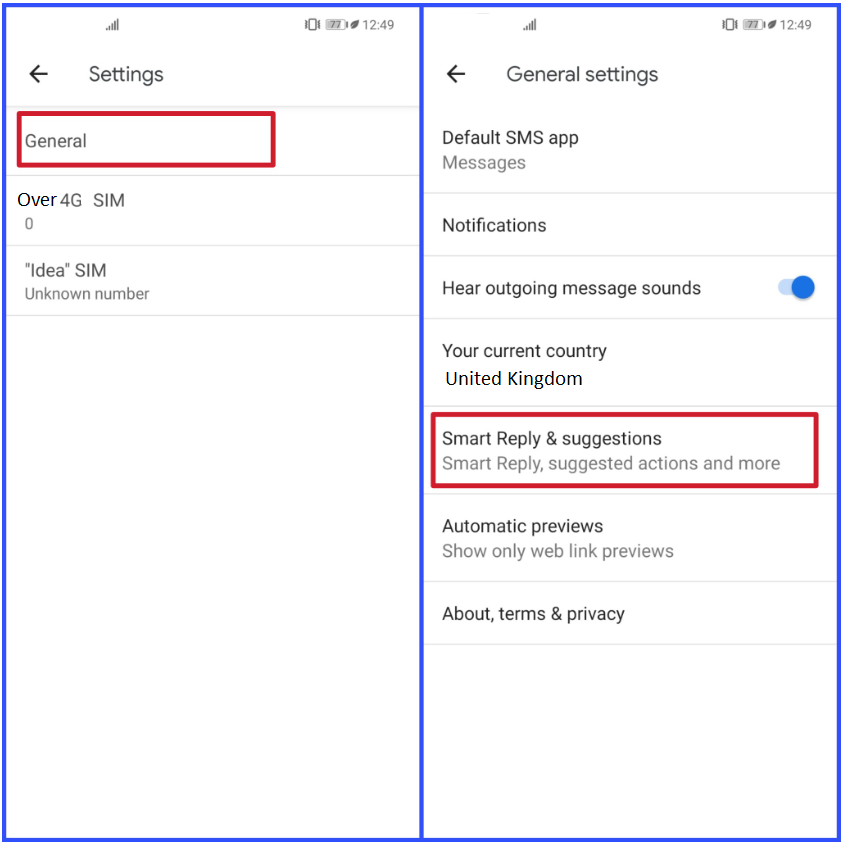
Step 5: After opening General Settings, slide down you will see “Smart Reply & Suggestions”
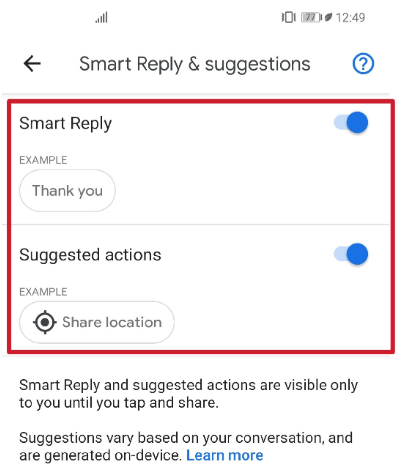
Step 6: Enable the Smart Reply & Suggestions Actions
How does it work?
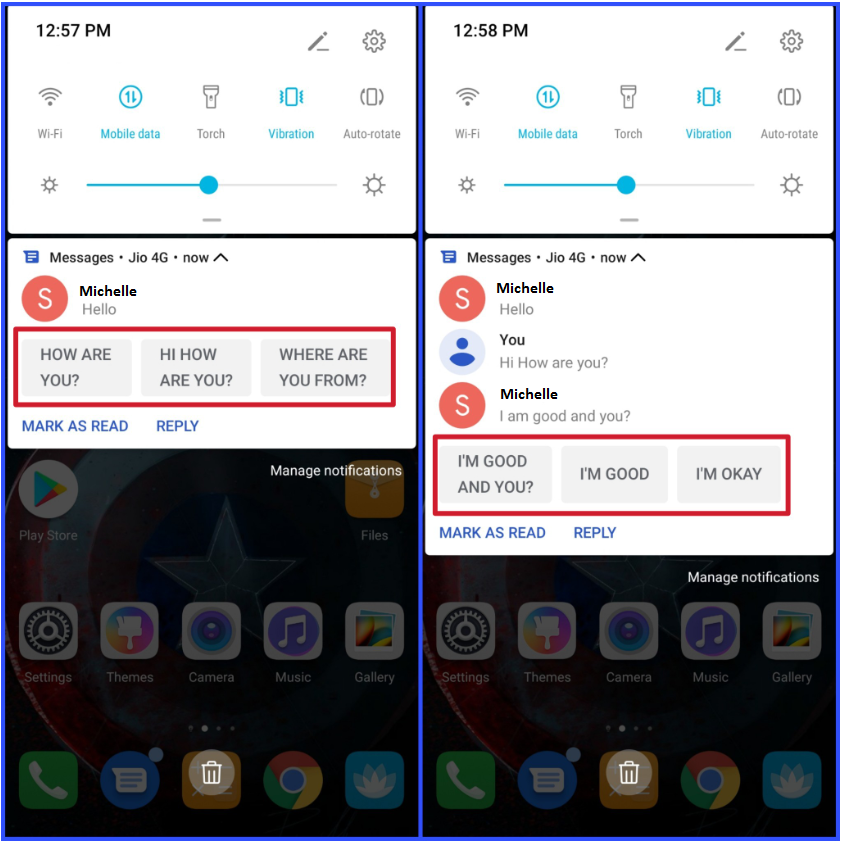
At the bottom of a conversation, you will sometimes see suggested replies based on recent messages in the conversation. You can’t edit these replies. To send a suggested reply, tap it.
If you have any queries please comment down and don’t forget to like!
Cheers.


- Posts
- Following
- Followers
- Energy
-

Sebastian
-
+ Follow

-
- 139 Posts
- 390 Following
- 424 Followers
- 10125 Energy



- Posts
- photo
- video

Hello Everyone,
Hope everyone is doing great after the amazing launch event. Today I going to share a trick to quickly reply to the text messages without having much effort.
Smart Reply & Suggestions:
Whenever you get a text message pop up on the notification bar, but you are busy in some other work or maybe you are unable to type the message then this trick would be very helpful for you. “Smart Reply & Suggestions” helps in quick response to the text message by just simply tapping on the suggested reply also it is an inbuilt feature.
So let’s start:
Step 1: Open your default message application
Step 2: At the upper right corner, you can see 3 dots tap on it
Step 3: You can see Settings, open it
Step 4: After opening settings, you can see the first option “General” open it
Step 5: After opening General Settings, slide down you will see “Smart Reply & Suggestions”
Step 6: Enable the Smart Reply & Suggestions Actions
How does it work?
At the bottom of a conversation, you will sometimes see suggested replies based on recent messages in the conversation. You can’t edit these replies. To send a suggested reply, tap it.
If you have any queries please comment down and don’t forget to like!
Cheers.
Source: https://www.greenbot.com/article/2872787/how-to-change-text-message-quick-responses-on-android-lollipop.html