



 More Products
 Compare














我的荣耀 开启荣耀之旅



 Disagree Terms
 Log out




[EMUI] Exploring the features of Camera settings!


 Last reply :
Hello HONOR Fans'
Hope you all had a great Weekend, Today I'm going to share a post on "EMUI Camera Settings & Features" in detail, Let's check it out below
EMUI's Camera has variety of features to enhance your Pictures to whole new level ;)
On the Camera App settings menu, you can adjust a variety of camera settings, modes, and specifications to suit your needs and enhance your camera experience!
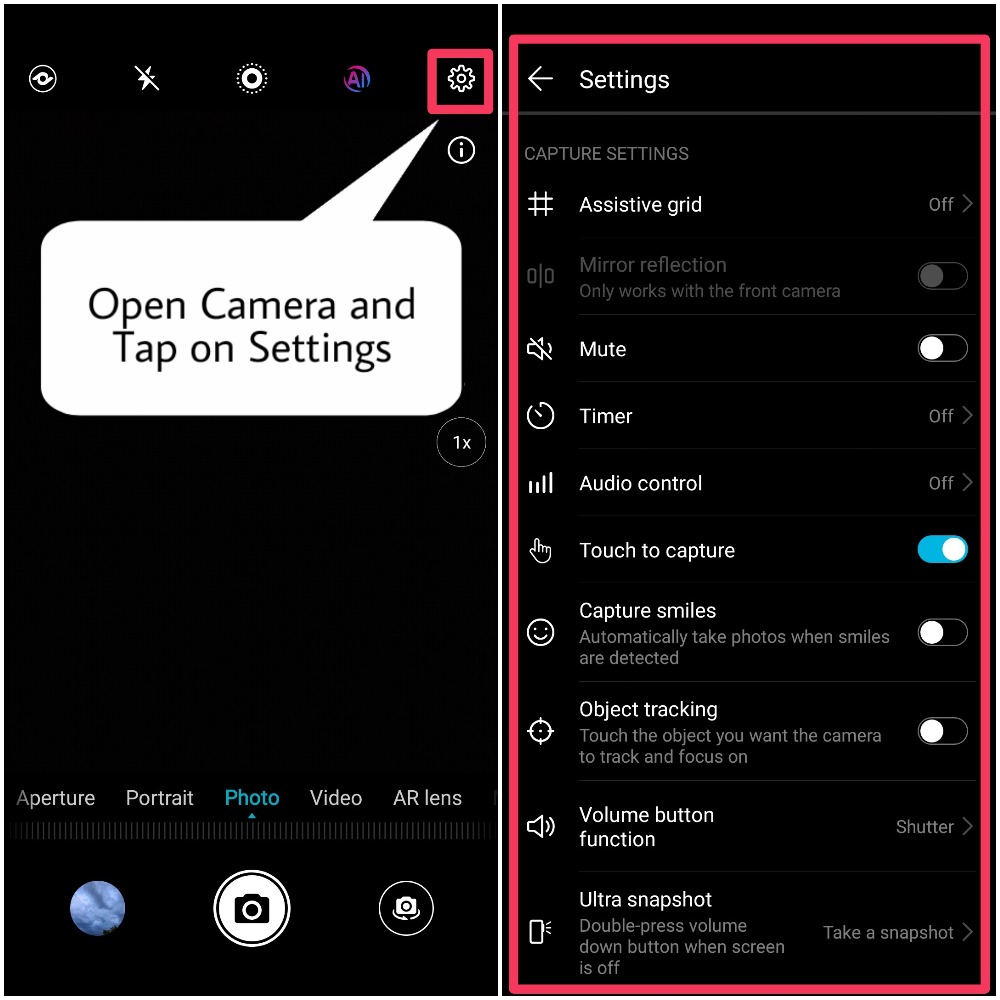
Capture smiles automatically:
Enable Capture smiles. The camera will now take a picture automatically when it detects a Smile!
Touch to capture:
Enable Touch to capture. Now when you touch an object , the camera will focus and take a picture automatically.
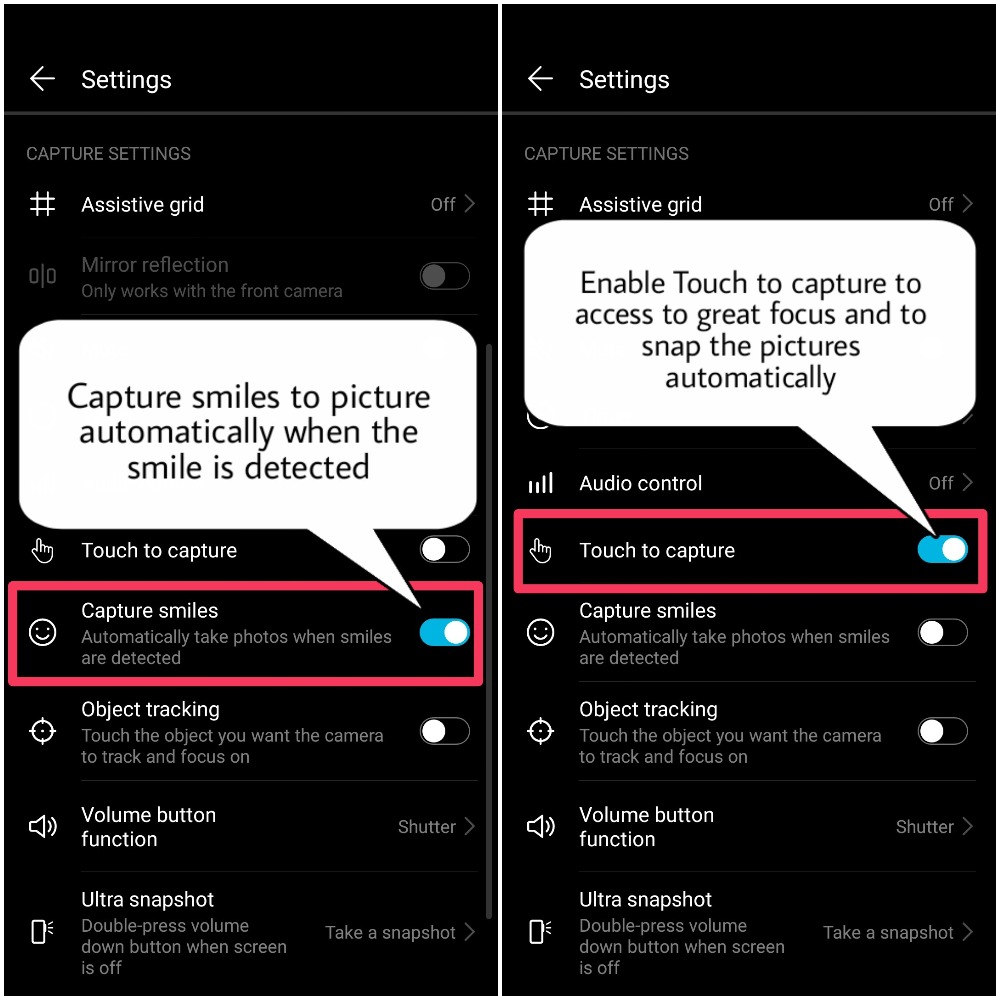
Lock focus length:
Touch & hold shutter icon and select Lock focal length. Now when you touch and hold the shutter button, the camera will no longer auto focus.
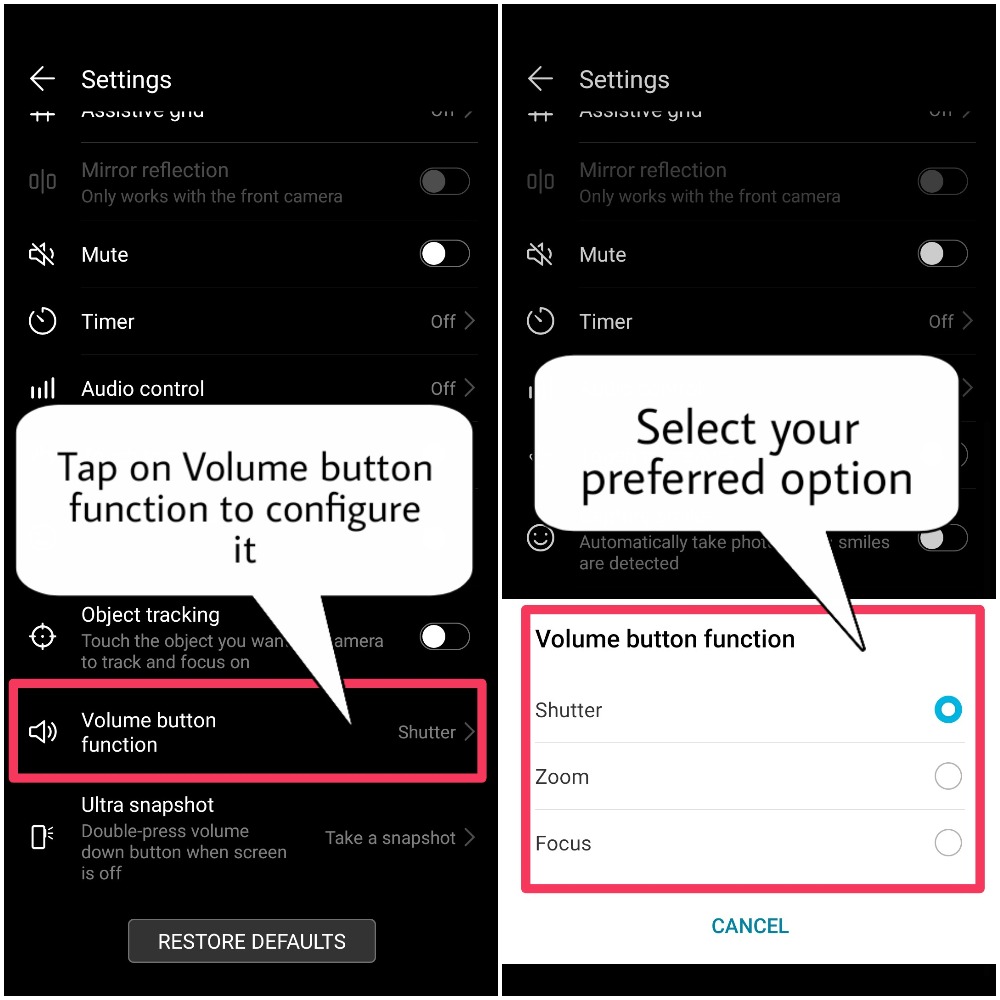
Volume button function:
Use the volume button to take pictures, focus a shot, or zoom in or out:
Tap on Volume button function and select Shutter, Zoom, or Focus mode according to your preference.
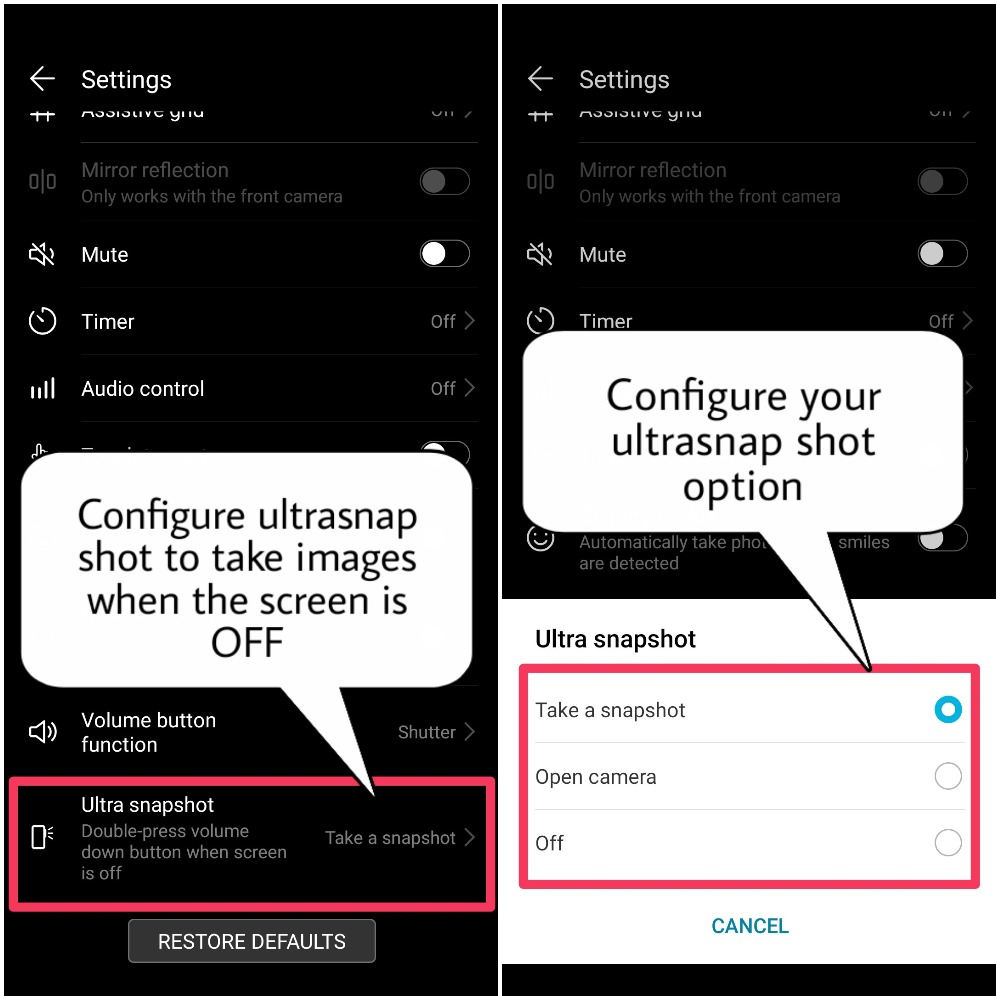
Ultra snapshot:
Configure Ultra snapshot to capture images when your devcie screen is 'OFF' or to launch 'Camera' App when the device screen is 'OFF'
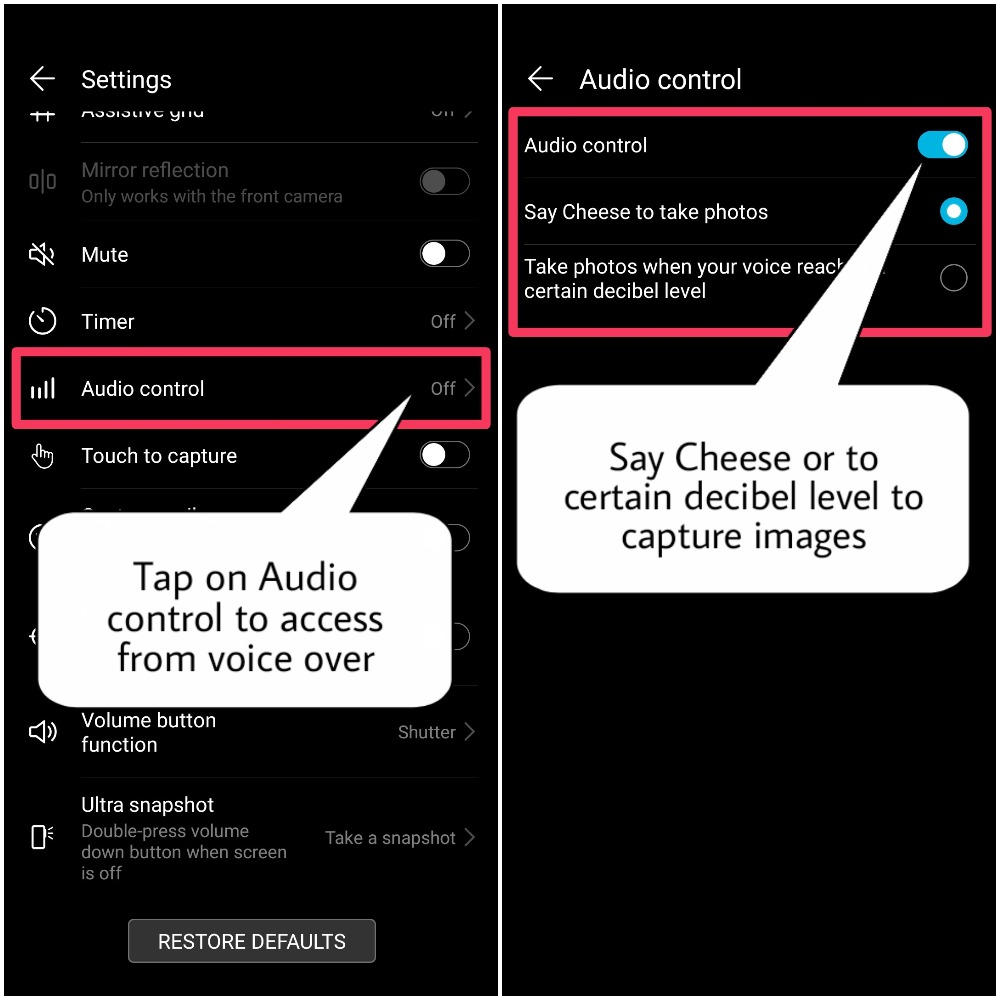
Audio Control:
Enable Audio control, to take pictures by saying 'Cheese' or according to the certain amount of 'decibel' level from your voice.
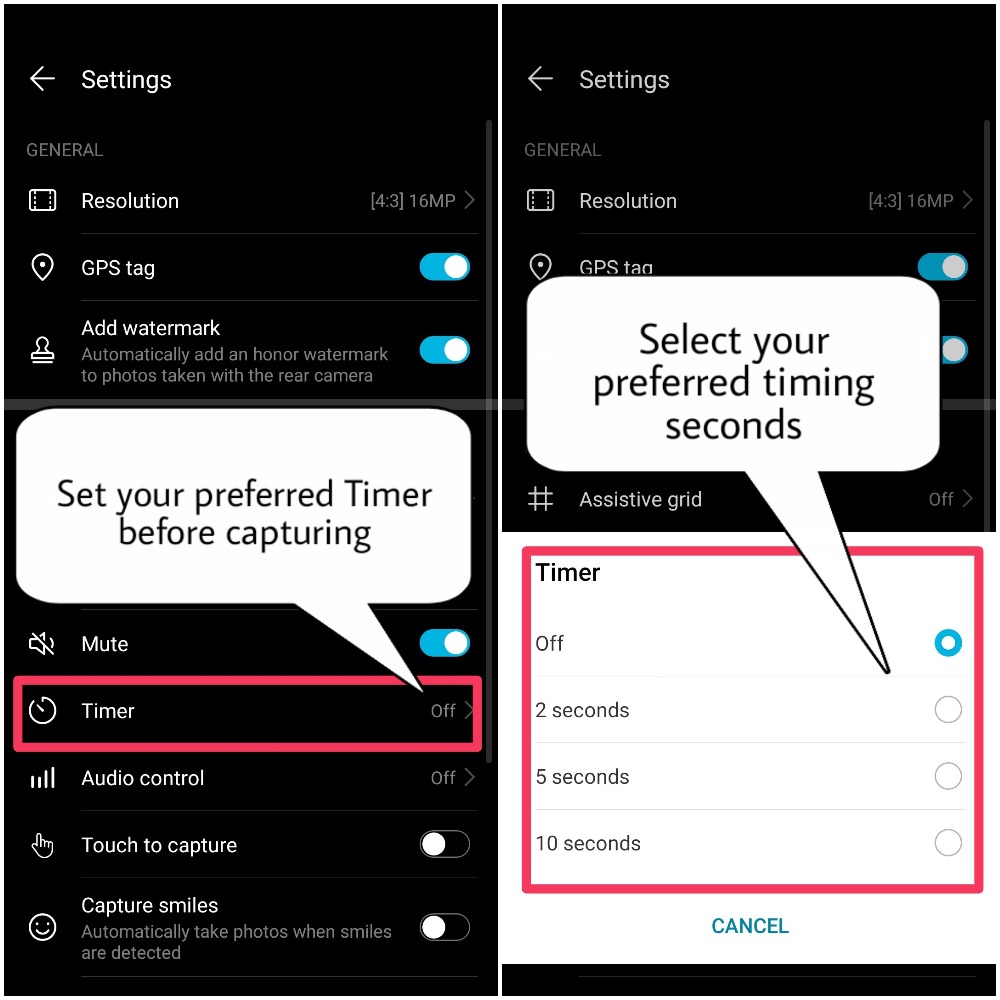
Timer:
Enable Timer option to an automatic shooting mode that counts down and then takes a photo with delay as per timing is selected, from 'OFF to max of 10 Seconds'
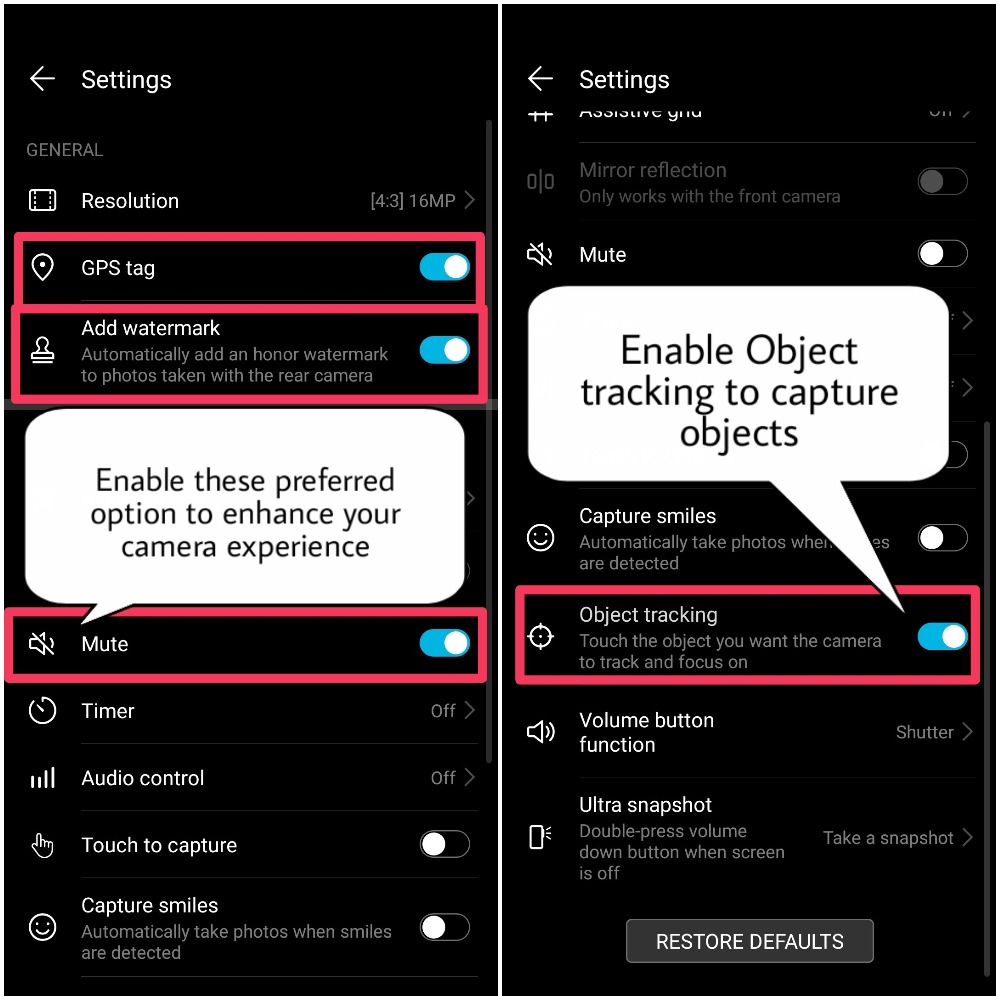
Object Tracking:
Enabling Object tracking is to detect moving objects and capture the images
GPS Tag, Watermark and Mute photography:
Enabling Mute is to turn OFF the camera shutter sound
Enable GPS tag allows you to tag your photos with precise geographic information
Enabling Watermark on your photos is to show of your device as well as prevent others from trying to copy and use the photo without permission.
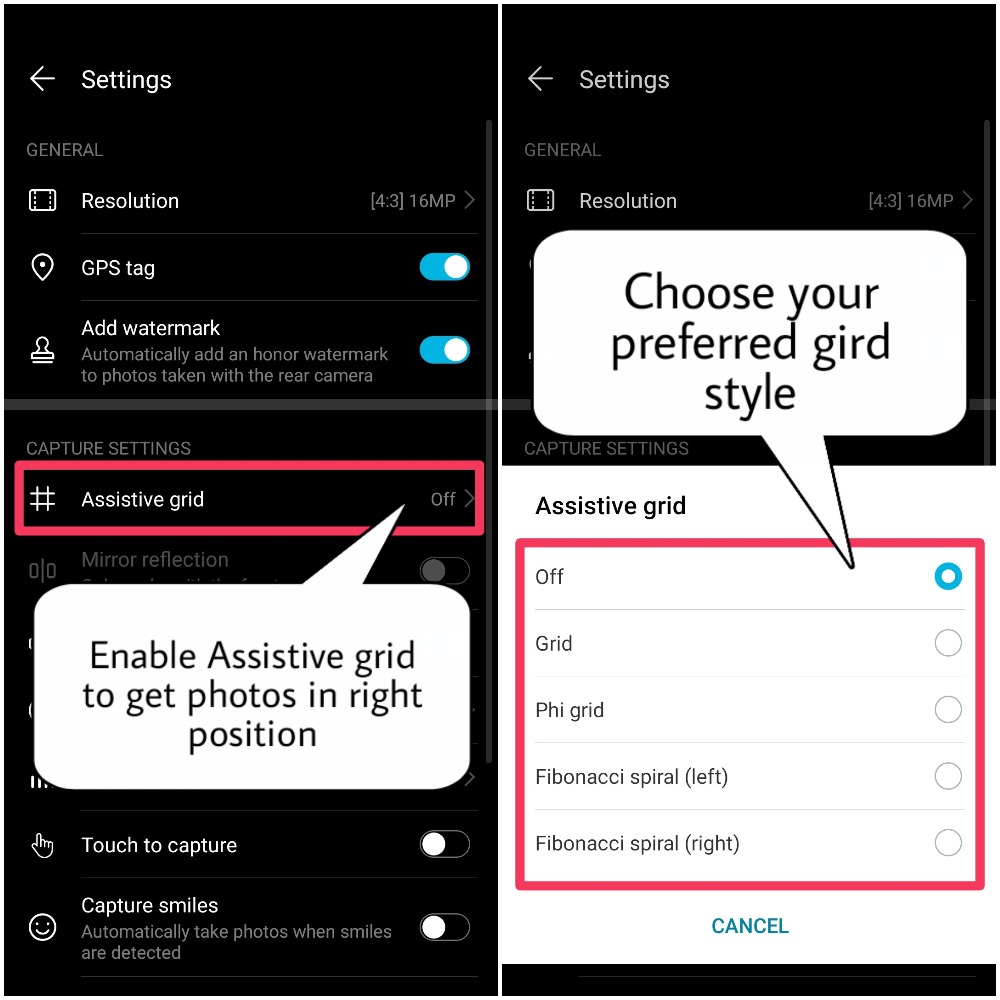
Assistive Grid:
Grid lines are used so that you can actually get a perfect composition of a picture.
You can select from Normal Grid, Phi, Fibonacci spiral (Left or Right) - different types of grid options is available till EMUI 9.0, sadly after getting updated to EMUI 9.1 only normal gird is available!
AI Photography:
AI camera of Honor 10 which identifies the scenes and detects best camera settings automatically to give you never-seen-before output. Now every photo will look unique and away from the clutter. Time to create your own photography niche with the AI camera which supports 22 categories and can recognise more than 500 scenarios. Take your penchant for photography to the next level with Honor 10.
AI Camera with Multiple Scene recognition
The fast and efficient AI algorithm instantaneously pairs subjects with the optimal camera setting and image context. The AI powered by independent NPU helps take professional-like photos
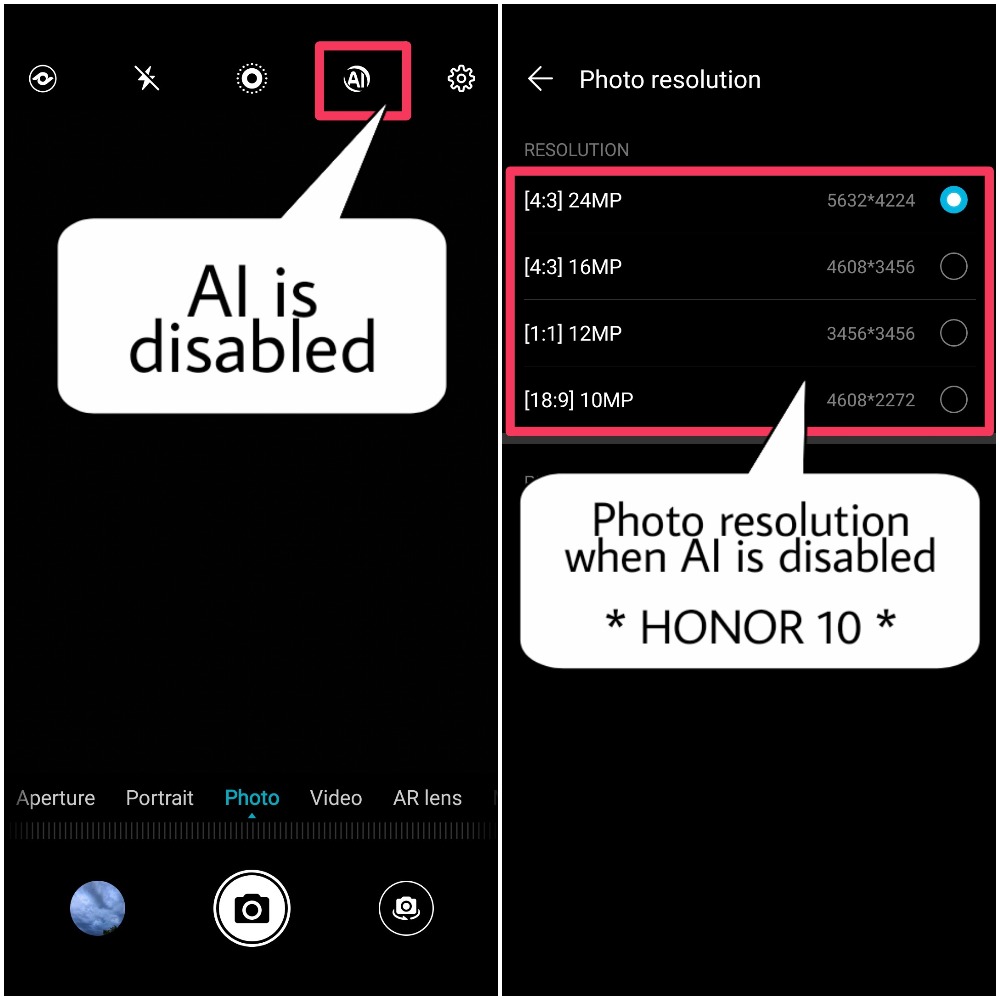
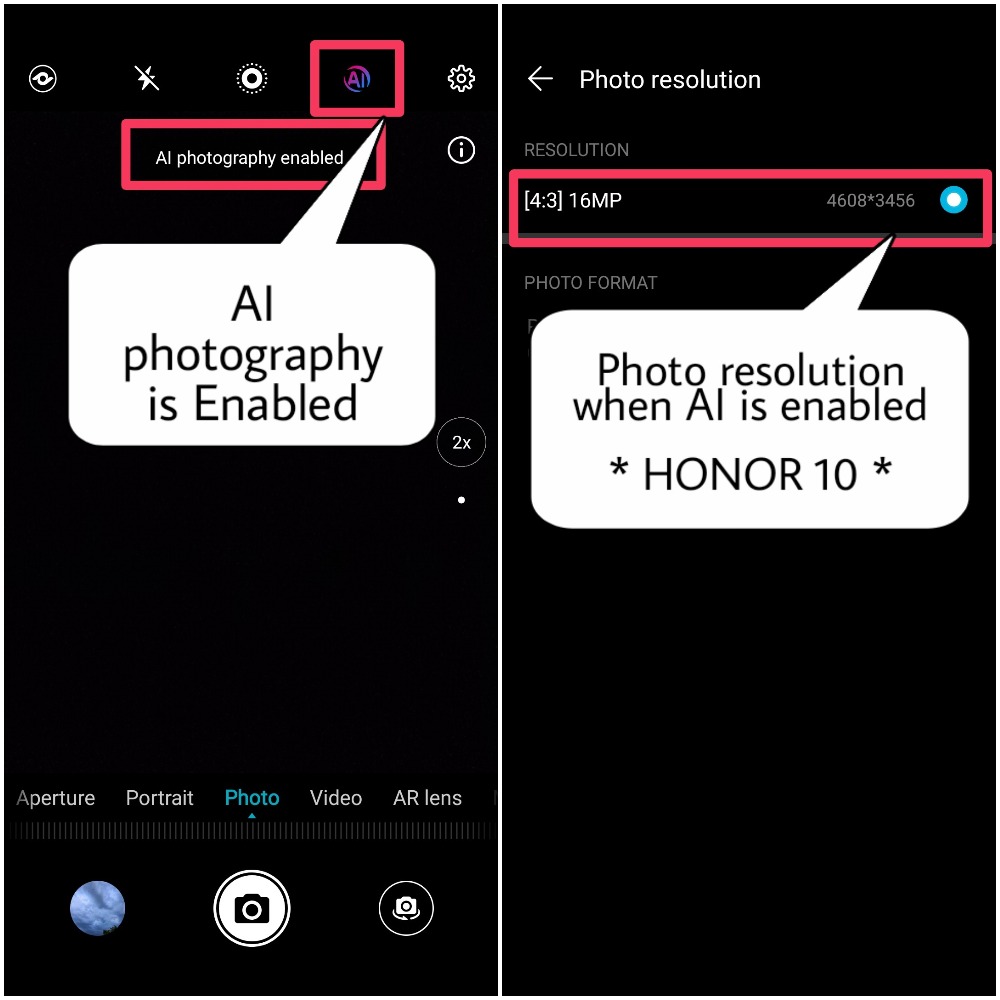
AI Enabled or Disabled - HONOR 10
When AI is disabled your camera can access to Full resolution i.e 24MP
When AI is enabled, then the maximum resolution of the photo will be set to 16MP
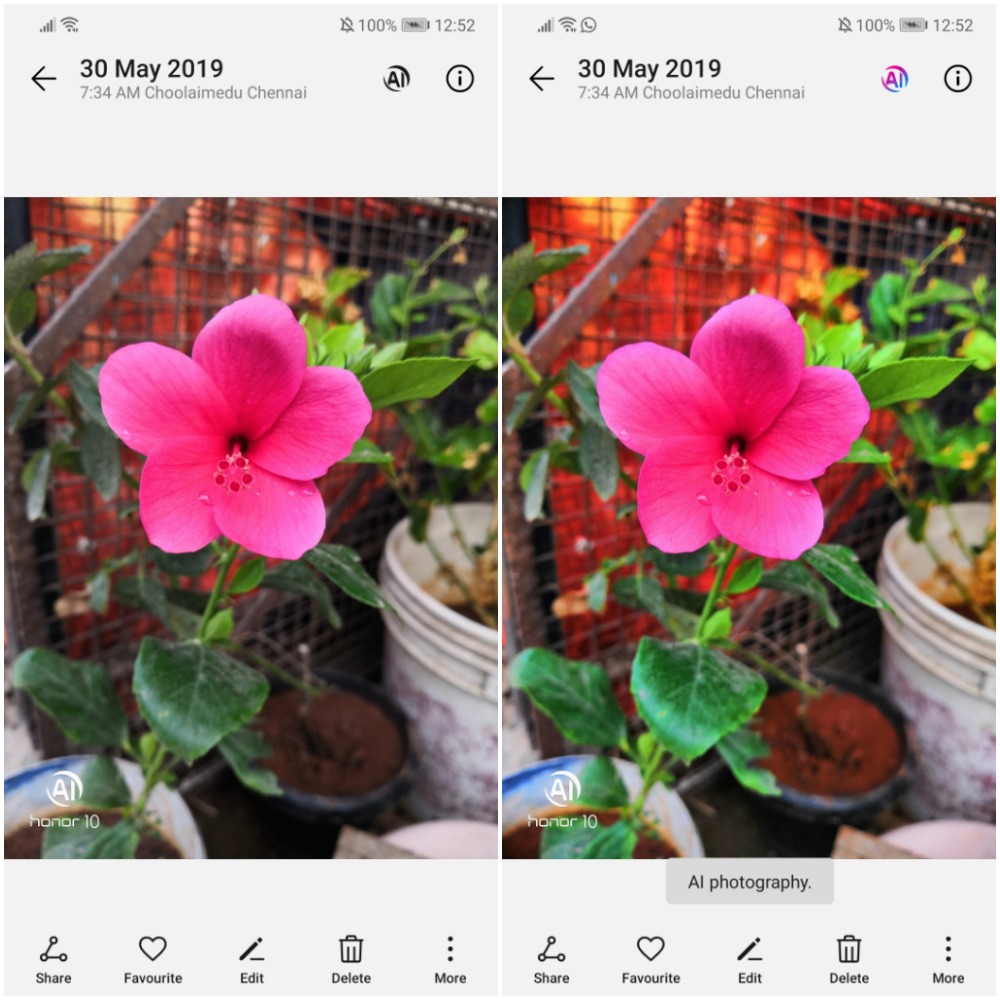
Sample Image with AI Disabled and AI Enabled
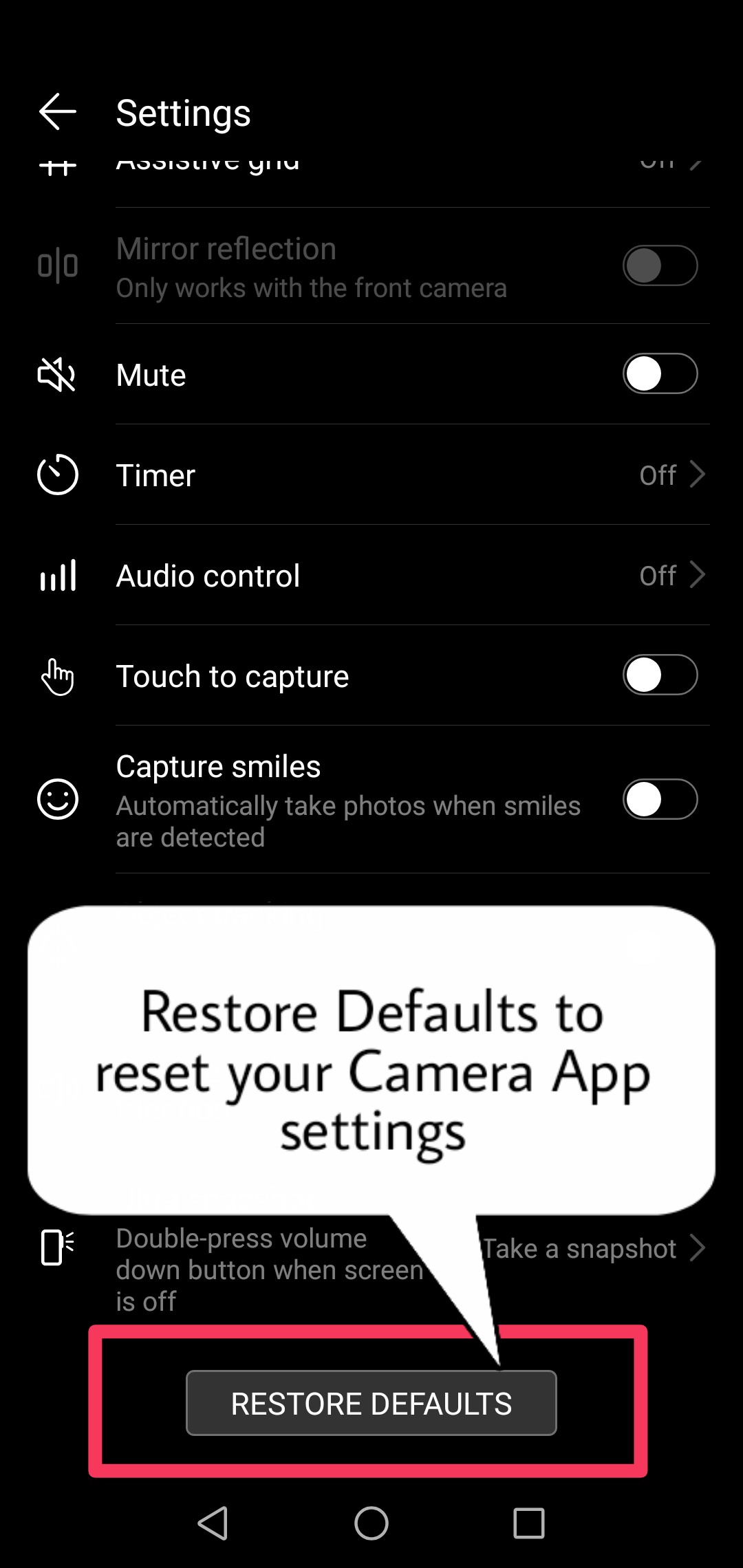
Restore Defaults:
Restores the Camera APP to its original manufacturer settings.
That's it guys, Hope you find this post useful!
Thank you for reading ;)


- Posts
- Following
- Followers
- Energy
-
 Tamil G
Moderator Intern
Tamil G
Moderator Intern
-
+ Follow

-
- 542 Posts
- 49 Following
- 881 Followers
- 39795 Energy

-
 New Comer
-
 Followers reach 50
-
 Followers reach 100
-
 Followers reach 200
-
 7 Days Check-in
-
 30 Days Check-in
-
 100 Days Check-in
-
 Moderator
-
 Halloween 2020
-
 HONOR STAR 2020
-
 New Year 2021
-
 Animal Photography
-
 Plant Photography
-
 Red Photography
-
 Survey Medal!
-
 Water Photography
-
 World Cycling & Running Day
-
 Product Photography
-
 Sky Photography
-
 Activity Photography Medal
-
 Autumn Photography
-
 Rain Photography
-
 HONOR 50: Best Shot!
-
 Monthly Photo Sharing #1 Landscape
-
 HONOR Magic4 Pro
-
 Monthly Photo Sharing #2 People
-
 Monthly Photo Sharing #3 Spring
-
 Monthly Photo Sharing #4 Animal



- Posts
- photo
- video

Hello HONOR Fans'
Hope you all had a great Weekend, Today I'm going to share a post on "EMUI Camera Settings & Features" in detail, Let's check it out below
EMUI's Camera has variety of features to enhance your Pictures to whole new level ;)
On the Camera App settings menu, you can adjust a variety of camera settings, modes, and specifications to suit your needs and enhance your camera experience!
Capture smiles automatically:
Enable Capture smiles. The camera will now take a picture automatically when it detects a Smile!
Touch to capture:
Enable Touch to capture. Now when you touch an object , the camera will focus and take a picture automatically.
Lock focus length:
Touch & hold shutter icon and select Lock focal length. Now when you touch and hold the shutter button, the camera will no longer auto focus.
Volume button function:
Use the volume button to take pictures, focus a shot, or zoom in or out:
Tap on Volume button function and select Shutter, Zoom, or Focus mode according to your preference.
Ultra snapshot:
Configure Ultra snapshot to capture images when your devcie screen is 'OFF' or to launch 'Camera' App when the device screen is 'OFF'
Audio Control:
Enable Audio control, to take pictures by saying 'Cheese' or according to the certain amount of 'decibel' level from your voice.
Timer:
Enable Timer option to an automatic shooting mode that counts down and then takes a photo with delay as per timing is selected, from 'OFF to max of 10 Seconds'
Object Tracking:
Enabling Object tracking is to detect moving objects and capture the images
GPS Tag, Watermark and Mute photography:
Enabling Mute is to turn OFF the camera shutter sound
Enable GPS tag allows you to tag your photos with precise geographic information
Enabling Watermark on your photos is to show of your device as well as prevent others from trying to copy and use the photo without permission.
Assistive Grid:
Grid lines are used so that you can actually get a perfect composition of a picture.
You can select from Normal Grid, Phi, Fibonacci spiral (Left or Right) - different types of grid options is available till EMUI 9.0, sadly after getting updated to EMUI 9.1 only normal gird is available!
AI Photography:
AI camera of Honor 10 which identifies the scenes and detects best camera settings automatically to give you never-seen-before output. Now every photo will look unique and away from the clutter. Time to create your own photography niche with the AI camera which supports 22 categories and can recognise more than 500 scenarios. Take your penchant for photography to the next level with Honor 10.
AI Camera with Multiple Scene recognition
The fast and efficient AI algorithm instantaneously pairs subjects with the optimal camera setting and image context. The AI powered by independent NPU helps take professional-like photos
AI Enabled or Disabled - HONOR 10
When AI is disabled your camera can access to Full resolution i.e 24MP
When AI is enabled, then the maximum resolution of the photo will be set to 16MP
Sample Image with AI Disabled and AI Enabled
Restore Defaults:
Restores the Camera APP to its original manufacturer settings.
That's it guys, Hope you find this post useful!
Thank you for reading ;)