



 More Products
 Compare














我的荣耀 开启荣耀之旅



 Disagree Terms
 Log out




[AppGallery] Install Apps on the HONOR 9X Pro without Google Play :O


 Last reply :
Hey everyone!
With the global launch of the 9X Pro having just been announced, I thought I would share with you a recent experience of the HONOR 9X Pro I bought from China, which has untitleddailyalmostuntitleddaily gone off without a hitch, all things considered. I was very happy with it looks-wise - the HONOR 9X Pro certainly looks more premium than its price. And thanks to the Kirin 810, the device is even powerful enough to run pretty high-spec games with amazing rendering and no lag.
The biggest obstacle I met when setting up the HONOR 9X Pro however, was installing apps. The 9X Pro doesn’t support GMS (Google Mobile Services), which includes Google Play. One solution is to install a third-party app store like APKPure, and then you can find some of the apps you need.
But, if your old phone is still working, I have another option that can save you lots of time: Phone Clone. This app allows you to quickly copy apps and data to an HONOR phone, no matter what your old phone is.
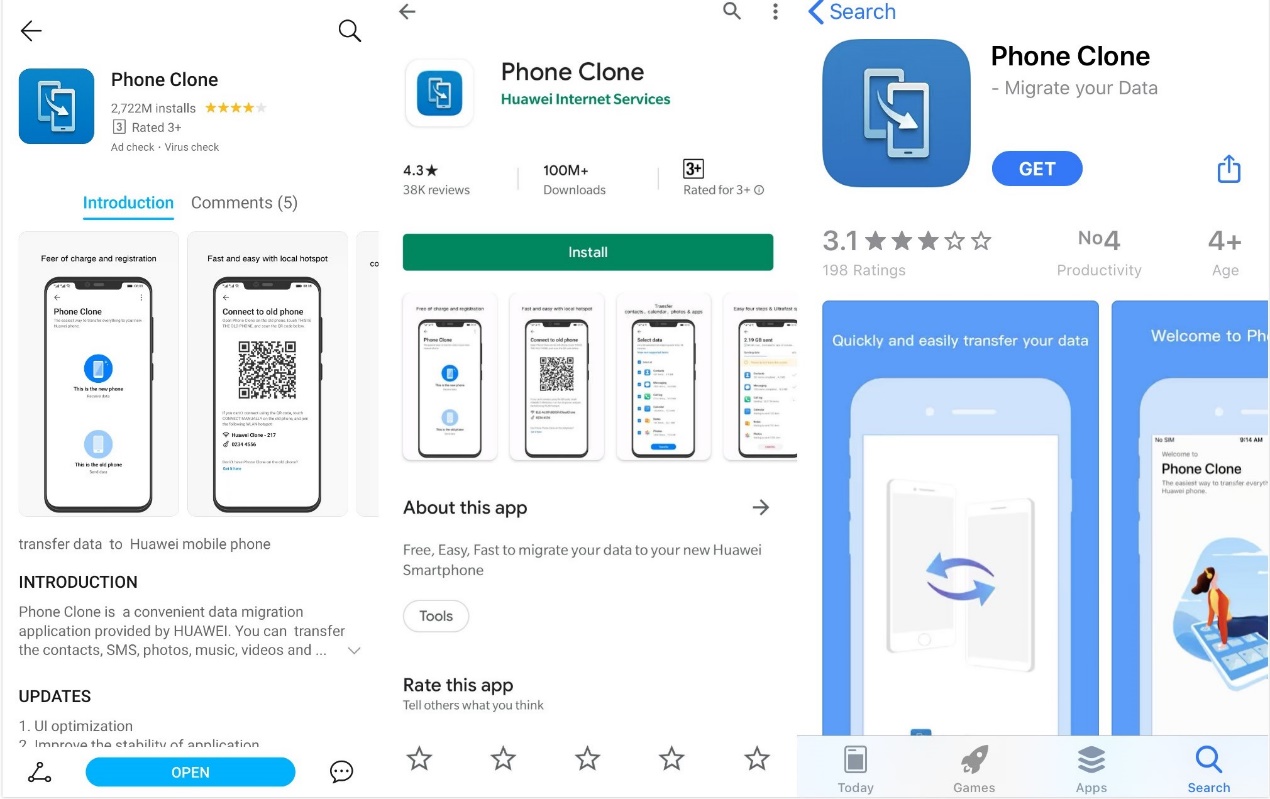
Before copying the apps, you need to install Phone Clone on both phones. The app can be found on whatever app store you are using.
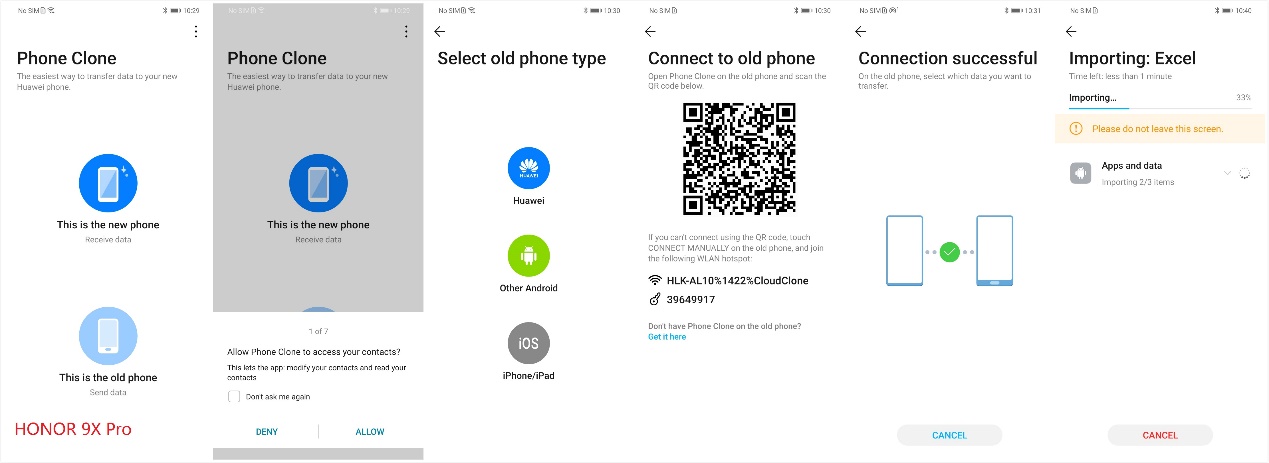
As Sam outlined in his rundown of alternative ways to get non-Google Play apps, Phone Clone is very easy to use. I simply chose my HONOR 9X Pro as the “This is the new phone” option and put my old one under “This is the old phone”.
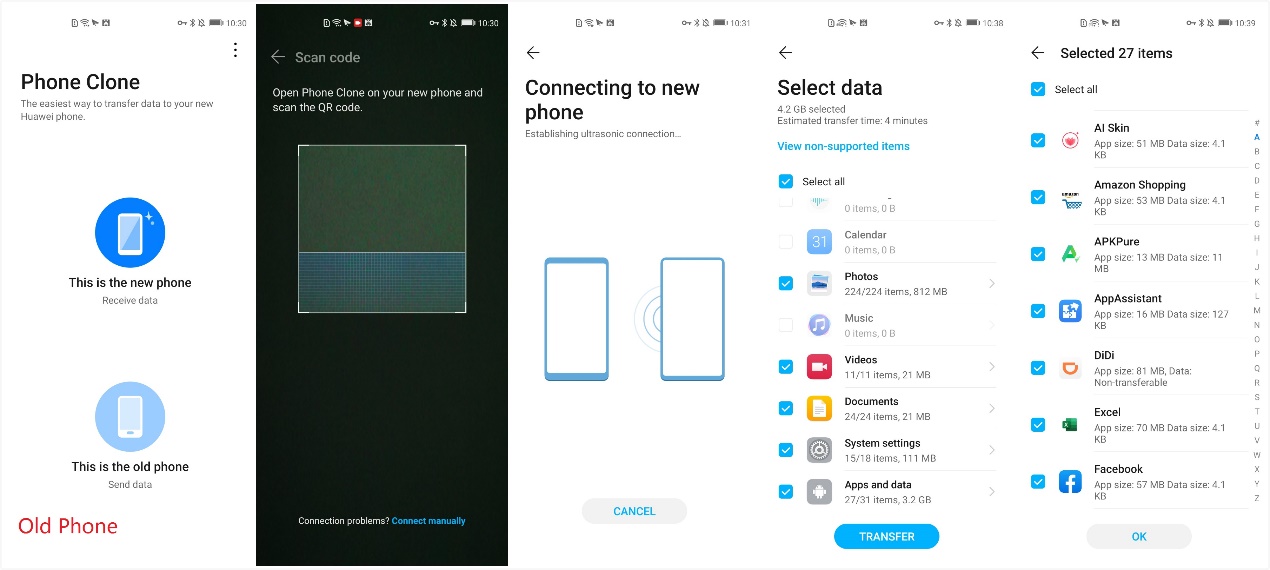
After that, you can choose whatever apps you need. For example, I wanted to use the Amazon, Instagram, and Facebook on my HONOR 9X Pro, so I chose them and waited for Phone Clone to work its magic.
This method will only take you 10 minutes even you really have tons of apps to be copied. Plus, not only does it work for the HONOR 9X Pro but also other HONOR phones that don’t support GMS, for example, the HONOR View30, which was also just launched in China market.
I hope this information is useful to some of you, whether you’re a current HONOR phone owner or an expectant 9X Pro user!


- Posts
- Following
- Followers
- Energy
-

BabyYoda
-
+ Follow

-
- 26 Posts
- 15 Following
- 180 Followers
- 3249 Energy






- Posts
- photo
- video

Hey everyone!
With the global launch of the 9X Pro having just been announced, I thought I would share with you a recent experience of the HONOR 9X Pro I bought from China, which has untitleddailyalmostuntitleddaily gone off without a hitch, all things considered. I was very happy with it looks-wise - the HONOR 9X Pro certainly looks more premium than its price. And thanks to the Kirin 810, the device is even powerful enough to run pretty high-spec games with amazing rendering and no lag.
The biggest obstacle I met when setting up the HONOR 9X Pro however, was installing apps. The 9X Pro doesn’t support GMS (Google Mobile Services), which includes Google Play. One solution is to install a third-party app store like APKPure, and then you can find some of the apps you need.
But, if your old phone is still working, I have another option that can save you lots of time: Phone Clone. This app allows you to quickly copy apps and data to an HONOR phone, no matter what your old phone is.
Before copying the apps, you need to install Phone Clone on both phones. The app can be found on whatever app store you are using.
As Sam outlined in his rundown of alternative ways to get non-Google Play apps, Phone Clone is very easy to use. I simply chose my HONOR 9X Pro as the “This is the new phone” option and put my old one under “This is the old phone”.
After that, you can choose whatever apps you need. For example, I wanted to use the Amazon, Instagram, and Facebook on my HONOR 9X Pro, so I chose them and waited for Phone Clone to work its magic.
This method will only take you 10 minutes even you really have tons of apps to be copied. Plus, not only does it work for the HONOR 9X Pro but also other HONOR phones that don’t support GMS, for example, the HONOR View30, which was also just launched in China market.
I hope this information is useful to some of you, whether you’re a current HONOR phone owner or an expectant 9X Pro user!