



 More Products
 Compare














我的荣耀 开启荣耀之旅



 Disagree Terms
 Log out




[AppGallery] How Wish list works in HUAWEI AppGallery


 Last reply :
Hello HONOR Fans'
I hope you all doing great ;)
In this post - I'm going to share on an article on "How Wish list works in HUAWEI AppGallery"
Let's check it out;
Prerequisite:
HUAWEI AppGallery version v10.2.0 or above!
Step:1
Access to HUAWEI AppGallery "Wish list"
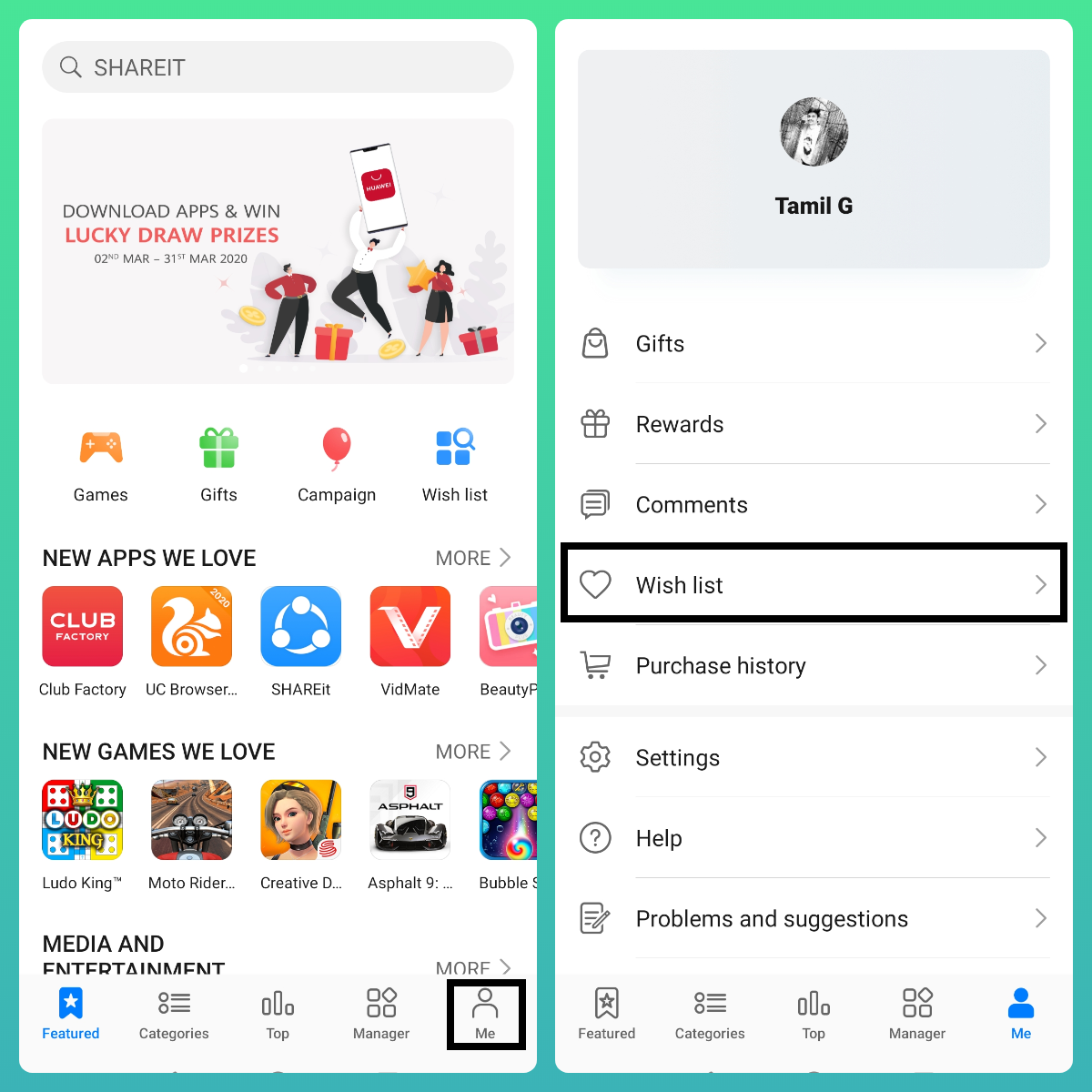
- Open AppGallery > navigate to "Me" tab and tap on "Wish list" option.
Step:2
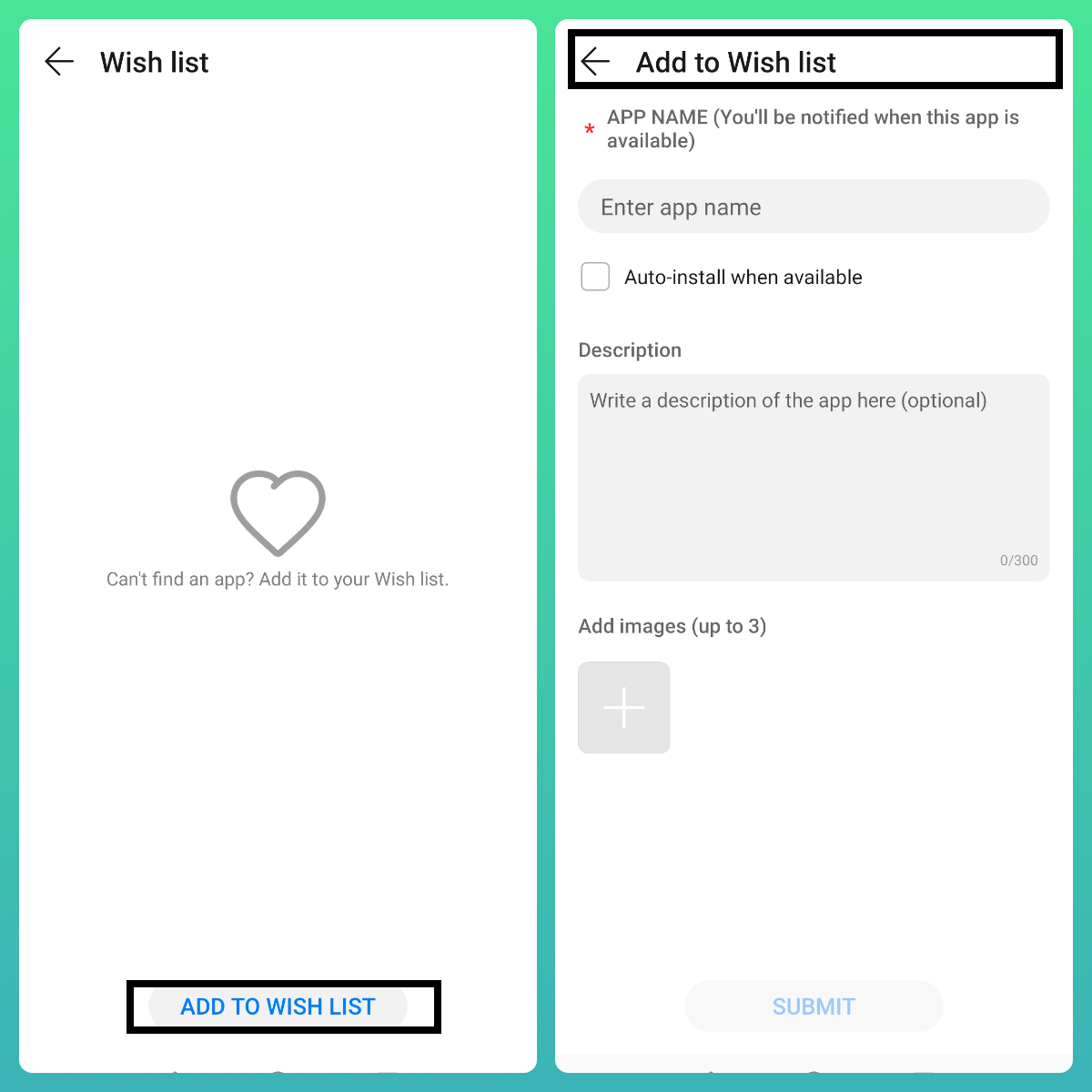
Add to Wish list
All you need is
App Name - Exact name of your required App
Description - A short description of your Wish list App
Images - Include some Screens of your App if you have some
Once done with every above mentioned details of your Wish list App
Click - Submit
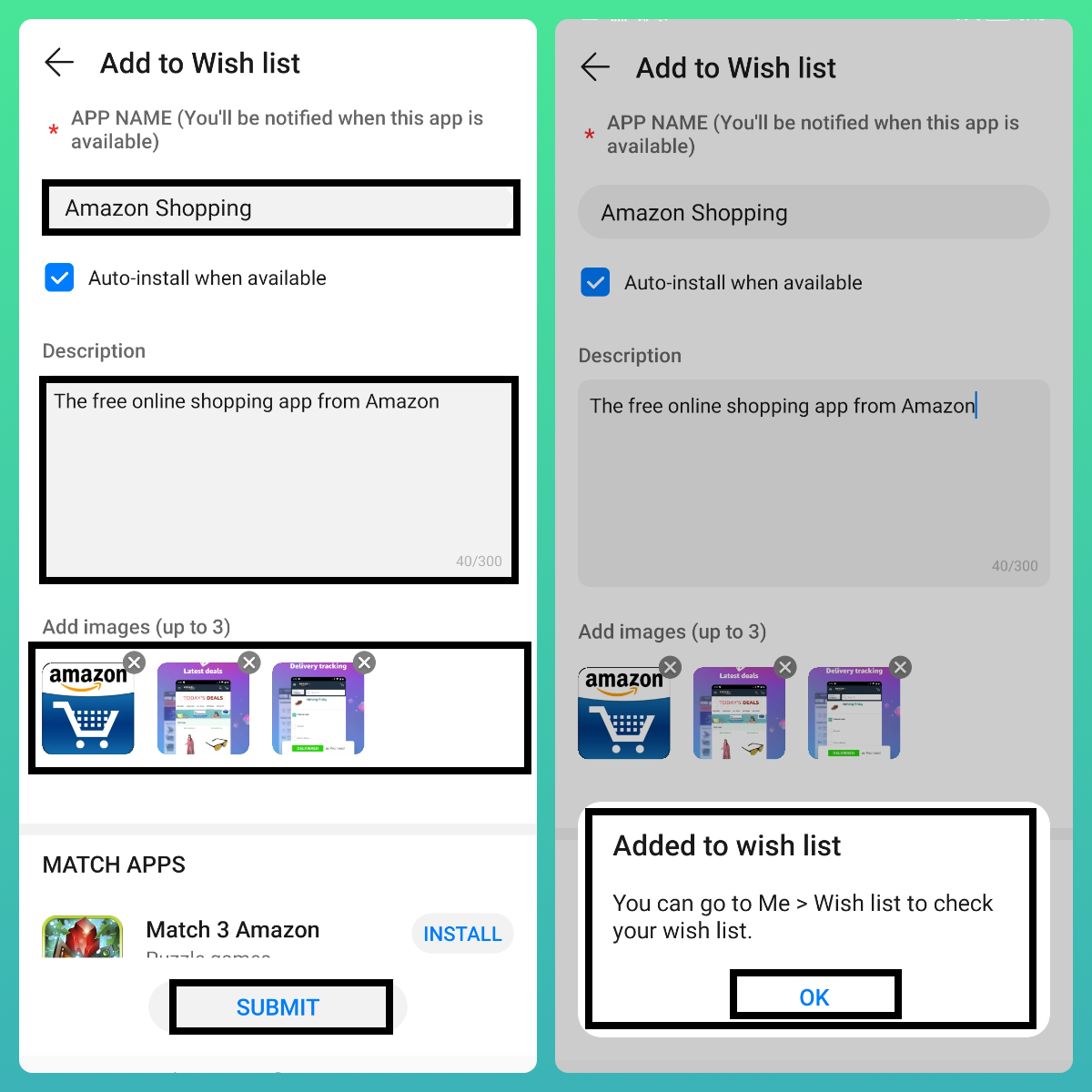
You will be prompted with a popup stating - Added to wish list
Step:3
Check your Wish details
- Go to "Me" > "Wish list" to check your wish listed Apps!
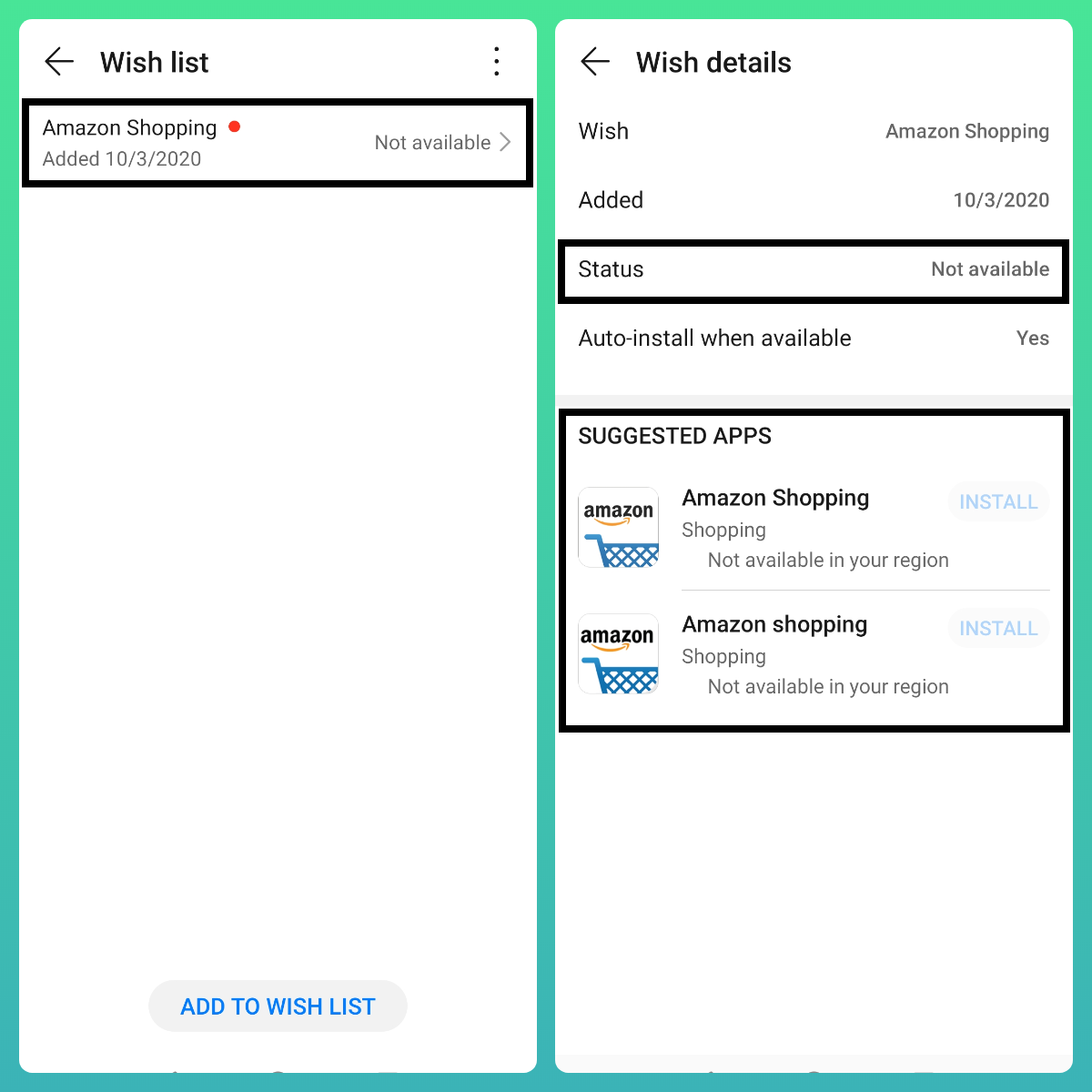
- You will be shown with details which includes Status, Suggested Apps etc according to your Wish listed Apps.
Step:4
Example (1)
- I have added "Telegram" as an my Wish list App - later i have installed Telegram from other sources!
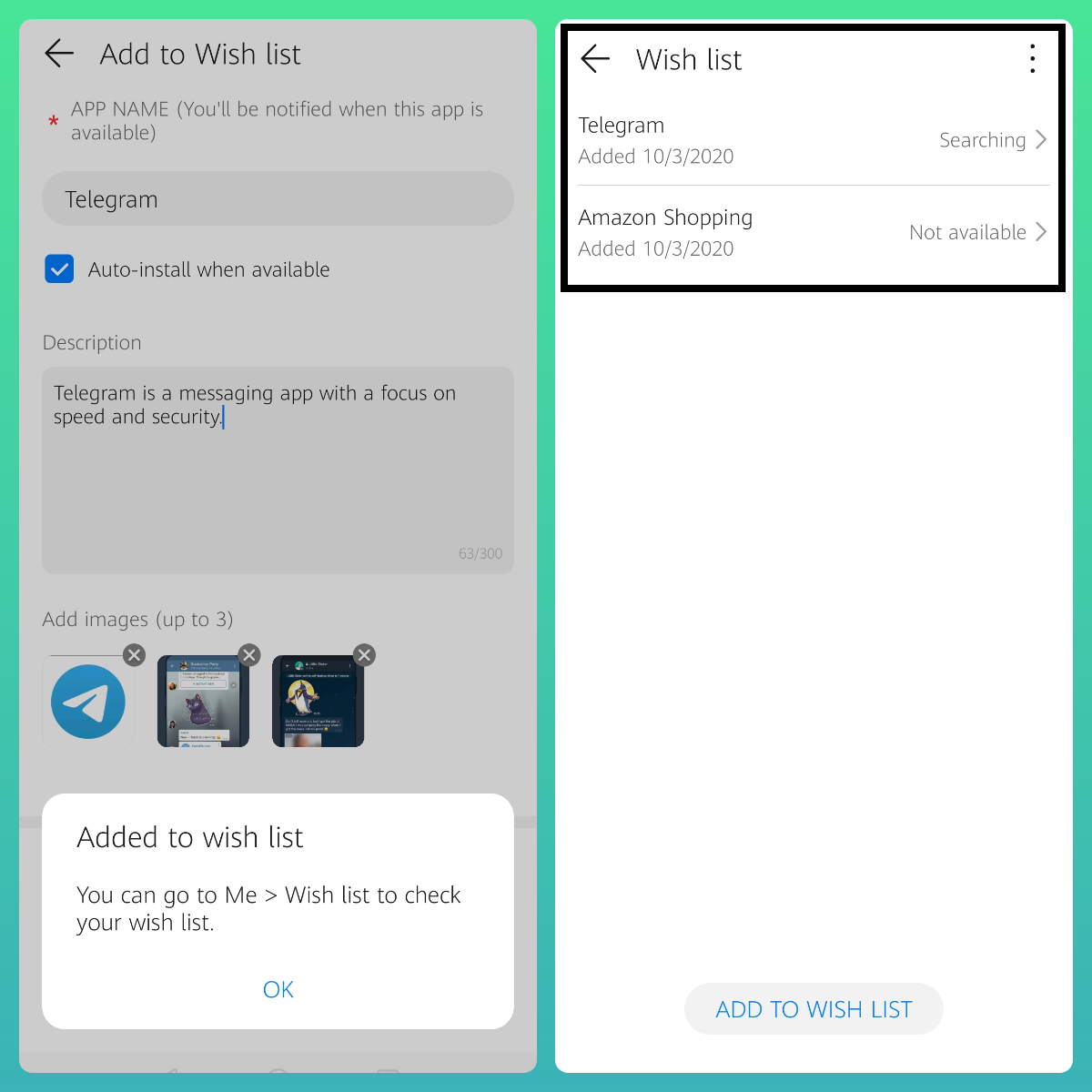
- Then i headed to AppGallery > Me > Wish list > Under Wish list
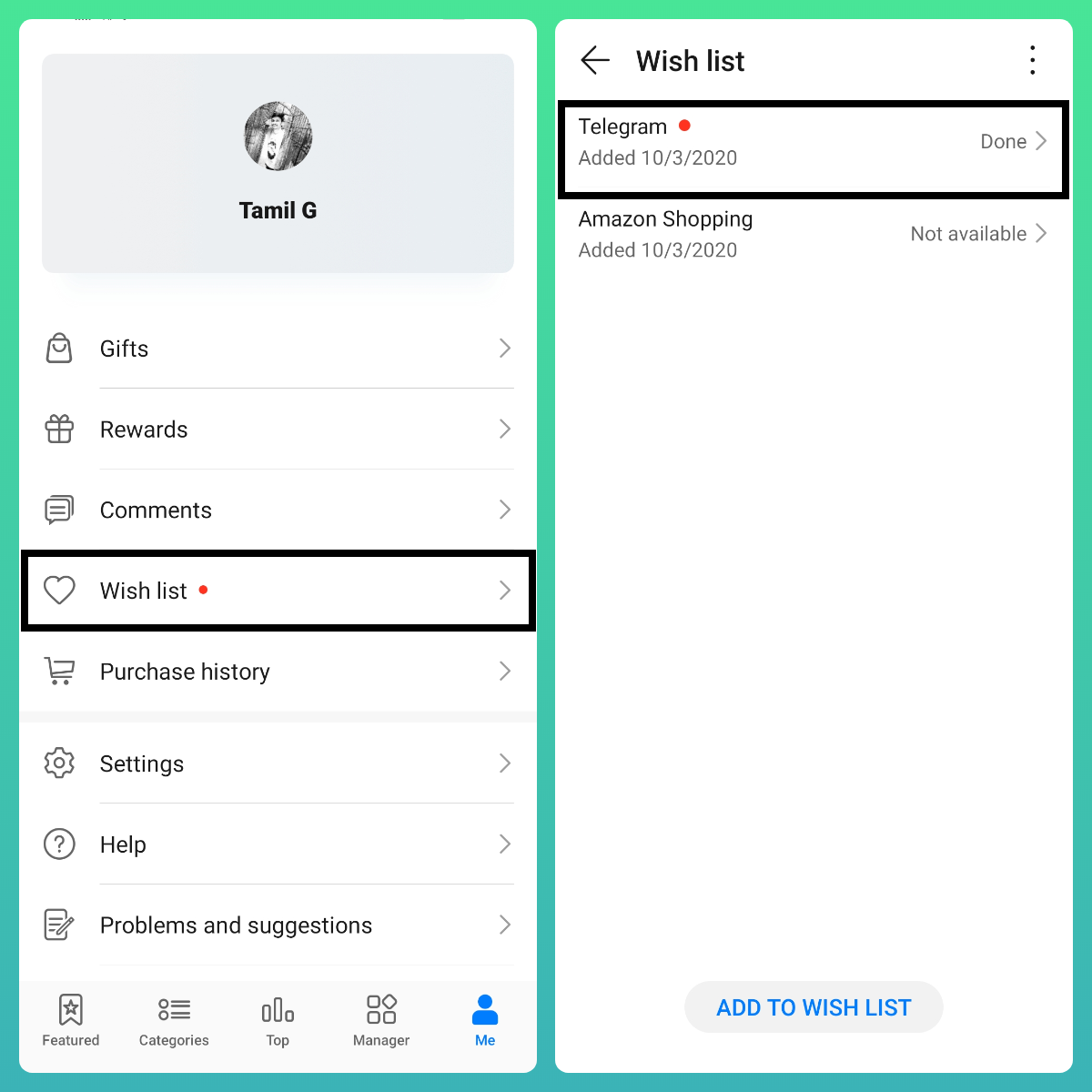
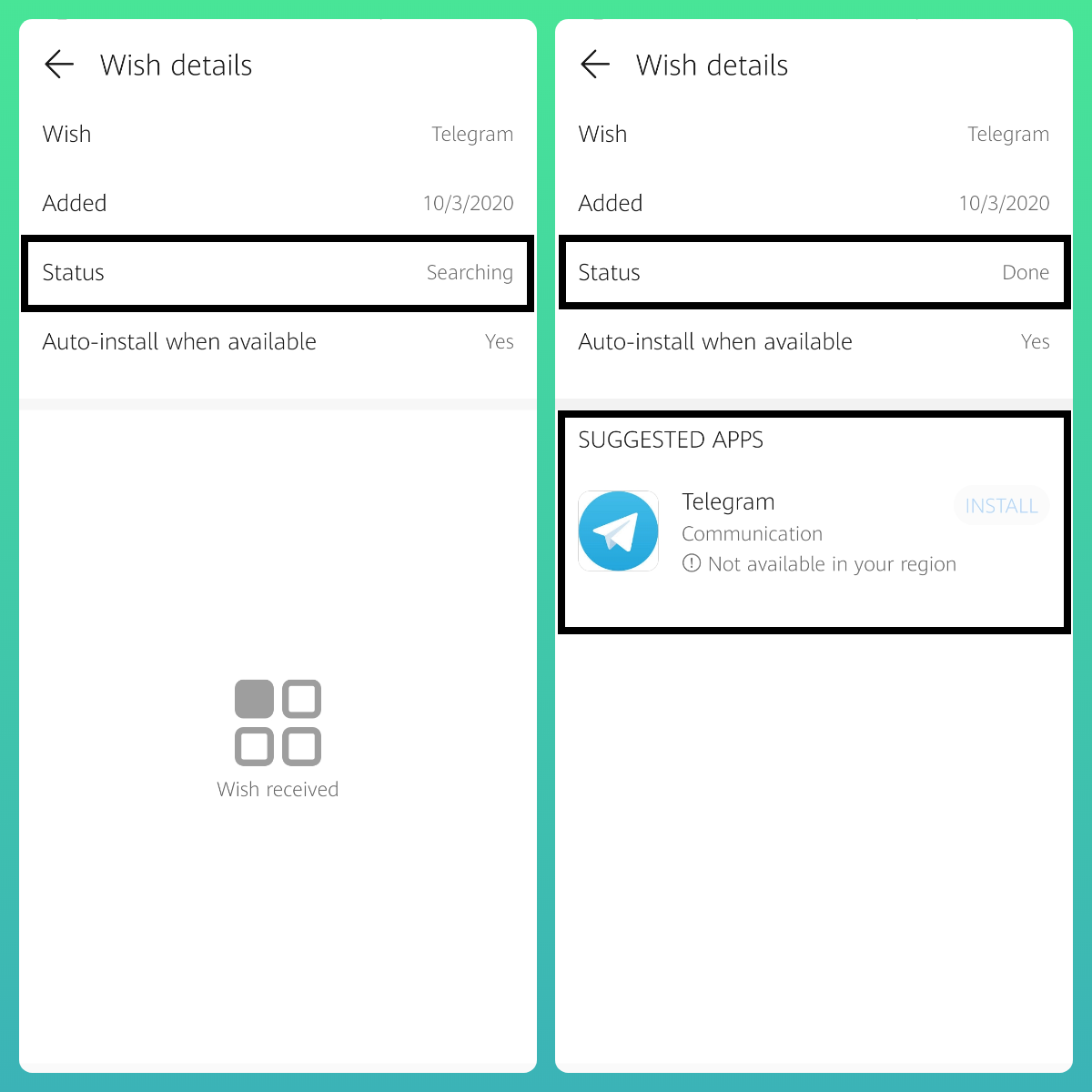
- Telegram > Status changed from "Searching" to "Done" | Which means the Wish listed App is installed on your device from any of the available outside sources.
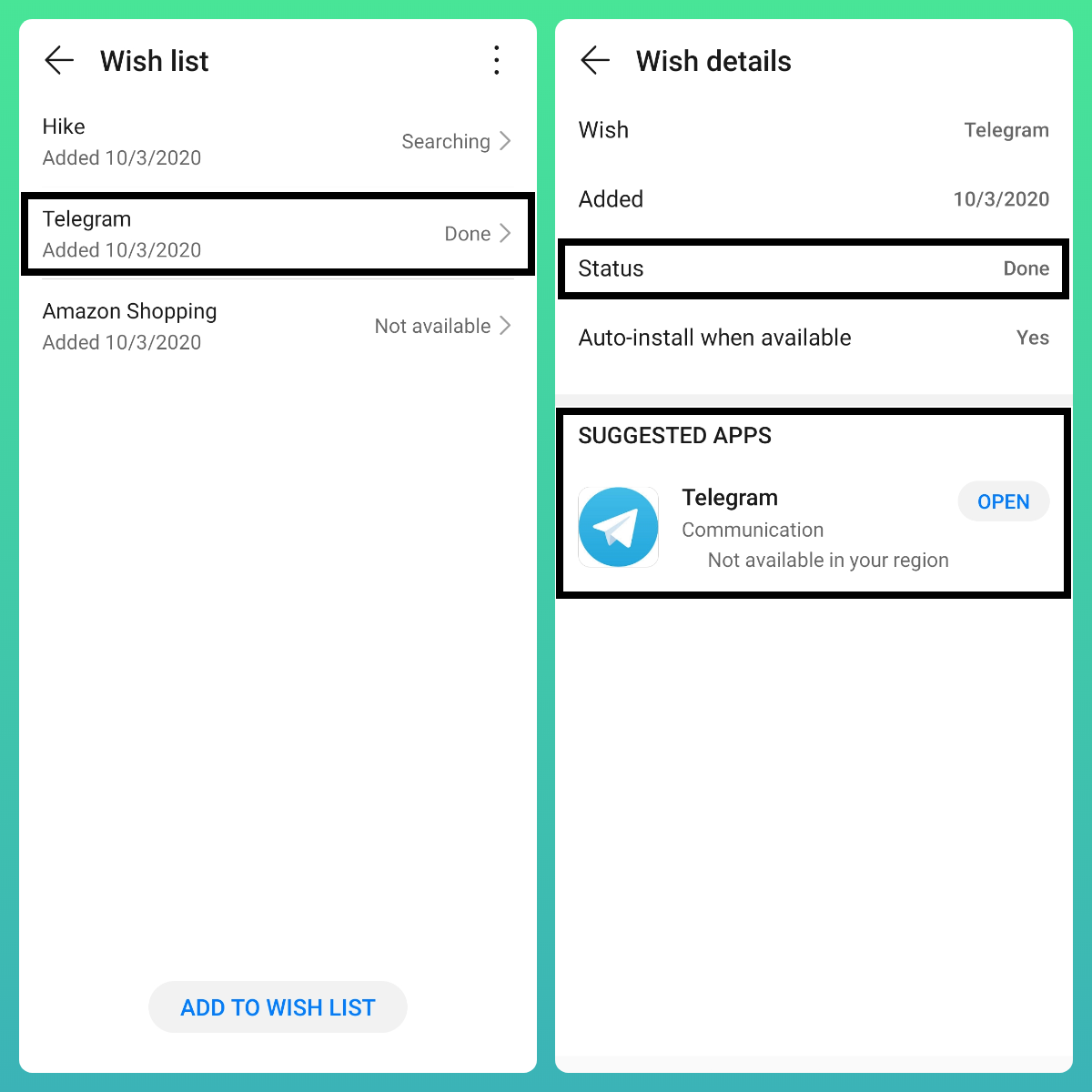
Example (2)
- I have already installed "Amazon Shopping App" in my device but i wanted to Wish list App in AppGallery
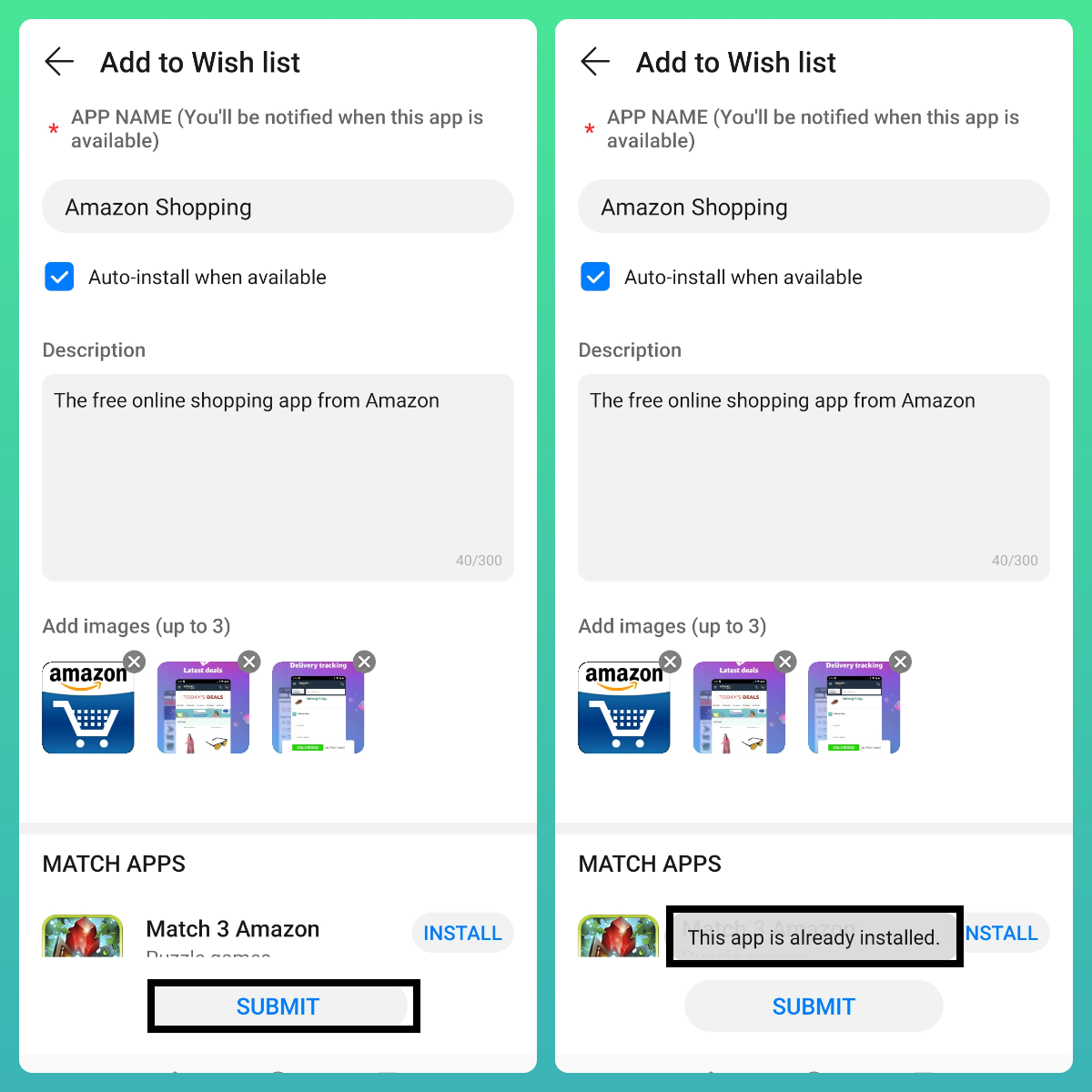
- I have added all details but upon Submitting, I'm prompted with a message "This app is already installed"
Step:5
Deleting your Wish list Apps
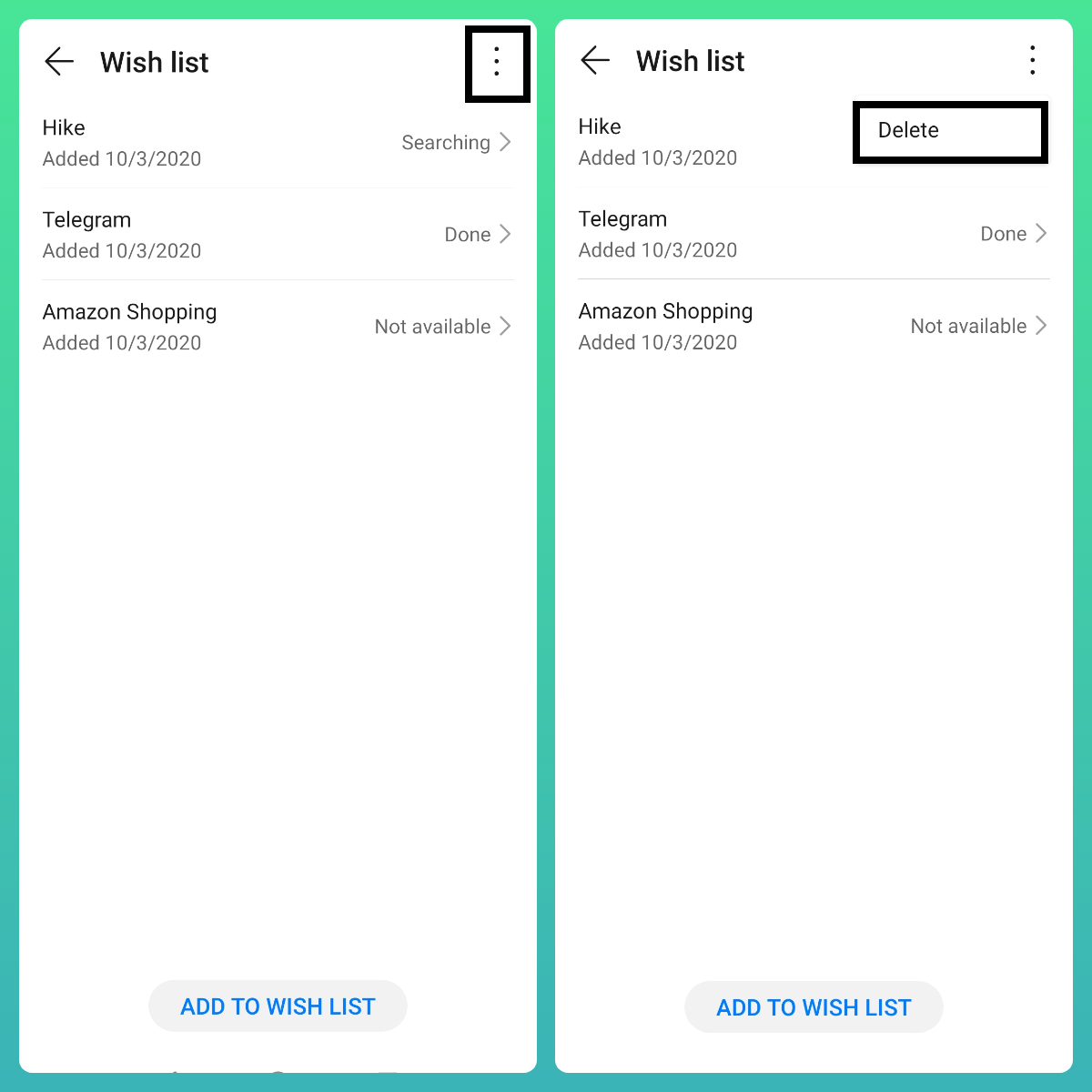
- Go to "Me" > Wish list > Tap on the 3 dots on the right corner and select "Delete" alternatively you can just "touch and hold" any of the Wish listed Apps to access the delete option.
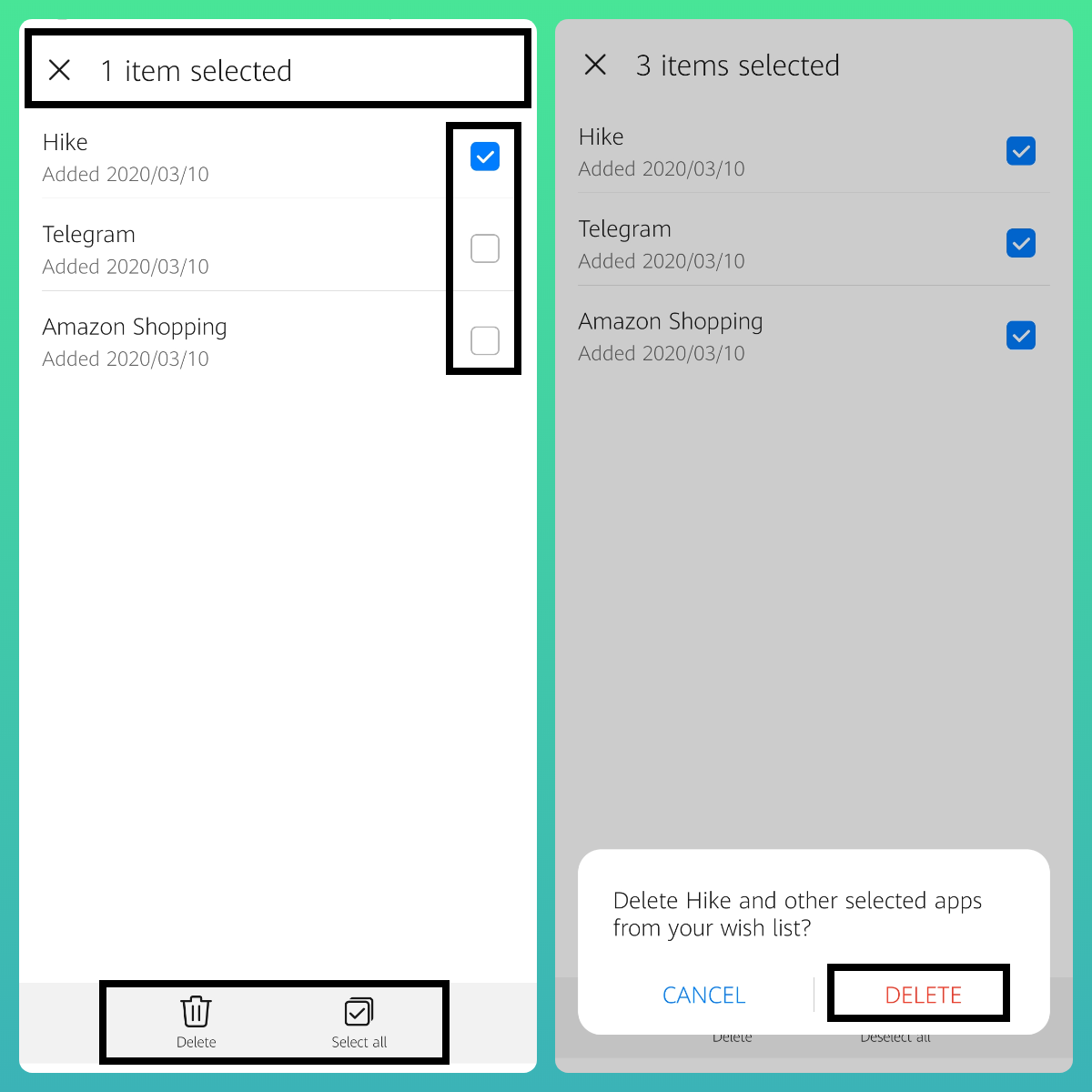
Status of your Wish list
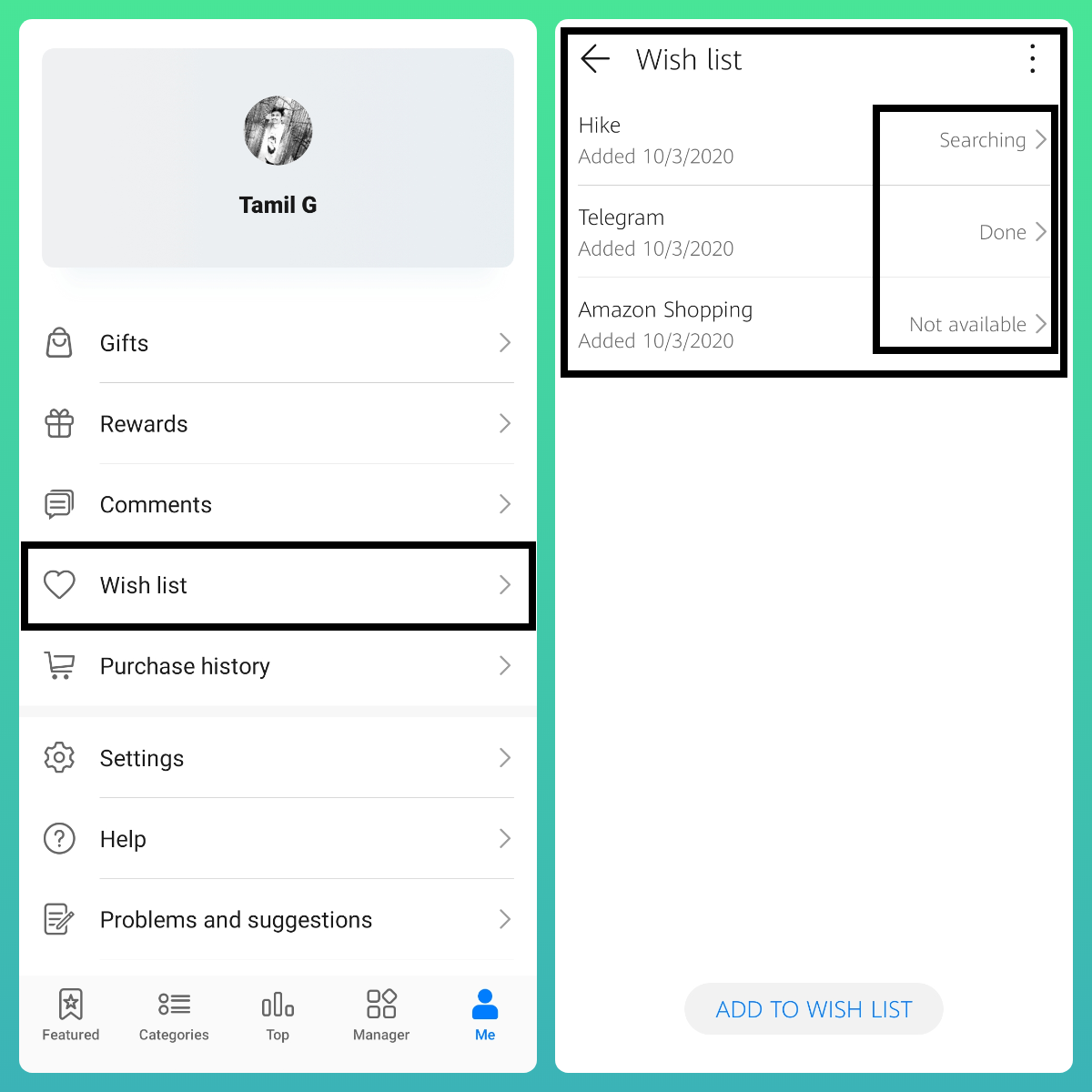
Searching: Recently submitted Wish listed Apps
Available: One or more Apps have been recommended to the user, but No App has not been installed yet.
Done: User has installed one or more of the suggested Apps from AppGallery or from outside sources.
Not available: Searching the App name did not match any published app, or the suggested app is not available to the User yet.
App not found: The wish has been in “not available” status for some time, searching the App name still does not match any published App, or No suggested Apps made available!
NOTE:
This article is to just show up "How AppGallery Wish list works"
App availability and Suggested Apps depends on your Country or Region | Thank you for your understanding ;)
That's it - Hope you all find this post useful | Thank you for reading ;)


- Posts
- Following
- Followers
- Energy
-
 Tamil G
Moderator Intern
Tamil G
Moderator Intern
-
+ Follow

-
- 542 Posts
- 49 Following
- 881 Followers
- 39795 Energy

-
 New Comer
-
 Followers reach 50
-
 Followers reach 100
-
 Followers reach 200
-
 7 Days Check-in
-
 30 Days Check-in
-
 100 Days Check-in
-
 Moderator
-
 Halloween 2020
-
 HONOR STAR 2020
-
 New Year 2021
-
 Animal Photography
-
 Plant Photography
-
 Red Photography
-
 Survey Medal!
-
 Water Photography
-
 World Cycling & Running Day
-
 Product Photography
-
 Sky Photography
-
 Activity Photography Medal
-
 Autumn Photography
-
 Rain Photography
-
 HONOR 50: Best Shot!
-
 Monthly Photo Sharing #1 Landscape
-
 HONOR Magic4 Pro
-
 Monthly Photo Sharing #2 People
-
 Monthly Photo Sharing #3 Spring
-
 Monthly Photo Sharing #4 Animal



- Posts
- photo
- video

Hello HONOR Fans'
I hope you all doing great ;)
In this post - I'm going to share on an article on "How Wish list works in HUAWEI AppGallery"
Let's check it out;
Prerequisite:
HUAWEI AppGallery version v10.2.0 or above!
Step:1
Access to HUAWEI AppGallery "Wish list"
- Open AppGallery > navigate to "Me" tab and tap on "Wish list" option.
Step:2
Add to Wish list
All you need is
App Name - Exact name of your required App
Description - A short description of your Wish list App
Images - Include some Screens of your App if you have some
Once done with every above mentioned details of your Wish list App
Click - Submit
You will be prompted with a popup stating - Added to wish list
Step:3
Check your Wish details
- Go to "Me" > "Wish list" to check your wish listed Apps!
- You will be shown with details which includes Status, Suggested Apps etc according to your Wish listed Apps.
Step:4
Example (1)
- I have added "Telegram" as an my Wish list App - later i have installed Telegram from other sources!
- Then i headed to AppGallery > Me > Wish list > Under Wish list
- Telegram > Status changed from "Searching" to "Done" | Which means the Wish listed App is installed on your device from any of the available outside sources.
Example (2)
- I have already installed "Amazon Shopping App" in my device but i wanted to Wish list App in AppGallery
- I have added all details but upon Submitting, I'm prompted with a message "This app is already installed"
Step:5
Deleting your Wish list Apps
- Go to "Me" > Wish list > Tap on the 3 dots on the right corner and select "Delete" alternatively you can just "touch and hold" any of the Wish listed Apps to access the delete option.
Status of your Wish list
Searching: Recently submitted Wish listed Apps
Available: One or more Apps have been recommended to the user, but No App has not been installed yet.
Done: User has installed one or more of the suggested Apps from AppGallery or from outside sources.
Not available: Searching the App name did not match any published app, or the suggested app is not available to the User yet.
App not found: The wish has been in “not available” status for some time, searching the App name still does not match any published App, or No suggested Apps made available!
NOTE:
This article is to just show up "How AppGallery Wish list works"
App availability and Suggested Apps depends on your Country or Region | Thank you for your understanding ;)
That's it - Hope you all find this post useful | Thank you for reading ;)