



 More Products
 Compare














我的荣耀 开启荣耀之旅



 Disagree Terms
 Log out




[AppGallery] HONOR 9X Pro APP Guide – How to get all the Apps you need


 Last reply :
Hi HONOR fans!
As you now know, HONOR is on the verge of unveiling the HONOR 9X Pro to global markets, officially launching on the 24th of February!
The 9X Pro will also become the first HONOR smartphone to run on the HMS software. So, If you are planning on getting your hands on an HONOR 9X Pro and are wondering if you can get all of your most commonly used APPs such as Facebook, Instagram, WhatsApp etc, then don’t worry! There are plenty of ways to get them and there are even more APPs available for your new HONOR 9X Pro.
Today I am going to introduce you to the many simple ways you can easily download all your essential APPs. Keep reading and find out what suits you best! ☺
1. From Huawei APP Gallery
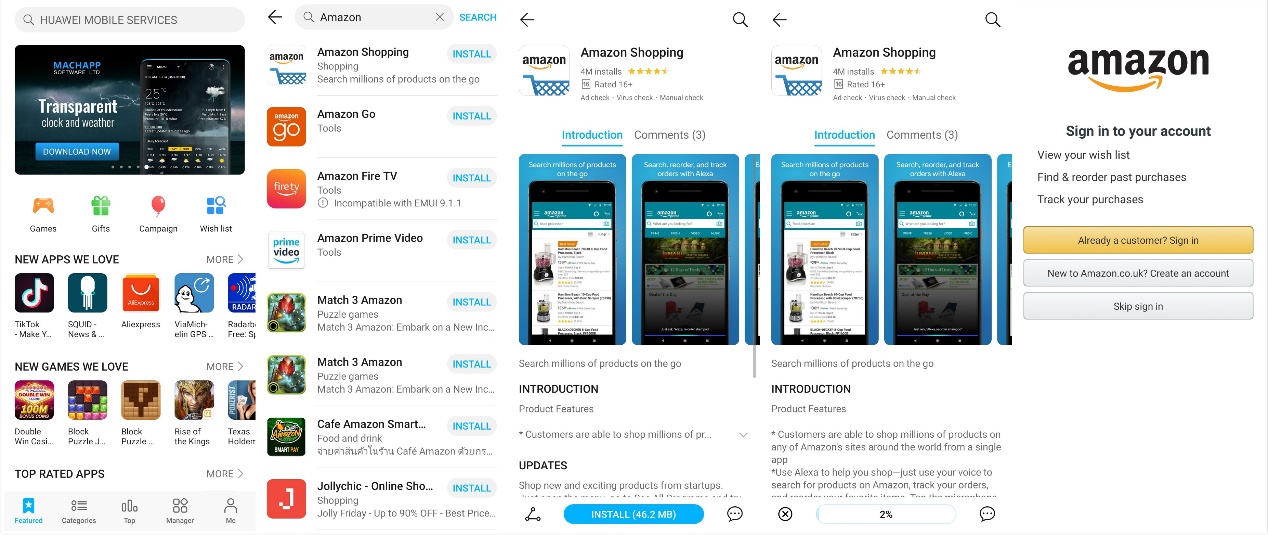
The great news is that more and more apps are launching in Huawei App Gallery. Let’s take the Amazon app as an example. Just type “Amazon” in the search box and hit install. Wait a few seconds, and you are good to go.
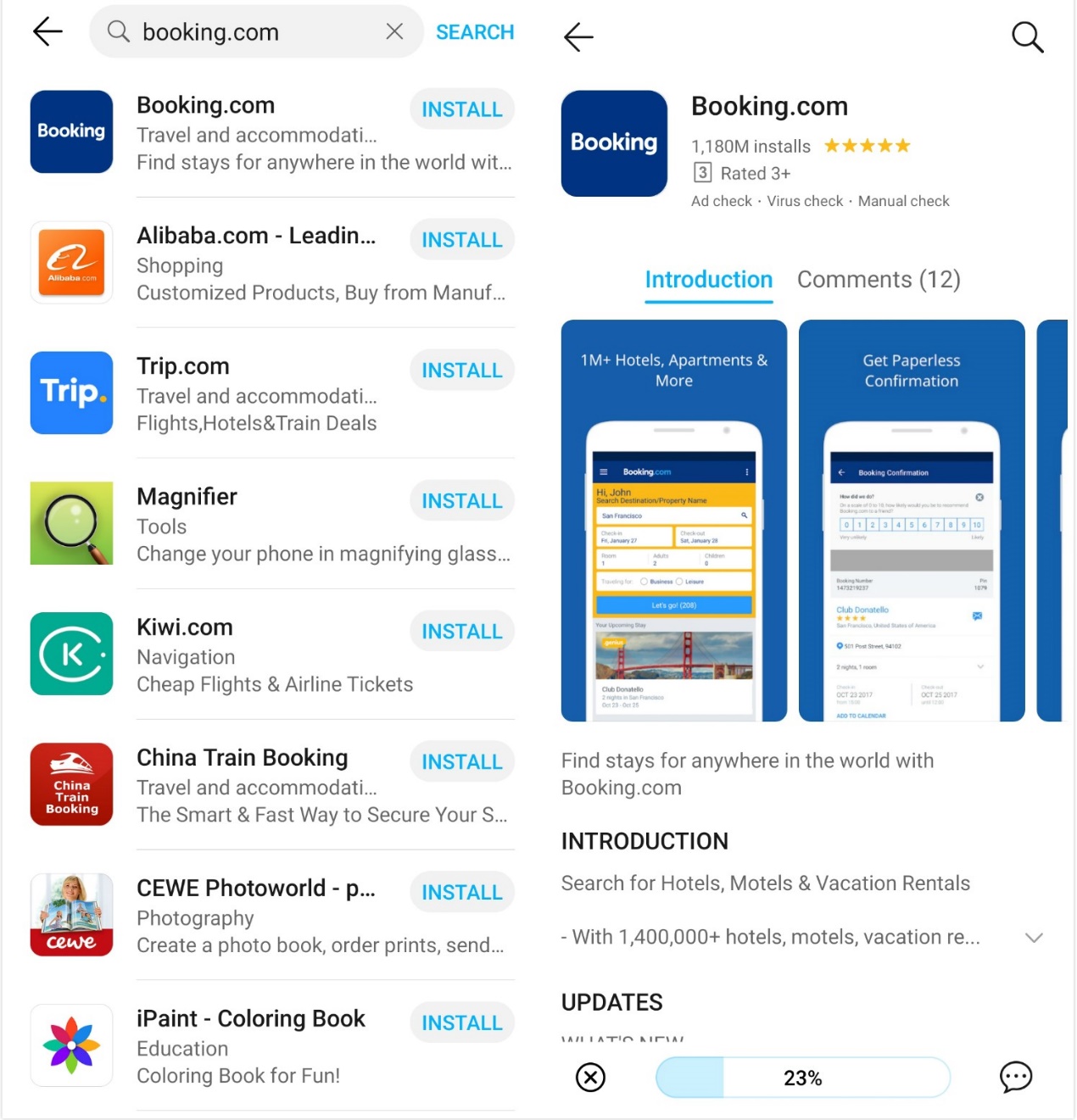
The Booking.com app is also available in the App Gallery.
2. By Phone Clone
Phone Clone allows you to quickly copy apps and data to an HONOR phone, no matter what your old phone is.
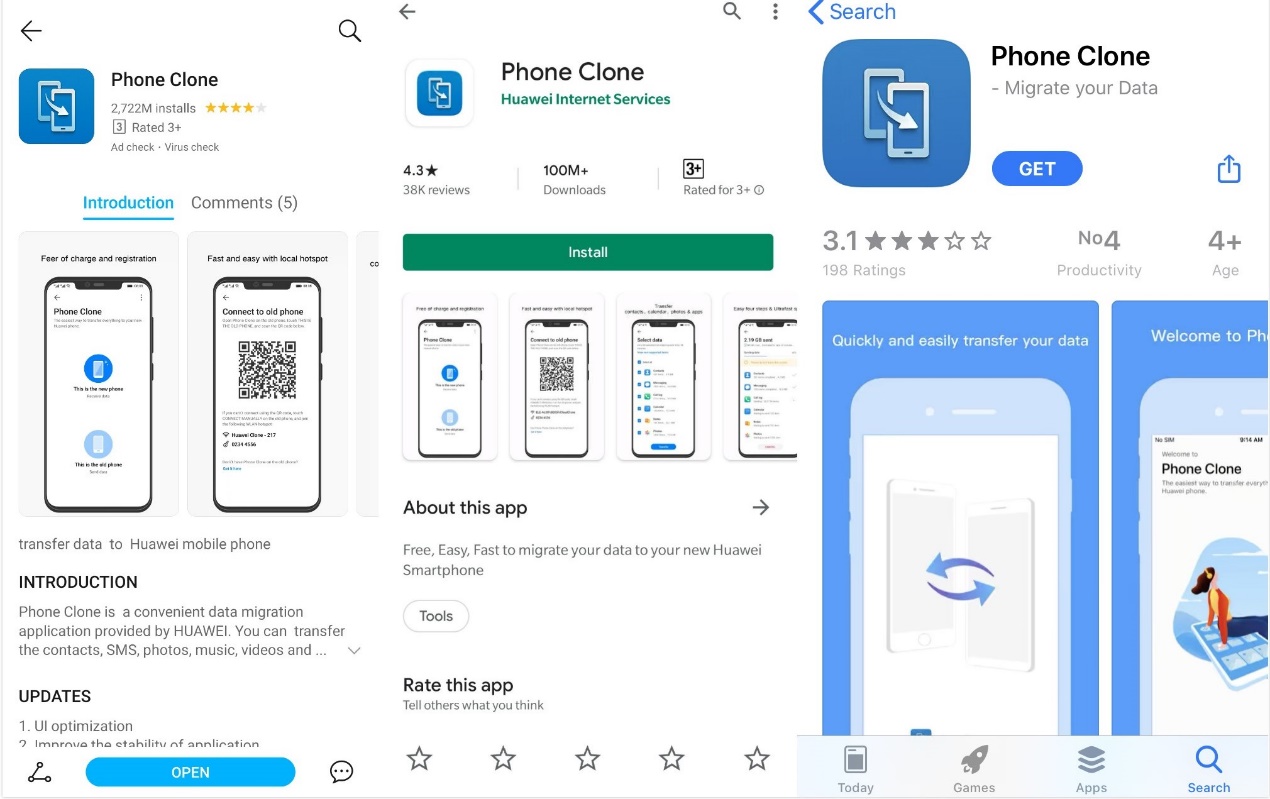
Before copying the apps, you need to install the Phone Clone on both phones. The app can be found on whatever app store you are using.
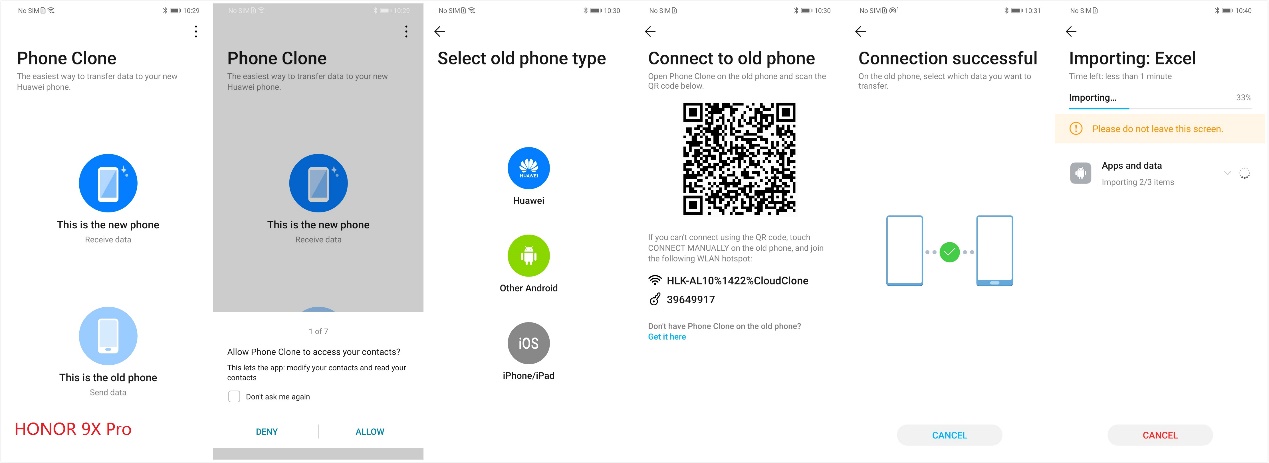
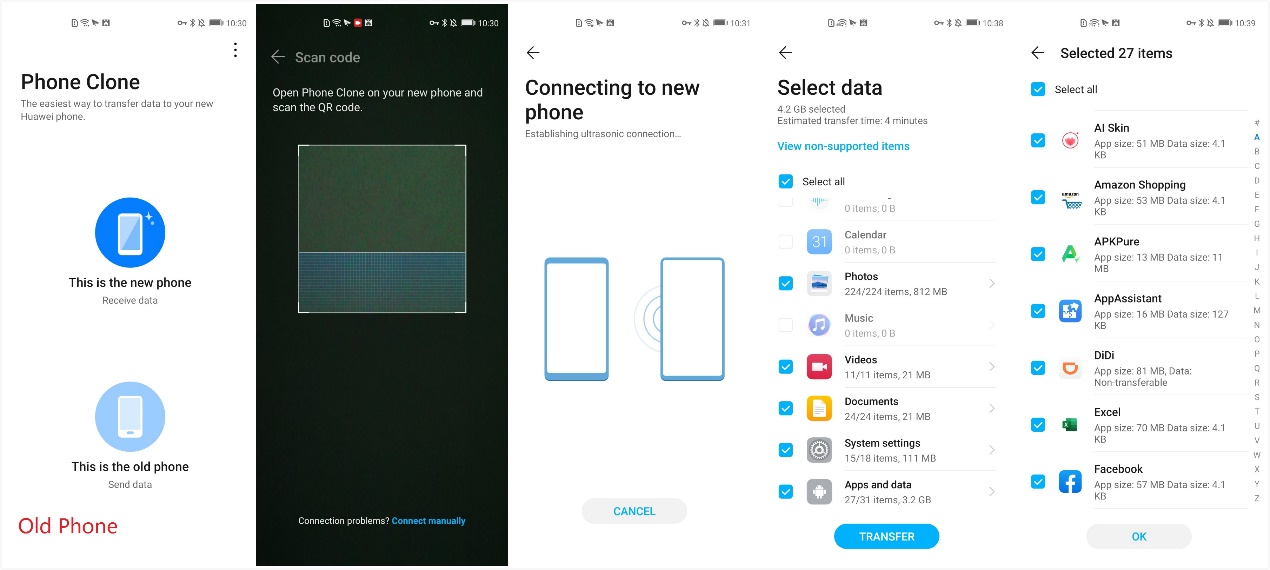
The instructions of how to use the Phone Clone are quite clear and straightforward. In my case, I chose the “This is the new phone” button in my HONOR 9X Pro and then chose the “This is the old phone” button in my HONOR 20.
After following the relevant steps, you can then choose whatever data and app you need. For example, I chose to use the Amazon, Excel, and Facebook apps in my HONOR 9X Pro, transferring them with ease from my HONOR 20. Simply choose the apps you need and let Phone Clone manage the rest.
3. From Other APP Store (APKPure)

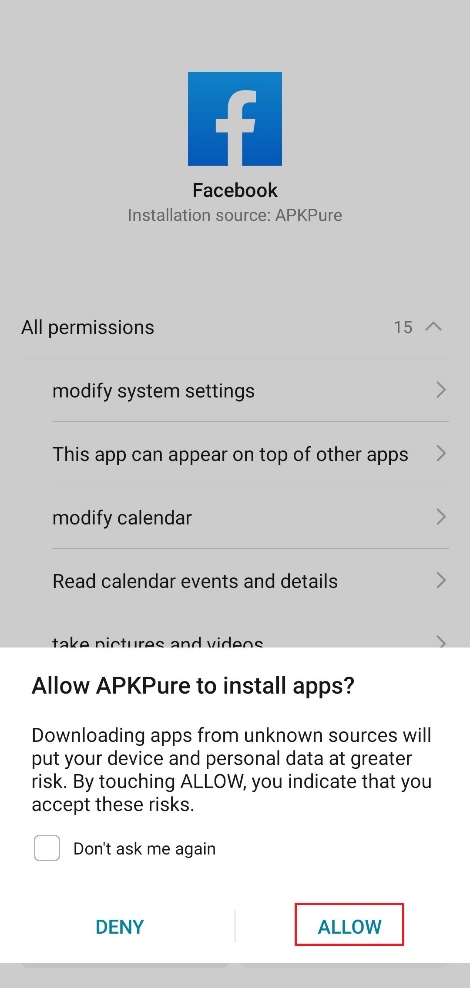
With APK Pure, you can not only download apps you need but also manage and update them. When you install the app which is downloaded from APK Pure for the first time, the HONOR 9X Pro will ask your permission to install apps from the APK Pure. This will only show up once, and it won’t bother you again.
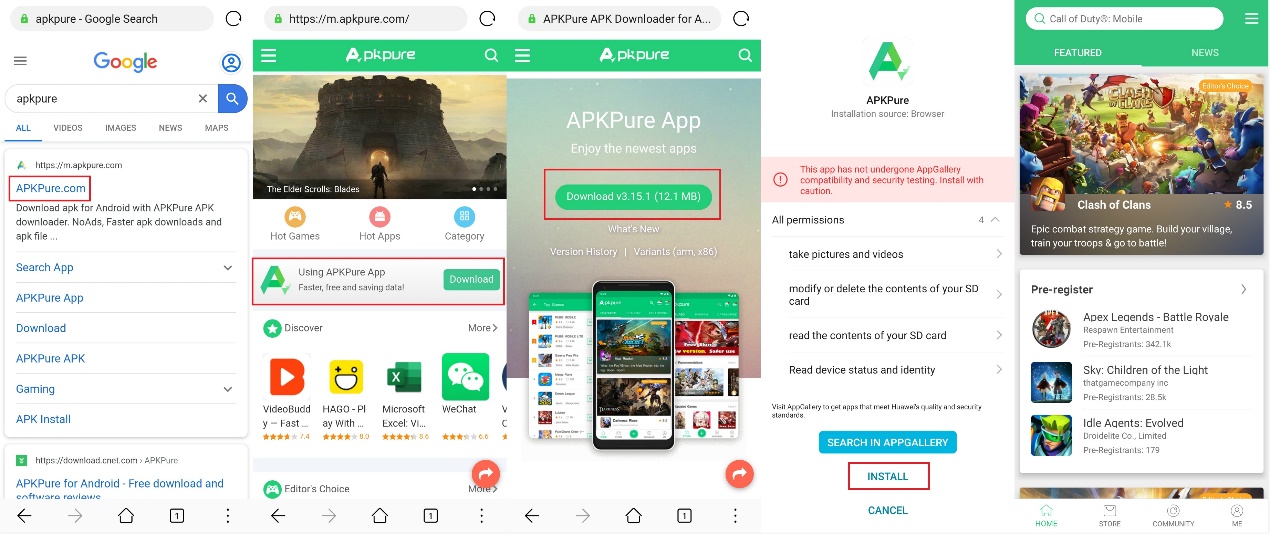
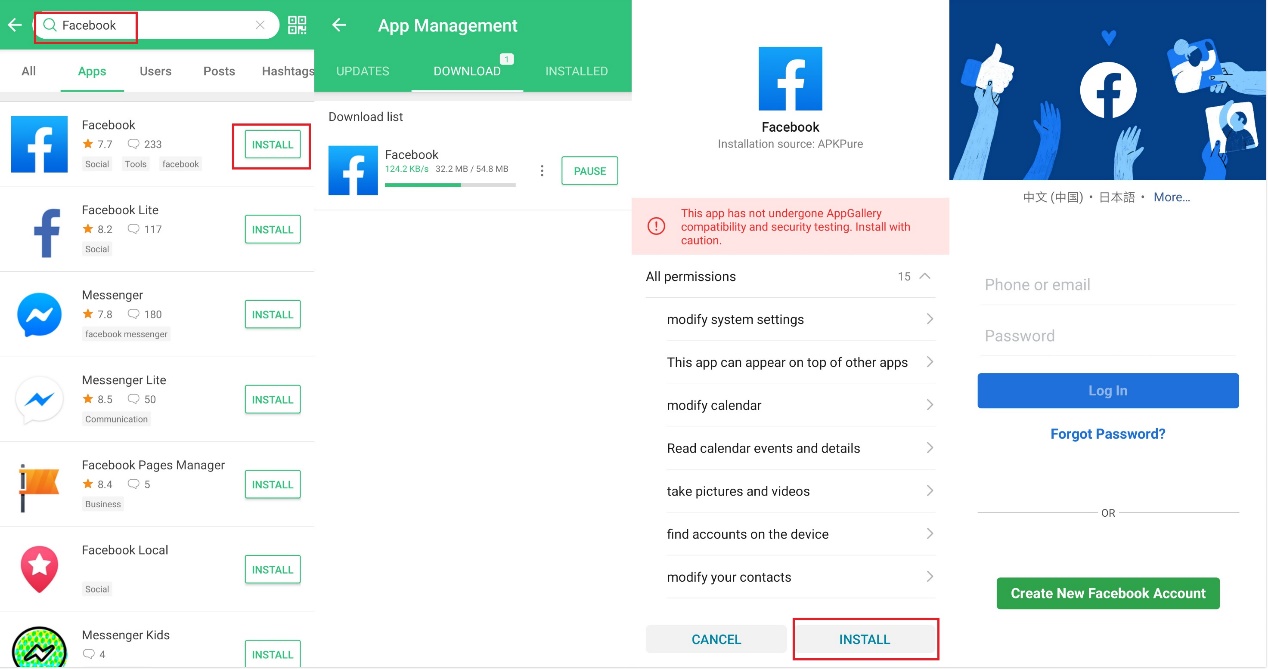
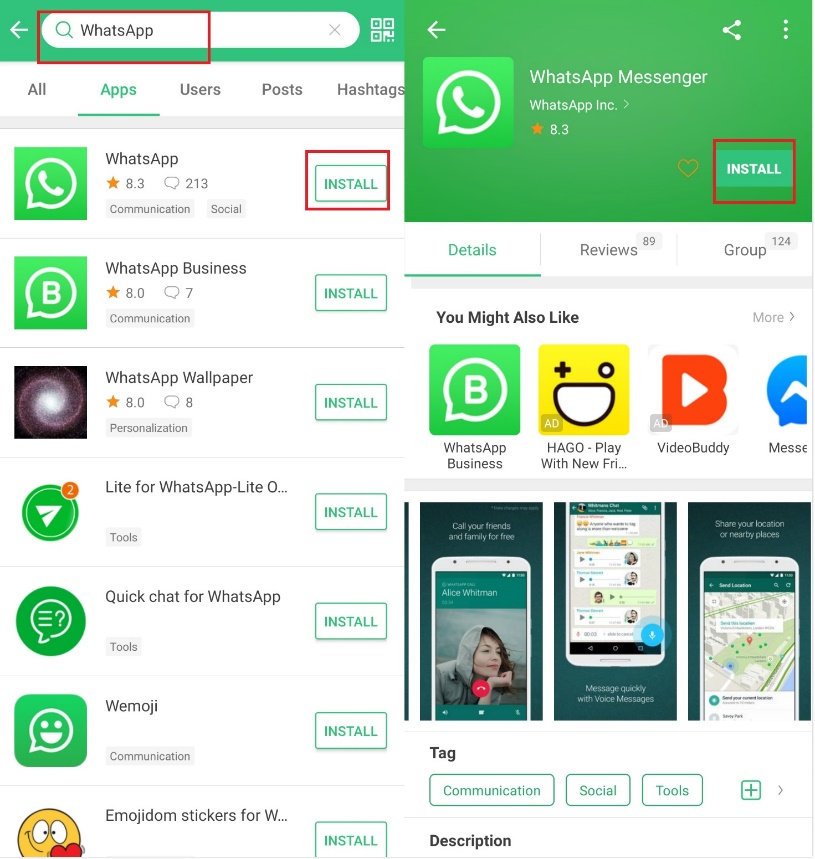
Just like most of us, the apps I use most frequently every day are social networking apps. I’ll show you how to get them in the below screenshots.
4. Alternative APPs
For the minimal apps that HONOR 9X Pro doesn’t support, you can easily find alternatives on APKPure too. Below we have listed a few solid alternatives that we recommend.
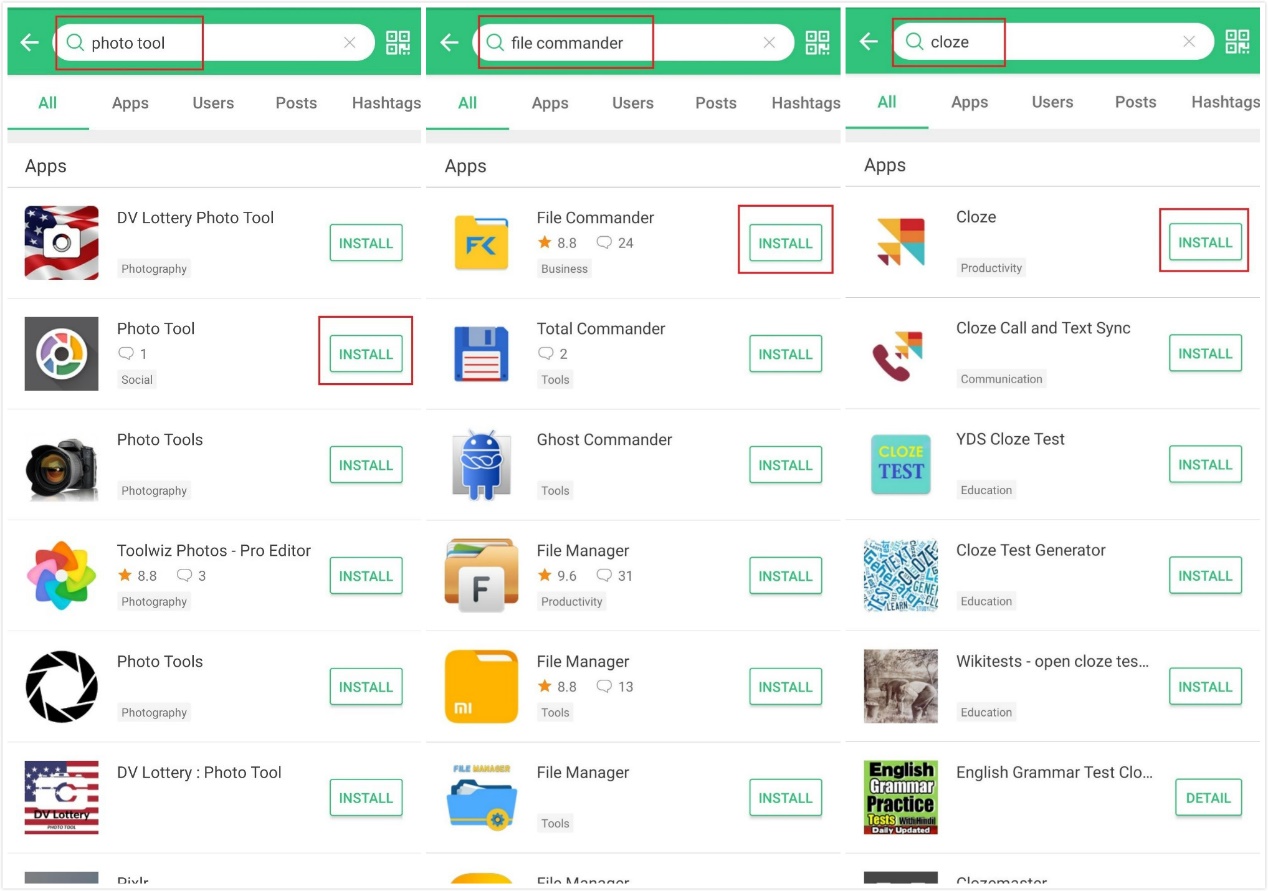
Google Photos→ Photo Tool Google Drive→ File Commander Google Contact→ Cloze
Google Photos→ Photo Tool
The Photo Tool app helps you backup, manage, and share your photos and videos easy and fast.
Google Drive→ File Commander
File Commander is a powerful file manager that allows you to handle any file on your Android device, cloud storage, or network location via a clean and intuitive interface. It is loaded with features - Vault security, Recycle Bin, Storage Analyzer, File Converter & also receive 5GB Free storage on MobiSystems Drive.
Google Contact→ Cloze
Cloze automatically creates one view of every person and company - all their contact details, and your complete history - your phone calls, text messages, every email back and forth, meetings, notes, files, social, and messages.
5. WAP Shortcuts
For some apps that provide good browser experience the best alternative would be to create the shortcut on the homepage for WAP version. You can see this below as a YouTube example.
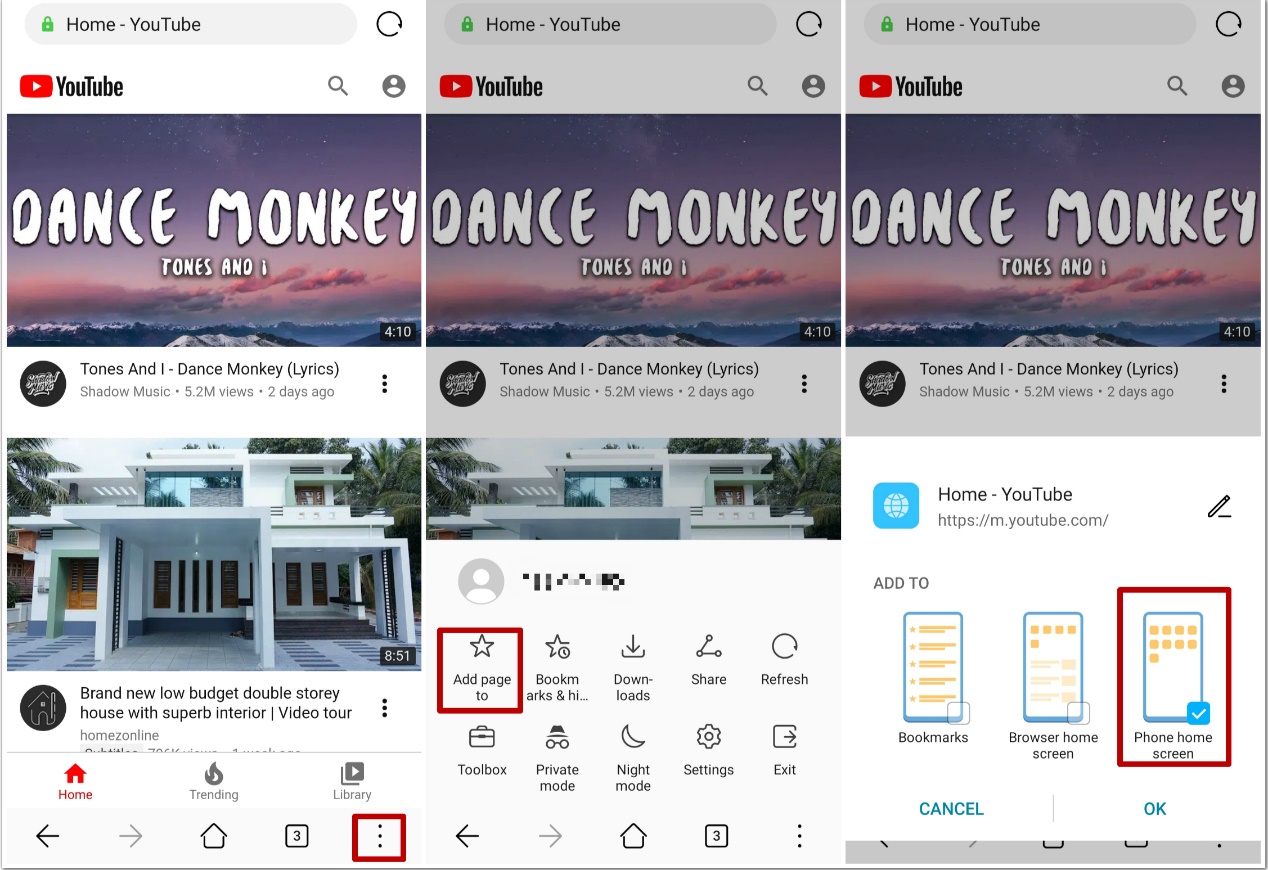
Once you have included the shortcut on your phone desk you are always just one click away to enjoying YouTube!
Here we have given you five easy methods of how to install all the apps you need. These methods don’t just work for the HONOR 9X Pro but also on other future HONOR phones.
Do you have a better suggestion or any questions? We would love to hear from you so don’t hesitate to share with us!


- Posts
- Following
- Followers
- Energy
-

 SAM_HONOR_UK
Community Team
SAM_HONOR_UK
Community Team
-
+ Follow

-
- 281 Posts
- 0 Following
- 724 Followers
- 10651 Energy








- Posts
- photo
- video

Hi HONOR fans!
As you now know, HONOR is on the verge of unveiling the HONOR 9X Pro to global markets, officially launching on the 24th of February!
The 9X Pro will also become the first HONOR smartphone to run on the HMS software. So, If you are planning on getting your hands on an HONOR 9X Pro and are wondering if you can get all of your most commonly used APPs such as Facebook, Instagram, WhatsApp etc, then don’t worry! There are plenty of ways to get them and there are even more APPs available for your new HONOR 9X Pro.
Today I am going to introduce you to the many simple ways you can easily download all your essential APPs. Keep reading and find out what suits you best! ☺
1. From Huawei APP Gallery
The great news is that more and more apps are launching in Huawei App Gallery. Let’s take the Amazon app as an example. Just type “Amazon” in the search box and hit install. Wait a few seconds, and you are good to go.
The Booking.com app is also available in the App Gallery.
2. By Phone Clone
Phone Clone allows you to quickly copy apps and data to an HONOR phone, no matter what your old phone is.
Before copying the apps, you need to install the Phone Clone on both phones. The app can be found on whatever app store you are using.
The instructions of how to use the Phone Clone are quite clear and straightforward. In my case, I chose the “This is the new phone” button in my HONOR 9X Pro and then chose the “This is the old phone” button in my HONOR 20.
After following the relevant steps, you can then choose whatever data and app you need. For example, I chose to use the Amazon, Excel, and Facebook apps in my HONOR 9X Pro, transferring them with ease from my HONOR 20. Simply choose the apps you need and let Phone Clone manage the rest.
3. From Other APP Store (APKPure)
With APK Pure, you can not only download apps you need but also manage and update them. When you install the app which is downloaded from APK Pure for the first time, the HONOR 9X Pro will ask your permission to install apps from the APK Pure. This will only show up once, and it won’t bother you again.
Just like most of us, the apps I use most frequently every day are social networking apps. I’ll show you how to get them in the below screenshots.
4. Alternative APPs
For the minimal apps that HONOR 9X Pro doesn’t support, you can easily find alternatives on APKPure too. Below we have listed a few solid alternatives that we recommend.
Google Photos→ Photo Tool Google Drive→ File Commander Google Contact→ Cloze
Google Photos→ Photo Tool
The Photo Tool app helps you backup, manage, and share your photos and videos easy and fast.
Google Drive→ File Commander
File Commander is a powerful file manager that allows you to handle any file on your Android device, cloud storage, or network location via a clean and intuitive interface. It is loaded with features - Vault security, Recycle Bin, Storage Analyzer, File Converter & also receive 5GB Free storage on MobiSystems Drive.
Google Contact→ Cloze
Cloze automatically creates one view of every person and company - all their contact details, and your complete history - your phone calls, text messages, every email back and forth, meetings, notes, files, social, and messages.
5. WAP Shortcuts
For some apps that provide good browser experience the best alternative would be to create the shortcut on the homepage for WAP version. You can see this below as a YouTube example.
Once you have included the shortcut on your phone desk you are always just one click away to enjoying YouTube!
Here we have given you five easy methods of how to install all the apps you need. These methods don’t just work for the HONOR 9X Pro but also on other future HONOR phones.
Do you have a better suggestion or any questions? We would love to hear from you so don’t hesitate to share with us!