



 More Products
 Compare














我的荣耀 开启荣耀之旅



 Disagree Terms
 Log out




[AppGallery] Explore AppGallery to find all your Apps


 Last reply :
Hey HONOR FANS,
Today we'll be sharing with you some more information about the AppGallery, which you can enjoy with Huawei Mobile Services!
Make it yours: the discovery center of infinite possibilities.
Huawei AppGallery is your destination for all apps, games, welcome gifts, prize draws, exclusive content, rewards, and much more from Mobile Services.
To explore the AppGallery, you need to 1st register your Huawei ID. Click the following two helpful links – for your easy how-to-tutorials.
Read the Huawei ID Article: https://community.hihonor.com/uk/topic/15855/detail.htm
Bag tons of weekly gifts with Huawei AppGallery
You can win up to 1000 Huawei Points if you participate in a lucky draw, e.g. by downloading travel apps, or win a new phone by playing a football app. Let yourself be surprised and enjoy the weekly hunt for amazing rewards.
Enjoy thousands of apps and games
Huawei AppGallery is your perfect mobile companion, because you’ll always find the right kind helper for your everyday tasks, from helpful apps to playful games, and everything in-between.
Below is a quick tutorial to help you enjoy three basic experience on AppGallery. Check it Out!
· How to install a specific app in the AppGallery.
· How to install a specific Quick-App in AppGallery.
· What should I do if I cannot find the app that I want? ADD IT TO THE WISH LIST!
How to install a specific APP in AppGallery
1. Find the AppGallery  on your phone and open it. Then search for the app you want to download in the search box.
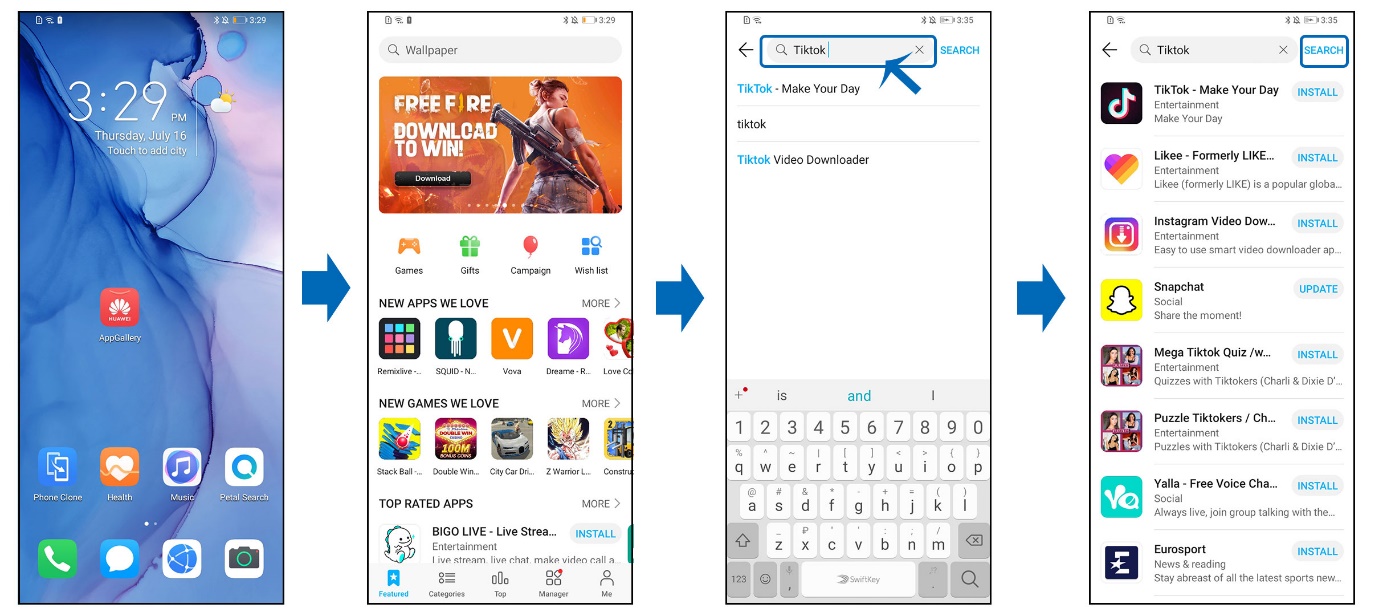
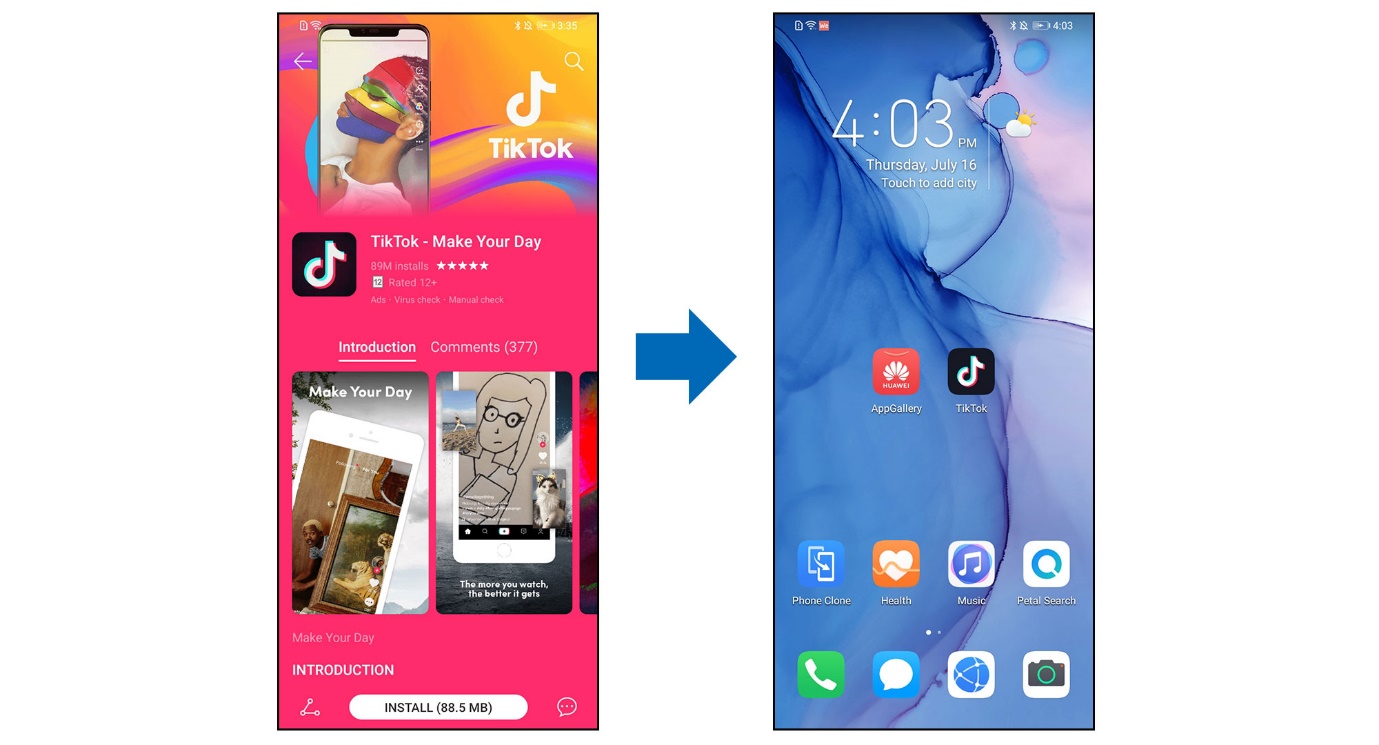
2. During the time of installation, you can read the information about the app including the comments, introduction, updates and recommendations. After the app has successfully installed, you can find it on your homepage.
How to install a specific Quick App in AppGallery
1. Find AppGallery  on your phone and open it. Next, find the search box above and type the name of the app that is supported by Quick App. Here, we install Darts FRVR as an example. You can directly enter Darts FRVR’s Quick APP version without any installation or downloading process.
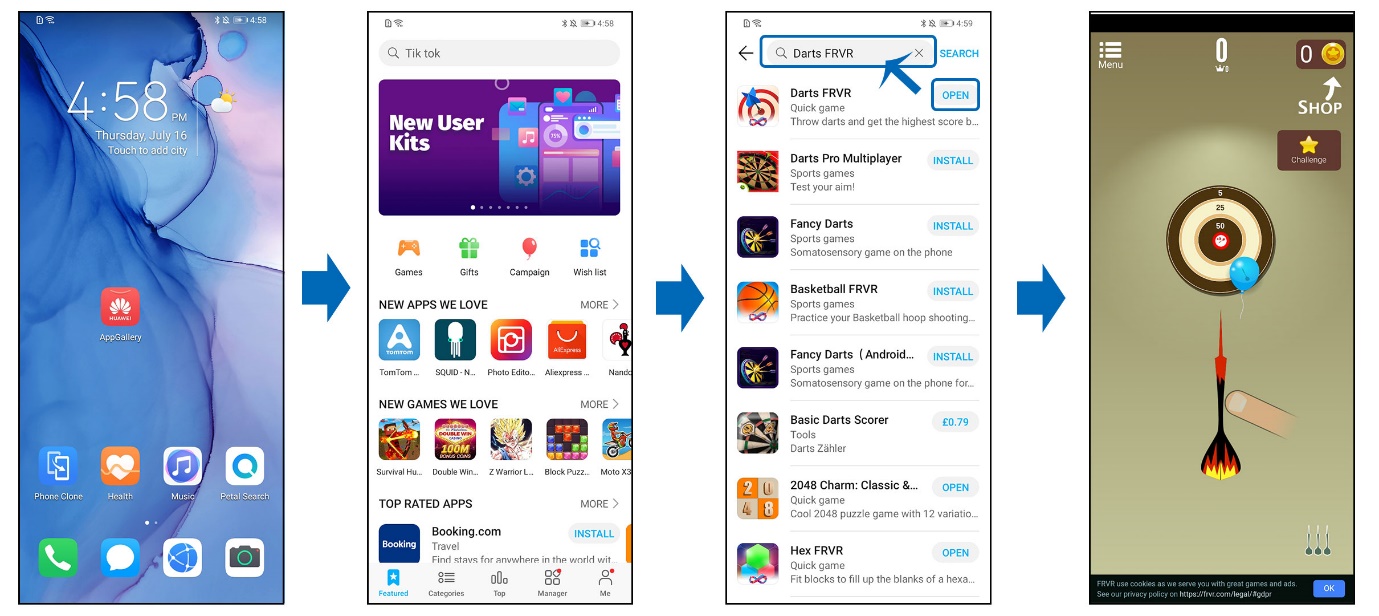
2. You can add it to your homepage to access it conveniently.
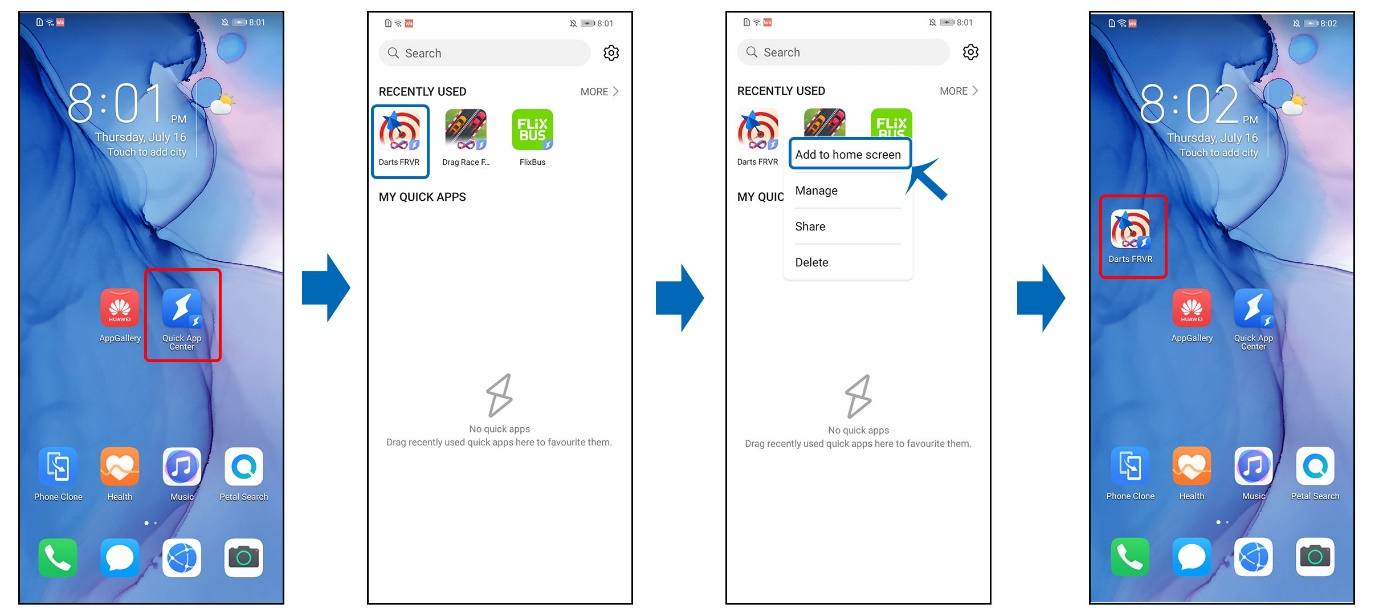
After you open the quick app version of the app, you will see the Quick App Center icon on your home screen. Open the Quick App Center, you will see the quick apps you used recently.
Long press on the quick app of Darts FRVR, and then choose Add to home screen.
You will find the icon of Darts FRVR on your home screen now!
What should I do if I cannot find the APP that I want?
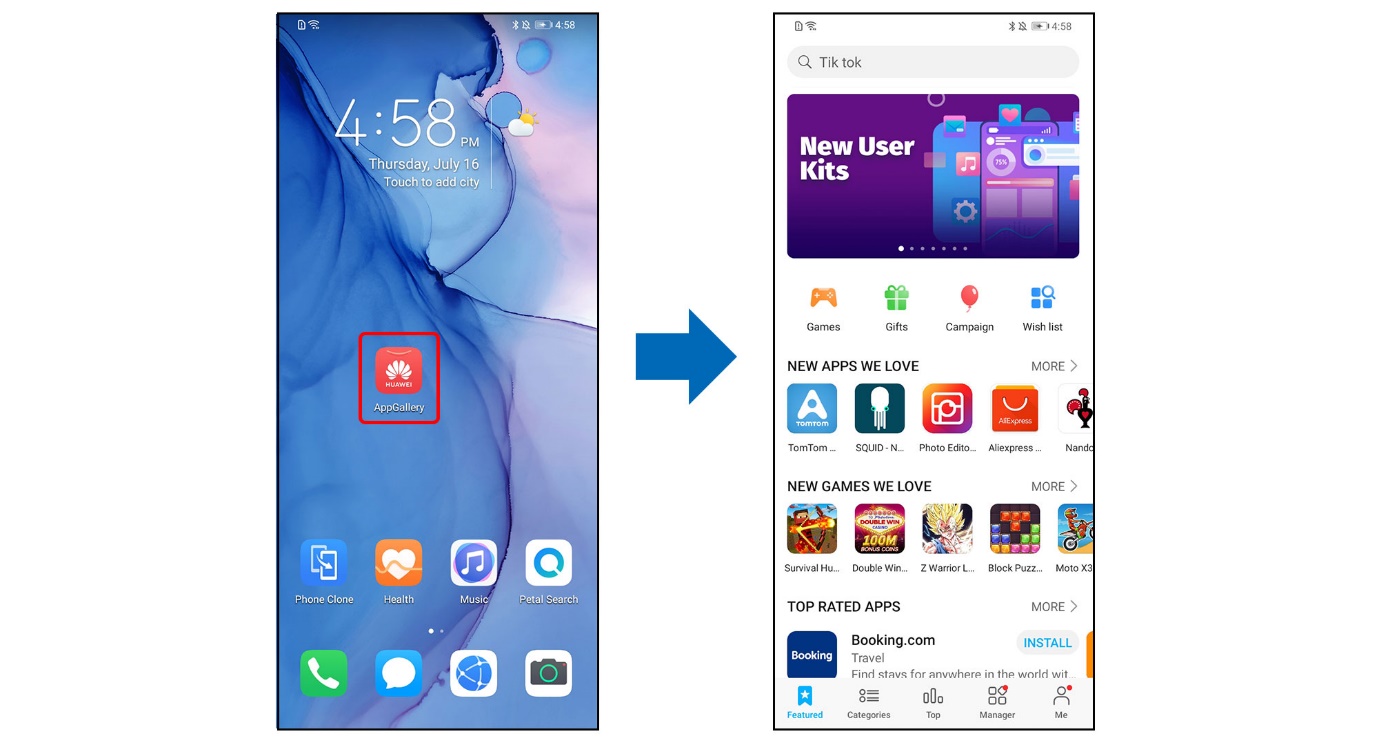
1. Find the AppGallery  on your phone and open it.
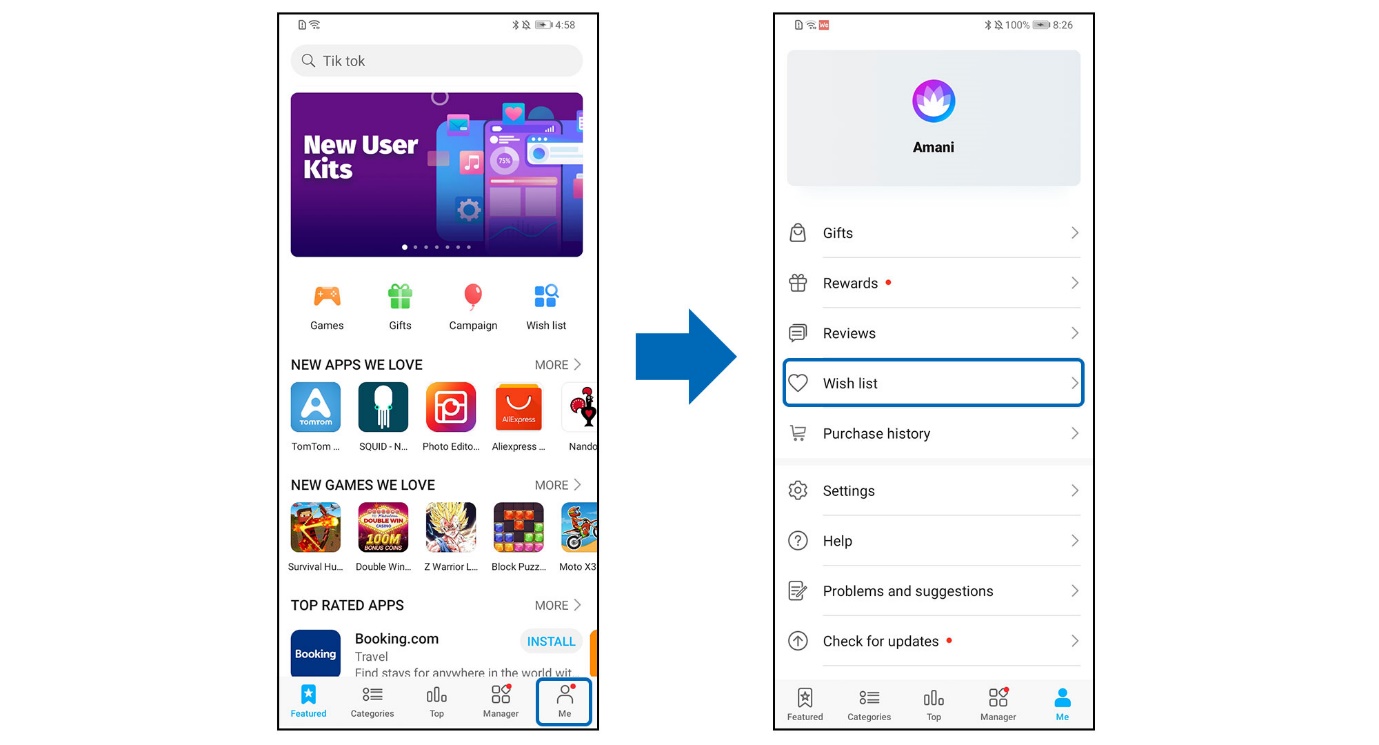
2. Find Wish list in AppGallery.
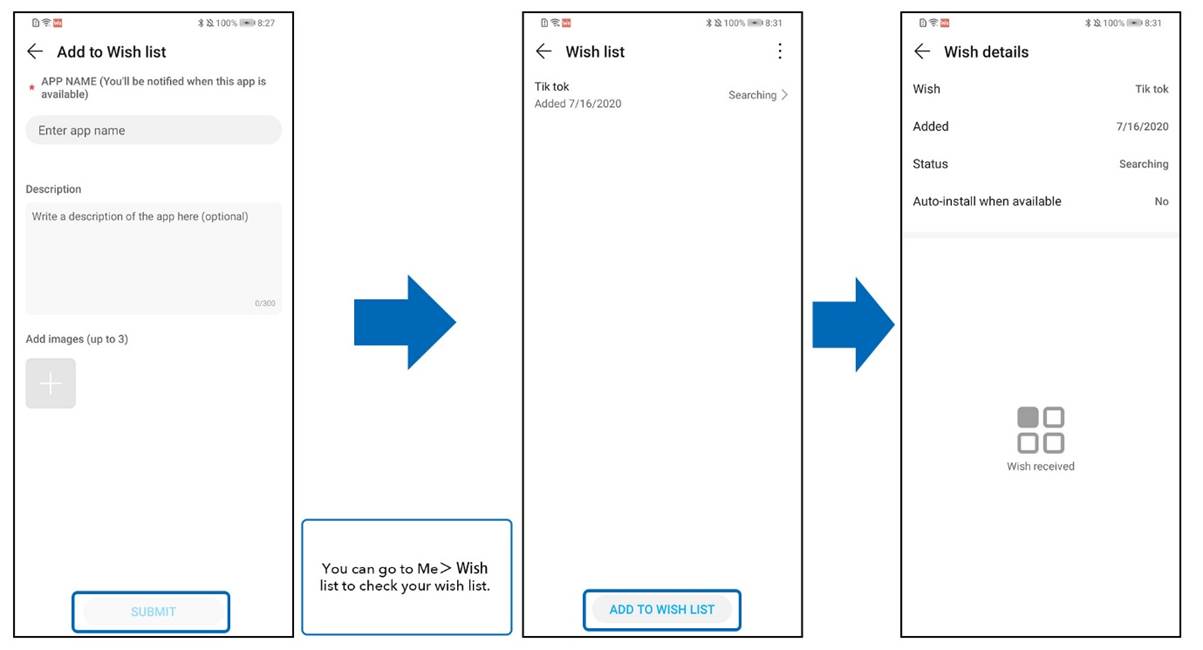
3. Describe the app that you wish to have as detailed as possible and submit. You can also choose Auto-install when the app is available. What you have added will be shown in the Wish List, you can see the status of the app here. We will try our best to keep improving your experience with the AppGallery.
Here are some apps currently available in the AppGallery:
- AccuWeather
- Akinator the Genie
- AliExpress
- Amazon
- AntiVirus Security
- Auto Trader
- AVAST Mobile Security & Antivirus
- Badoo
- BBC News
- BeSoccer - Live Score
- Booking.com
- Call Recorder - ACR
- Chelsea FC
- Deezer
- Depop
- Divan.*
- Express VPN
- FBReader
- File Commander
- JD Sports
- London Live Bus Countdown
- My Vodafone UK
- Musixmatch
- Ookla Speedtest
- Oxford Dictionary of English
- Pedometer - Step Counter Free & Calorie Burner
- Podcast Addict
- QR code reader and scanner
- Radarbot
- Ryanair Cheap Flights
- Skyscanner
- SpareRoom
- talkSport
- The AA
- The Times
- The Sun
- Thetrainline
- Tik Tok
- TrainPal UK
- UKTV Play
- UNiDAYS
- Viber
- Video Editor Music, No Crop, Cut
Let us know your experience in AppGallery!


- Posts
- Following
- Followers
- Energy
-

 Ava_HONOR_UK
Community Team
Ava_HONOR_UK
Community Team
-
+ Follow

-
- 108 Posts
- 89 Following
- 520 Followers
- 9166 Energy







- Posts
- photo
- video

Hey HONOR FANS,
Today we'll be sharing with you some more information about the AppGallery, which you can enjoy with Huawei Mobile Services!
Make it yours: the discovery center of infinite possibilities.
Huawei AppGallery is your destination for all apps, games, welcome gifts, prize draws, exclusive content, rewards, and much more from Mobile Services.
To explore the AppGallery, you need to 1st register your Huawei ID. Click the following two helpful links – for your easy how-to-tutorials.
Read the Huawei ID Article: https://community.hihonor.com/uk/topic/15855/detail.htm
Bag tons of weekly gifts with Huawei AppGallery
You can win up to 1000 Huawei Points if you participate in a lucky draw, e.g. by downloading travel apps, or win a new phone by playing a football app. Let yourself be surprised and enjoy the weekly hunt for amazing rewards.
Enjoy thousands of apps and games
Huawei AppGallery is your perfect mobile companion, because you’ll always find the right kind helper for your everyday tasks, from helpful apps to playful games, and everything in-between.
Below is a quick tutorial to help you enjoy three basic experience on AppGallery. Check it Out!
· How to install a specific app in the AppGallery.
· How to install a specific Quick-App in AppGallery.
· What should I do if I cannot find the app that I want? ADD IT TO THE WISH LIST!
How to install a specific APP in AppGallery
1. Find the AppGallery on your phone and open it. Then search for the app you want to download in the search box.
2. During the time of installation, you can read the information about the app including the comments, introduction, updates and recommendations. After the app has successfully installed, you can find it on your homepage.
How to install a specific Quick App in AppGallery
1. Find AppGallery on your phone and open it. Next, find the search box above and type the name of the app that is supported by Quick App. Here, we install Darts FRVR as an example. You can directly enter Darts FRVR’s Quick APP version without any installation or downloading process.
2. You can add it to your homepage to access it conveniently.
After you open the quick app version of the app, you will see the Quick App Center icon on your home screen. Open the Quick App Center, you will see the quick apps you used recently.
Long press on the quick app of Darts FRVR, and then choose Add to home screen.
You will find the icon of Darts FRVR on your home screen now!
What should I do if I cannot find the APP that I want?
1. Find the AppGallery on your phone and open it.
2. Find Wish list in AppGallery.
3. Describe the app that you wish to have as detailed as possible and submit. You can also choose Auto-install when the app is available. What you have added will be shown in the Wish List, you can see the status of the app here. We will try our best to keep improving your experience with the AppGallery.
Here are some apps currently available in the AppGallery:
- AccuWeather
- Akinator the Genie
- AliExpress
- Amazon
- AntiVirus Security
- Auto Trader
- AVAST Mobile Security & Antivirus
- Badoo
- BBC News
- BeSoccer - Live Score
- Booking.com
- Call Recorder - ACR
- Chelsea FC
- Deezer
- Depop
- Divan.*
- Express VPN
- FBReader
- File Commander
- JD Sports
- London Live Bus Countdown
- My Vodafone UK
- Musixmatch
- Ookla Speedtest
- Oxford Dictionary of English
- Pedometer - Step Counter Free & Calorie Burner
- Podcast Addict
- QR code reader and scanner
- Radarbot
- Ryanair Cheap Flights
- Skyscanner
- SpareRoom
- talkSport
- The AA
- The Times
- The Sun
- Thetrainline
- Tik Tok
- TrainPal UK
- UKTV Play
- UNiDAYS
- Viber
- Video Editor Music, No Crop, Cut
Let us know your experience in AppGallery!