



 More Products
 Compare














我的荣耀 开启荣耀之旅



 Disagree Terms
 Log out




[AppGallery] A Guide to Installing Popular Photo Editing Apps on HMS Smartphones!


 Last reply :
Hi HONOR Fans,
As I was browsing through the HONOR Global Community I came across an article that I thought would be valuable to the UK community. And so, here it is, adapted from Rishie's original article, which is a tutorial to download ride-sharing apps on HMS smartphones such as the HONOR 9X Pro and HONOR 9A.
Although these phones do not have Google Play, they do posses the AppGallery & Petal Search pre-installed, from which you can get almost all apps. Many users are regularly asking about how to download useful apps on HMS smartphones; the answer is here: AppGallery.
In this article I am going to guide you on how to download and install some popular photo editing apps, PicsArt & PicsKit, which are available on AppGallery, Snapseed & Adobe Lightroom. I hope that Snapseed & Adobe Lightroom will soon be available on the AppGallery but for the time being we can use them by installing them through Petal Search. Let us get to work now!
Installation Guide - PicsArt

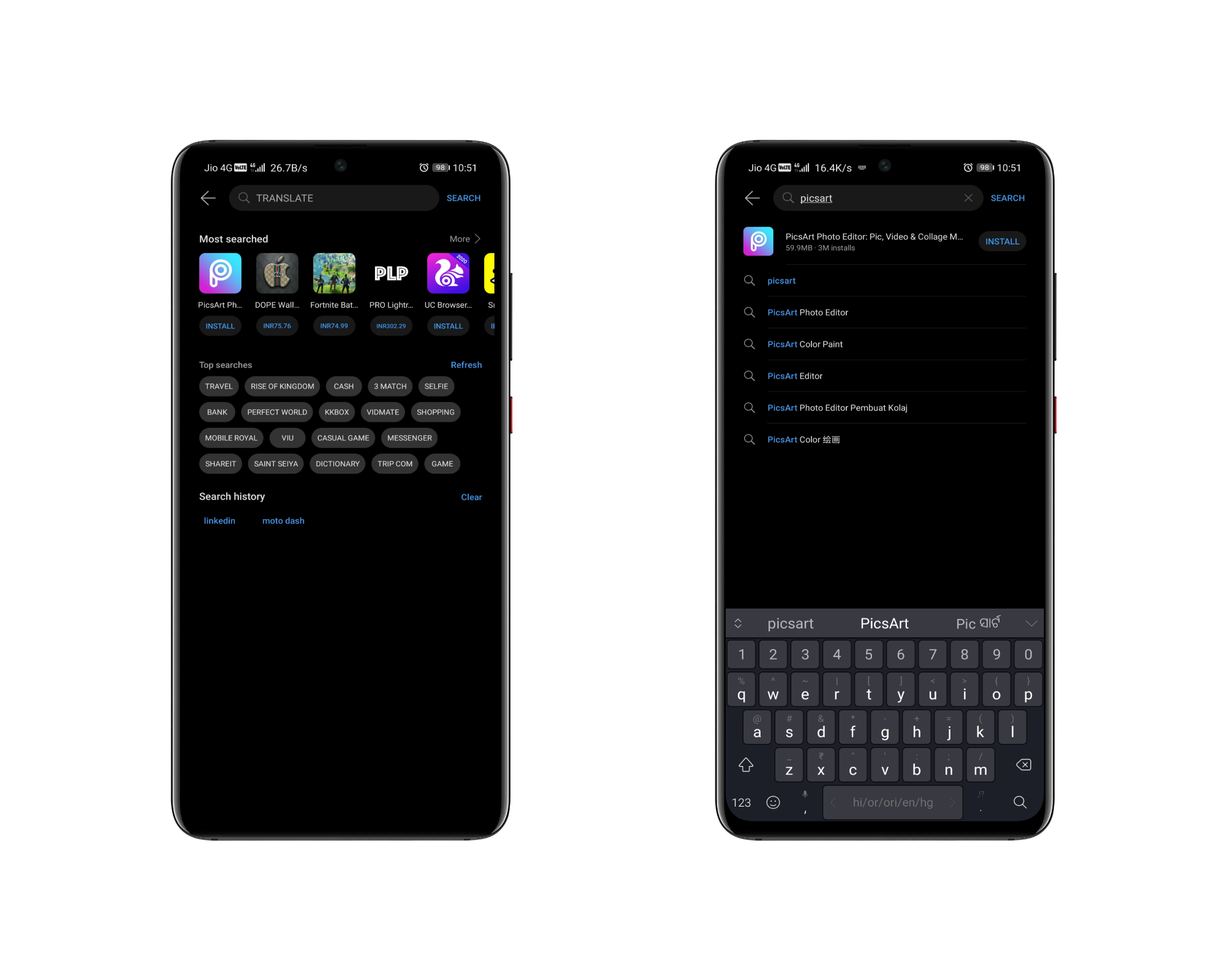
Step - 1: Open AppGallery on your device, on the home screen, tap on the search bar & type PicsArt.
Step - 2: It will show you a list related to the keyword. Tap on the first one.
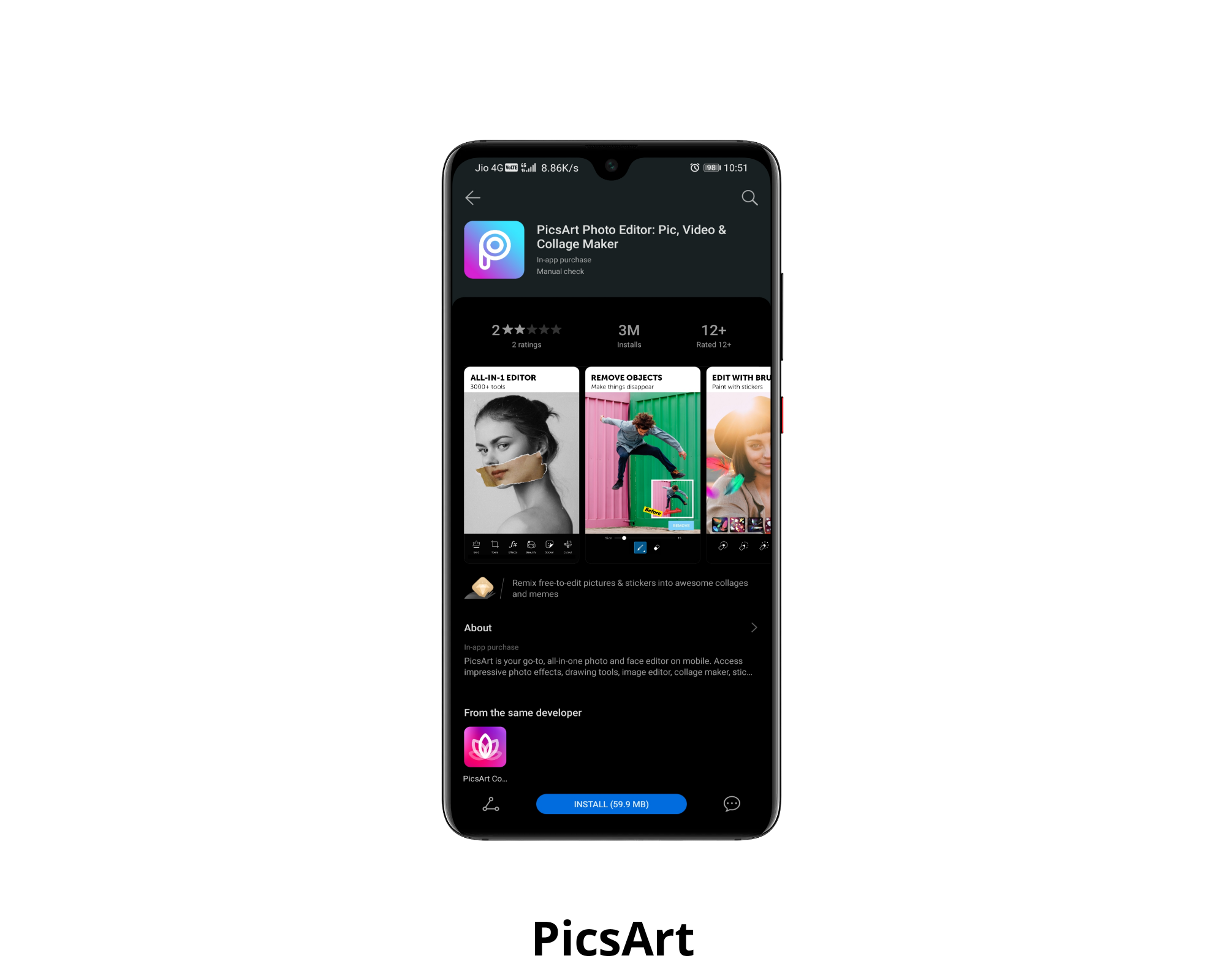
Step - 3: By tapping, you will get to see the app in front of you. Check the details in About if you want. You will see the Open below. Tap on that.
Step - 4: It will open the app. Done, you are ready to go. Open it & start using the photo editing, collage, logo creating, etc features it has to offer.
Or, tap the below link to jump to the app page directly
http://tiny.cc/lwfysz
Or,
Scan the QR below

Installation Guide - PicsKit

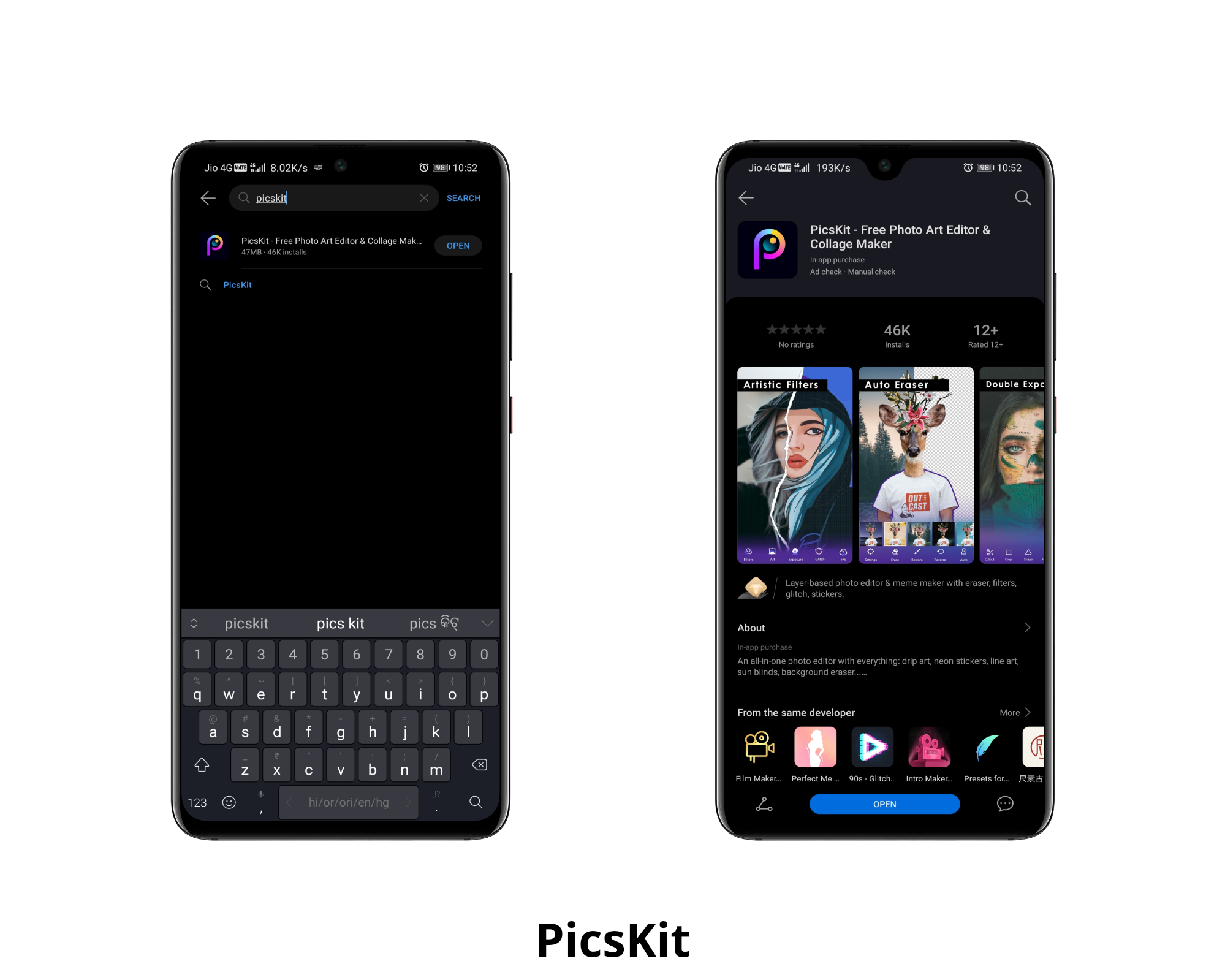
Step - 1: Open AppGallery on your device, on the home screen, tap on the search bar & type PicsKit.
Step - 2: It will show you a list related to the keyword. Tap on the first one.
Step - 3: By tapping, you will get to see the app in front of you. Check the details in About if you want. You will see the Open below. Tap on that.
Step - 4: It will open the app. Done, you are ready to go. Open it & start using the features it has to offer.
Or, tap the below link to jump to the app page directly
http://tiny.cc/dxfysz
Or,
Scan the QR below

Instillation Guide - Snapseed

Step - 1: Install Petal Search through AppGallery, if you have not installed it earlier.
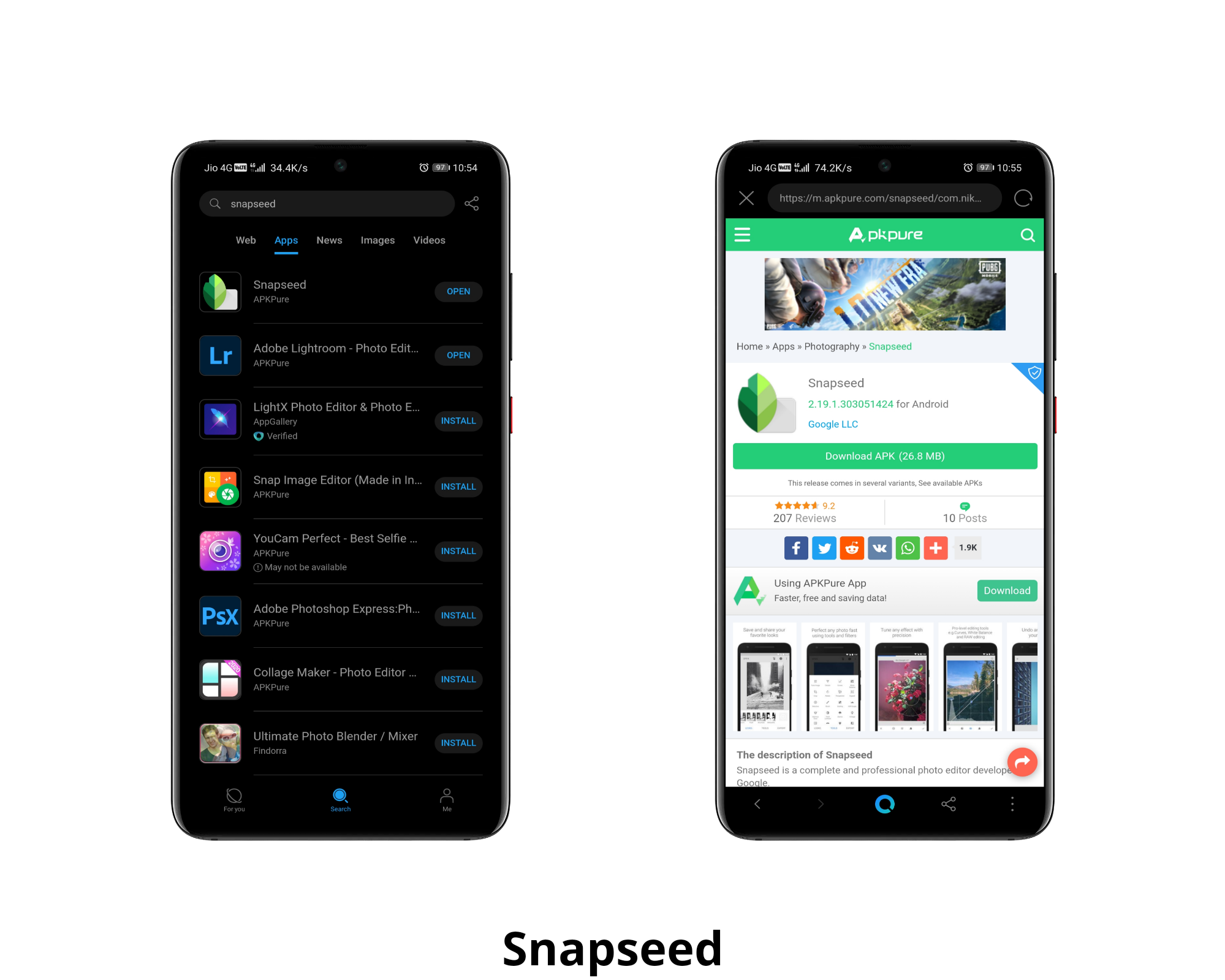
Step - 2: Open the app & on the home screen, tap on the search bar, and type Snapseed.
Step - 3: It will open All, where you will be able to know about the app & related posts to it. But you have to install it on your device. For that, tap on Apps. It will show you Snapseed.
Step - 4: Tapping on Install will take you to the app marketplace, where it will download the app.
Step - 5: Done, you are ready to go, start exploring the app.
Installation Guide - Adobe Lightroom

Step - 1: Install Petal Search through AppGallery, if you have not installed it earlier.
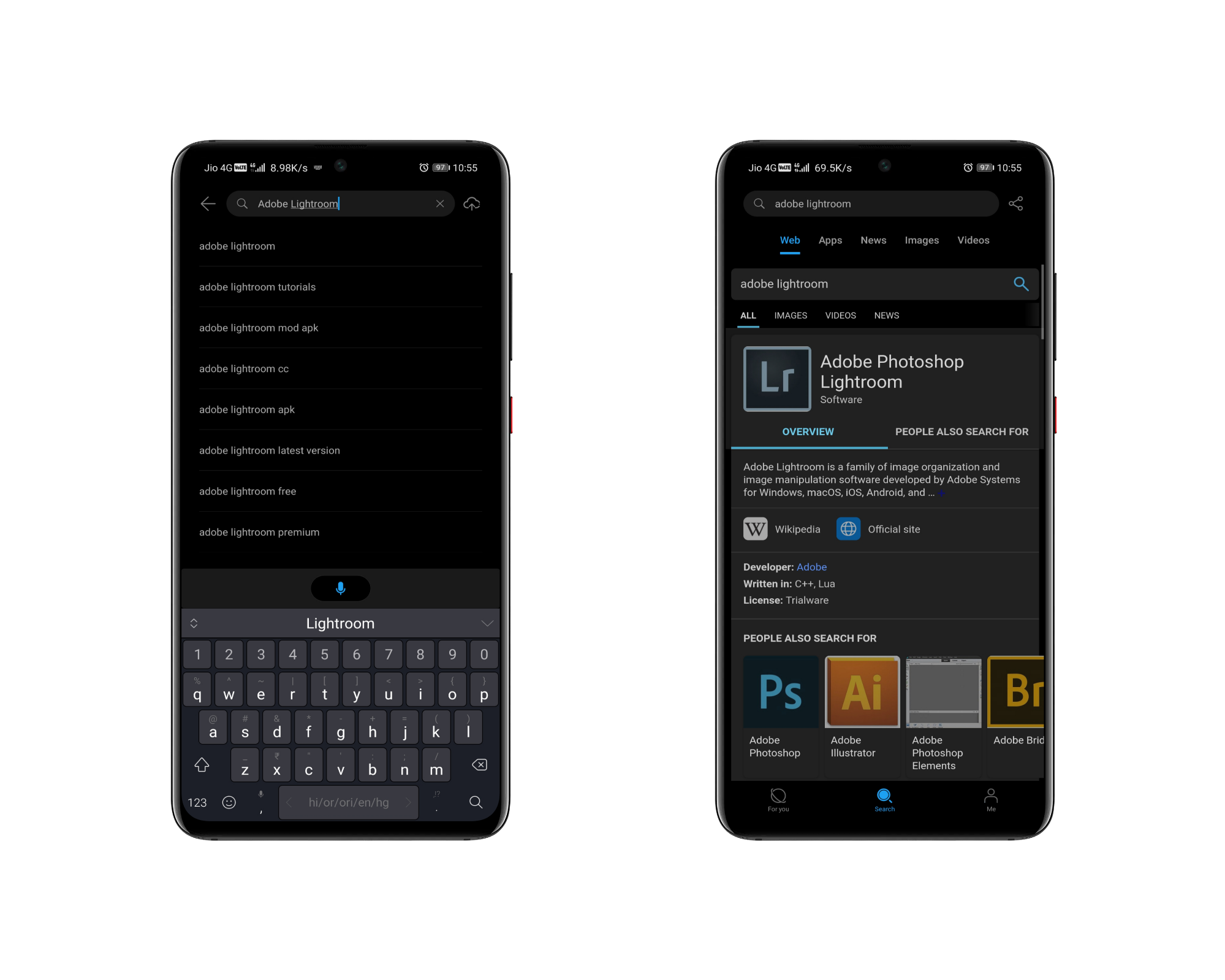
Step - 2: Open the app & on the home screen, tap on the search bar, and type Adobe Lightroom.
Step - 3: It will open All, where you will be able to know about the app & related posts to it. But you have to install it on your device. For that, tap on Apps. It will show you Adobe Lightroom.
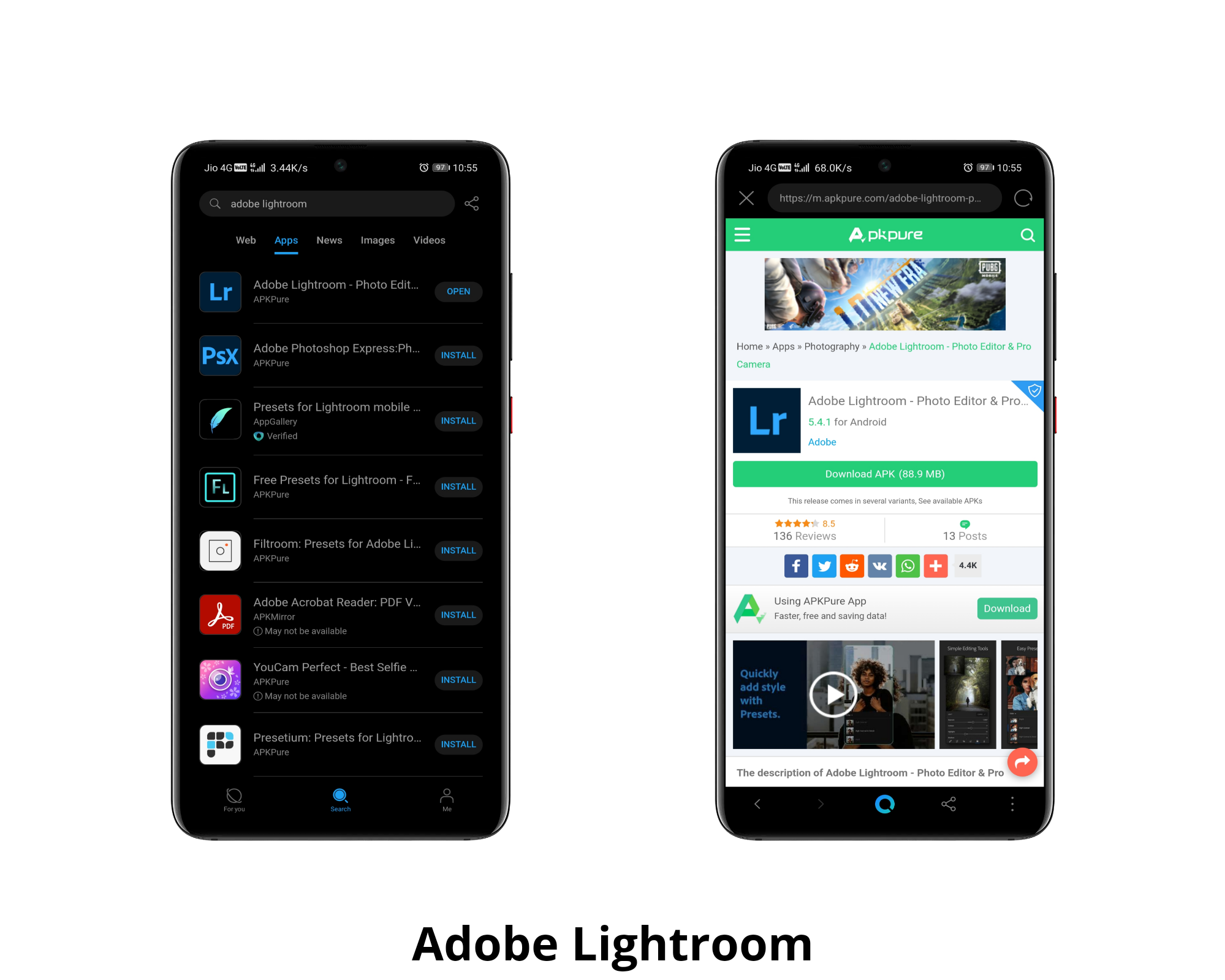
Step - 4: Tapping on Install will take you to the app marketplace, where it will download the app.
Step - 5: Done, you are ready to go, start exploring the app.
I hope you find the article helpful. Let me know if you face any issues during installation.
Thanks for reading!
Original Article by: Rishie
Original Location: HONOR Global Community



- Posts
- Following
- Followers
- Energy
-

 SAM_HONOR_UK
Community Team
SAM_HONOR_UK
Community Team
-
+ Follow

-
- 281 Posts
- 0 Following
- 724 Followers
- 10651 Energy








- Posts
- photo
- video

Hi HONOR Fans,
As I was browsing through the HONOR Global Community I came across an article that I thought would be valuable to the UK community. And so, here it is, adapted from Rishie's original article, which is a tutorial to download ride-sharing apps on HMS smartphones such as the HONOR 9X Pro and HONOR 9A.
Although these phones do not have Google Play, they do posses the AppGallery & Petal Search pre-installed, from which you can get almost all apps. Many users are regularly asking about how to download useful apps on HMS smartphones; the answer is here: AppGallery.
In this article I am going to guide you on how to download and install some popular photo editing apps, PicsArt & PicsKit, which are available on AppGallery, Snapseed & Adobe Lightroom. I hope that Snapseed & Adobe Lightroom will soon be available on the AppGallery but for the time being we can use them by installing them through Petal Search. Let us get to work now!
Installation Guide - PicsArt
Step - 1: Open AppGallery on your device, on the home screen, tap on the search bar & type PicsArt.
Step - 2: It will show you a list related to the keyword. Tap on the first one.
Step - 3: By tapping, you will get to see the app in front of you. Check the details in About if you want. You will see the Open below. Tap on that.
Step - 4: It will open the app. Done, you are ready to go. Open it & start using the photo editing, collage, logo creating, etc features it has to offer.
Or, tap the below link to jump to the app page directly
http://tiny.cc/lwfysz
Or,
Scan the QR below
Installation Guide - PicsKit
Step - 1: Open AppGallery on your device, on the home screen, tap on the search bar & type PicsKit.
Step - 2: It will show you a list related to the keyword. Tap on the first one.
Step - 3: By tapping, you will get to see the app in front of you. Check the details in About if you want. You will see the Open below. Tap on that.
Step - 4: It will open the app. Done, you are ready to go. Open it & start using the features it has to offer.
Or, tap the below link to jump to the app page directly
http://tiny.cc/dxfysz
Or,
Scan the QR below
Instillation Guide - Snapseed
Step - 1: Install Petal Search through AppGallery, if you have not installed it earlier.
Step - 2: Open the app & on the home screen, tap on the search bar, and type Snapseed.
Step - 3: It will open All, where you will be able to know about the app & related posts to it. But you have to install it on your device. For that, tap on Apps. It will show you Snapseed.
Step - 4: Tapping on Install will take you to the app marketplace, where it will download the app.
Step - 5: Done, you are ready to go, start exploring the app.
Installation Guide - Adobe Lightroom
Step - 1: Install Petal Search through AppGallery, if you have not installed it earlier.
Step - 2: Open the app & on the home screen, tap on the search bar, and type Adobe Lightroom.
Step - 3: It will open All, where you will be able to know about the app & related posts to it. But you have to install it on your device. For that, tap on Apps. It will show you Adobe Lightroom.
Step - 4: Tapping on Install will take you to the app marketplace, where it will download the app.
Step - 5: Done, you are ready to go, start exploring the app.
I hope you find the article helpful. Let me know if you face any issues during installation.
Thanks for reading!
Original Article by: Rishie
Original Location: HONOR Global Community