

 More Products
 Compare








A red, green, orange, or blue frame appears around the screen or app icon
| A red, green, orange, or blue frame appears around the screen or app icon |
A blinking red frame appears around the screen
If a blinking red frame appears on the screen, you may have Strict mode enabled.
Open Settings, search for and access Build number, and then touch Build number seven times in a quick succession until You are now a developer! displays (enter your lock screen password if required). Go back to the Settings screen, search for and access Strict mode enabled, and turn off the switch.

- Having Strict mode enabled, your device can identify when apps are acting strangely and causing the system to run slowly.
- A blinking red frame will appear around the screen when such apps are detected.
An orange or blue frame appears around the screen
If an orange or blue frame appears around the screen, while screen text or images are zoomed in, as shown in the following figure.
The color of the frame varies depending on the phone model.
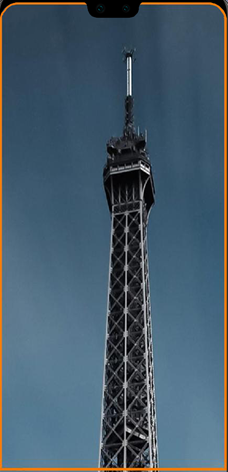
Magnification may have been enabled. When Magnification is enabled, tapping the screen three consecutive times will zoom in on the phone screen and an orange frame will appear around the screen. To restore the display to its original size, tap the screen another three times. To resolve the issue, open Settings, search for and access Magnification , and then disable it.
A green frame appears around an app icon
If a green frame is displayed when you touch an app icon, and you need to touch an app icon twice to open the app. Meanwhile, spoken feedback is provided when you touch the app icon.
ScreenReader may have been enabled. In this case, open Settings, search for and access ScreenReader, and disable ScreenReader.
In ScreenReader mode, you need to double-touch an item to select it, and use two fingers to swipe on the screen.
If the issue persists
Back up your data and take your device and proof of purchase to an HONOR Authorized Service Center for assistance.


