

 More Products
 Compare













The old laptop cannot be found on Device Clone
| The old laptop cannot be found on Device Clone |
Problem:
The old laptop cannot be found on Device Clone and Finding device… is displayed.
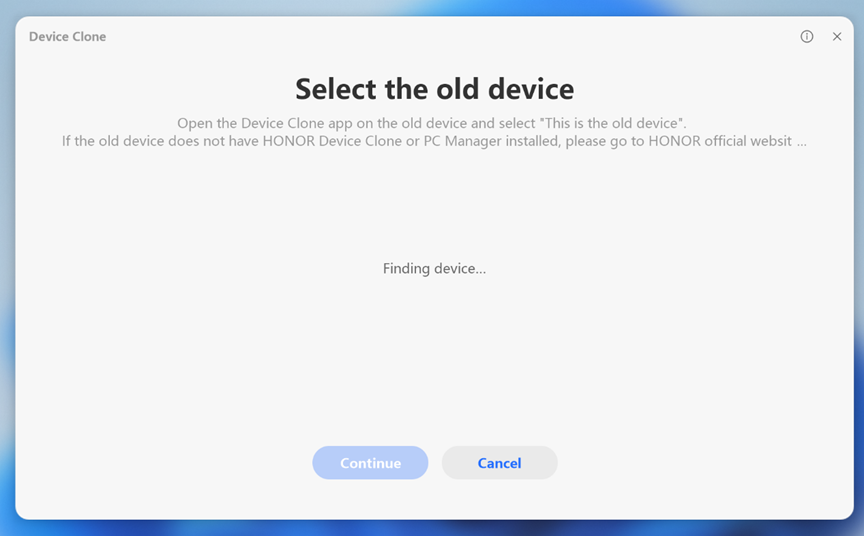
Cause:
- To clone between HONOR laptops, you need to enable Bluetooth and Wi-Fi.
- To clone between an HONOR laptop model and a laptop model from another manufacturer, you need to enable Bluetooth and connect the new and old laptops to the same local area network. Some public networks, such as company or school networks, will have network AP isolation.
Solution:
- Clone between HONOR laptops
Enable Bluetooth and Wi-Fi of the new and old laptops first. If the old laptop still cannot be found, try to connect the new and old laptops to the same network to see if the old laptop can be found.
- Clone between an HONOR laptop model and a laptop model from another manufacturer
Enable Bluetooth and connect the new and old laptops to the same network. If the old laptop still cannot be found, switch the network. Alternatively, you can open the mobile phone hotspot and connect the new and old laptops to the hotspot to see if the old laptop can be found.

Device Clone uses a local area network and does not consume mobile phone traffic.
微信扫描二维码分享文章
Thank you for helping us grow better!
Your response has been submitted successfully!
More Support

Hotline Support
Hotline:
1800-88-5645

Email Support


