

 More Products
 Compare















An app that is set to be Always allowed is still restricted when Digital balance (Student mode) is enabled
| An app that is set to be Always allowed is still restricted when Digital balance (Student mode) is enabled |
Problem:
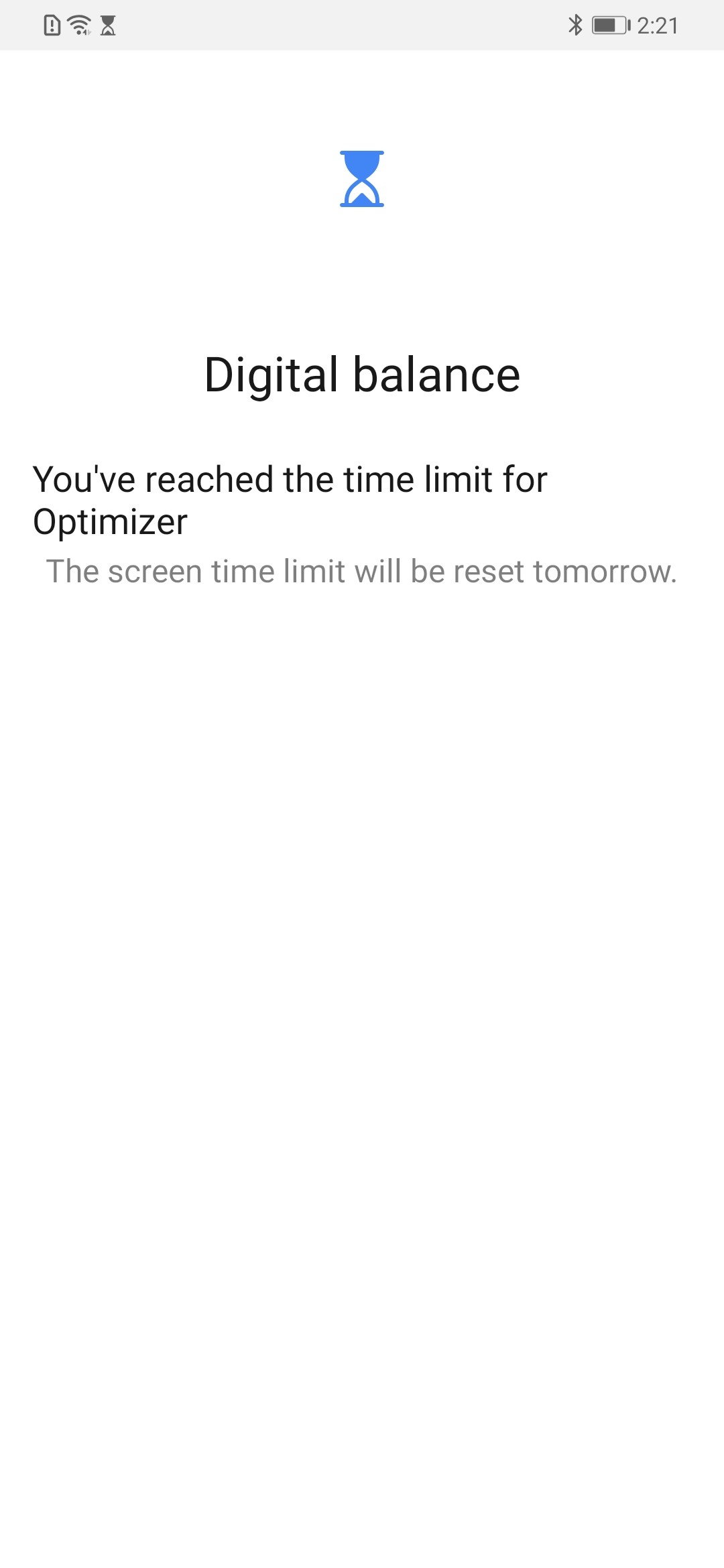
When Digital balance (Student mode) is enabled, the user touches an app that is set to be Always allowed and the message "You've reached the time limit for Optimizer" is displayed.
Cause:
You may have enabled App lock (a feature belonging to the Phone Manager/Optimizer app) for this app. If Phone Manager/Optimizer is not set to be Always allowed within Digital balance (Student mode), any app with the App lock feature enabled will be restricted when the usage time limit for Phone Manager/Optimizer is reached.
Solution:
Cancel the usage time limit for Phone Manager/Optimizer by doing the following:
- Go to , touch Phone Manager/Optimizer, and turn on the Always allowed switch.
微信扫描二维码分享文章
Thank you for helping us grow better!
Your response has been submitted successfully!
More Support

Hotline Support
Hotline:
1800-88-5645

Email Support


