
 More Products
 Compare
HONOR Store













我的荣耀 开启荣耀之旅
Best Drawing Tablet 2026: Choose the Right Device for Your Art
Table of Contents
Picking the best drawing tablet doesn’t have to be a chore. There are loads of great options out there, but not all of them will fit the way you like to create. Maybe you want a simple, no-fuss setup for sketching on the sofa, or you’re after a device that handles big illustration files without slowing down. This guide keeps things easy. You’ll see which models are worth a look, what features matter in real use, and a few handy tips to help you get more from your tablet right away.
Best Drawing Tablet Models Worth Considering 2026
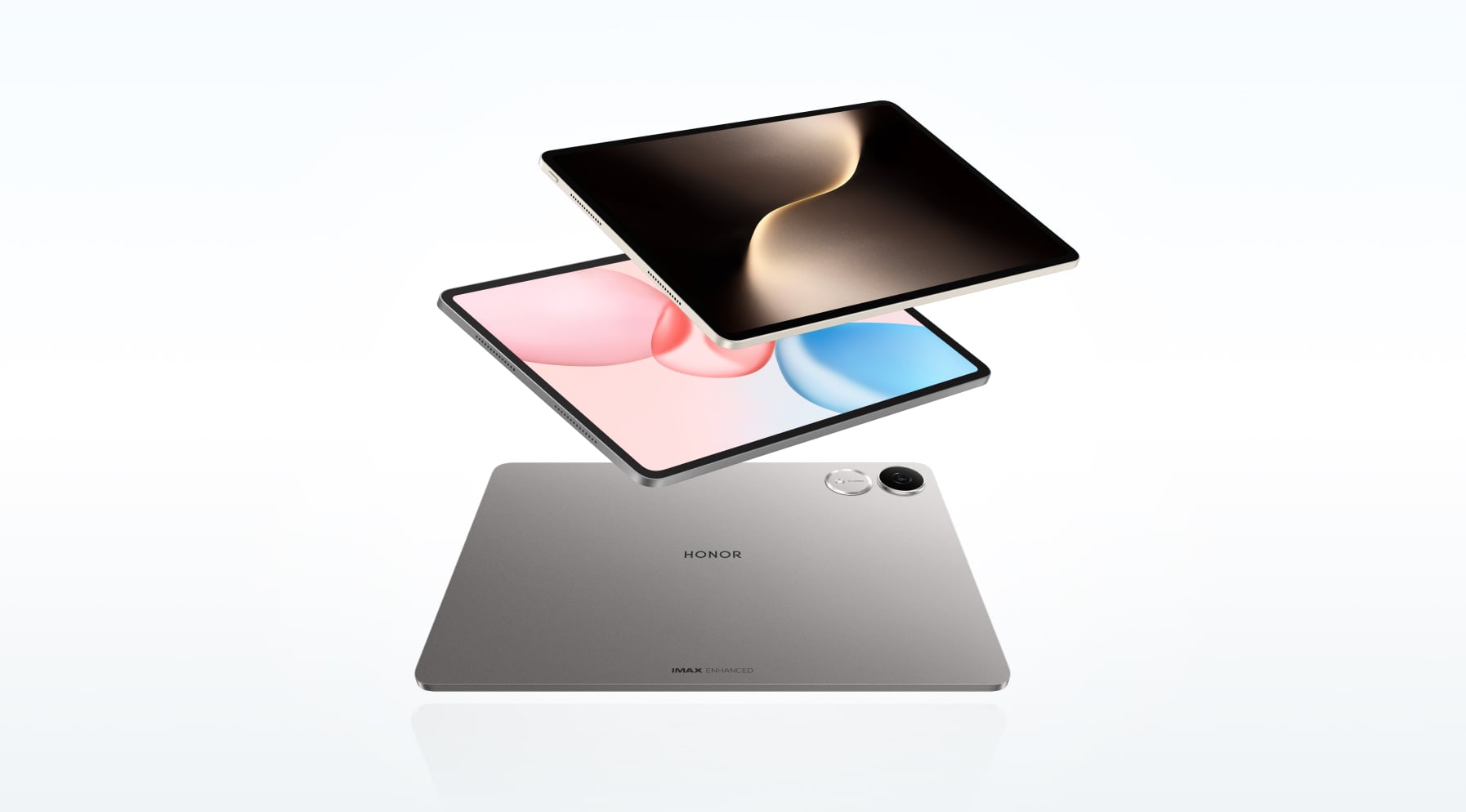
If you want the best tablet computer for drawing, focus on what makes your day-to-day work easier: a crisp screen, steady performance and a stylus that feels natural. The HONOR tablets for drawing below tick those boxes in different ways, so you can pick the one that matches your style.
HONOR MagicPad3
If your idea of the best tablet to draw digitally includes a large, bright canvas and pro-tier power, the HONOR MagicPad3 fits the bill. Its 13.3-inch 3.2K Eye Comfort display uses a 3:2 ratio, so storyboards, tall layouts and split-screen references all sit comfortably on screen. The panel reaches up to 165Hz ultra-fast refresh rate and can hit about 1,000 nits, giving you smooth motion and clear detail even in bright rooms.
The MagicPad3 is also light for its size. It uses a unibody aluminum alloy that feels smooth and resists smudges. The finish has a soft shimmer when it catches the light. At 595g and 5.79mm thin, it’s easier to carry than most large tablets, and the double-R curved edges help it sit comfortably in your hand.
This best digital art tablet runs MagicOS 9.0.1 on Android 15 with 16GB RAM and the Snapdragon 8 Gen 3 processor. It behaves like a full-power device, letting you layer, paint, and multitask without slowdowns.
A 12,450mAh silicon-carbon battery keeps you drawing for hours, and the 66W fast charge means you won’t wait long to get going again. The eight-speaker spatial audio adds a wide, open sound that works well for tutorials or background music.
It comes with the HONOR Magic-Pencil 3, offering 4,096 pressure levels, tilt support, ultra-low latency, palm rejection, and 0-pressure ink. Light sketch marks show up cleanly, and firmer strokes stay consistent.
The pen snaps to the top magnetically and charges wirelessly. A full charge takes around 45 minutes and lasts up to 10 hours of continuous writing.
Best for: Artists who want a laptop-sized drawing surface and responsive pen for illustration, concept art or mixed creative work.
What’s good:
● Huge 13.3-inch 3.2K (3:2) display with 7 Eye Comfort technologies (dynamic dimming, low blue, circadian night modes, and more)
● Up to 165Hz refresh rate and wide-gamut DCI-P3 support
● Professional drawing tablet with Snapdragon 8 Gen 3 chipset + 16GB RAM + MagicOS 9 (Android 15)
● 12,450mAh silicon-carbon battery with 66W fast charging
● Eight speakers with spatial audio
● Magic-Pencil 3: 4,096 pressure levels, tilt, low latency, wireless charging, helpful gestures
● 595g and 5.79mm thin with a smudge-resistant aluminum alloy unibody
HONOR Pad 10
Want the best drawing tablet for beginners that strikes a smooth balance between size, performance and price? The HONOR Pad 10 delivers. Its 12.1-inch 2.5K display runs at 120Hz, covers DCI-P3 colour, and keeps an 88% screen-to-body ratio.
There’s plenty of room for brush panels and references, and colours stay vibrant. Eye-comfort modes—including low blue light, flicker-free dimming and circadian night settings—make long sketching or study sessions easier on the eyes.
A Snapdragon 7 Gen 3 chip and MagicOS 9 handle everyday drawing apps and multitasking without strain. The 10,100mAh battery with 35W SuperCharge holds up well through classes, commutes or a full day of drawing. You also get a six-speaker system with HONOR Spatial Audio, which gives videos and music a more open sound.
The bundle includes the HONOR CHOICE TNHCHOP Pencil, offering 4,096 pressure levels, ultra-low perceptual latency and smart palm rejection. You can rest your hand naturally, sketch lightly or press harder without jagged lines. It connects via Bluetooth, charges through USB-C and lasts over 8 hours on a full charge.
Best for: Students, hobby artists and note-takers who want a versatile Android drawing tablet with pen for art, study and streaming at an approachable price.
What’s good:
● 12.1-inch 2.5K, 120Hz display
● Eye-care features: low blue light, flicker-free, dynamic dimming and more
● Snapdragon 7 Gen 3 + MagicOS 9
● 10,100mAh battery with 35W charging
● HONOR CHOICE TNHCHOP Pencil: 4,096 pressure levels, low latency, palm rejection, double-click eraser, 8+ hours of use
HONOR Pad V9
If you’re hunting for the best tablet for sketching or painting that’s light and easy to take everywhere, the HONOR Pad V9 stands out. It weighs just 475g and measures 6.1mm thick, so it slips into any bag without effort.
Its 11.5-inch 2.8K display reaches up to 144Hz, giving you a very smooth drawing and scrolling experience. It also supports IMAX Enhanced and HDR Vivid, so colours and motion look lively and sharp. TÜV Rheinland certifications for low blue light, flicker-free viewing and reduced reflections help keep your eyes comfortable.
Power comes from the MediaTek Dimensity 8350 Extreme Edition, paired with 8GB RAM and 256GB storage. MagicOS 9 on Android 15 adds handy AI-backed note-taking and multitasking tools. A 10,100mAh battery supports longer drawing spells, and the eight-speaker spatial audio setup gives the tablet surprisingly full sound for something this thin.
It also supports the Magic-Pencil 3, giving you 4,096 pressure levels, tilt control, ultra-low latency and magnetic wireless charging.
Best for: Anyone who wants the best budget drawing tablet that’s slim and portable with fast visuals, strong audio and reliable eye-comfort features.
What’s good:
● 11.5-inch 2.8K display with up to 144Hz, IMAX Enhanced and HDR Vivid
● TÜV-certified low blue light, flicker-free viewing and reduced reflections
● Dimensity 8350 Extreme Edition + MagicOS 9 (Android 15)
● Eight speakers with spatial sound
● Magic-Pencil 3 support: 4,096 pressure levels, tilt, ultra-low latency, magnetic wireless charging
What to Look for When Choosing a Drawing Tablet
When you’re hunting for good art tablets, focus on the parts that change how it actually feels to create: the screen, the pen, the power under the hood, and the software you’ll rely on every day. Specs matter, but only because they shape your drawing experience.
Screen: size, sharpness and colour
Your display is where all your ideas land, so it’s worth paying attention to.
● Size: If you draw on the move—on the sofa, train or in cafés—screens in the 10–11 inch range feel manageable and easy to hold. If you prefer a more open workspace with room for toolbars or split-screen reference, step up to 12–13 inches or more.
● Resolution: On a 10–11” screen, aim for at least 1920×1200 so your lines look clean and the interface doesn’t appear blocky. Larger panels benefit from higher pixel density; around 2K / 2.5K keeps fine strokes and small text crisp.
● Colour and contrast: If you draw casually, most modern displays will get the job done. For print work or client projects, look for best digital drawing tablets with strong sRGB coverage or even near-100% sRGB / Adobe RGB. Those standards help what you see on the screen match your final output.
● Refresh rate: A faster refresh rate—90Hz, 120Hz or above—makes a noticeable difference when you sketch quickly or zoom around your canvas. It helps the pen feel more responsive, especially in modern drawing apps.
Stylus: pressure, tilt and latency
A good pen can turn a tablet into a proper art tool.
● Active stylus support: Make sure the device works with a true active pen (such as EMR, AES or USI). Basic capacitive styluses can’t offer real pressure control, so they’re not suitable for art.
● Palm rejection: You should be able to rest your hand on the screen without stray marks. Strong palm rejection is a must for comfortable drawing on screen tablet.
● Pressure sensitivity: Most current pens offer 4096 or 8192 pressure levels. Even 4096 levels provide smooth line variation, and the jump beyond that is subtle in everyday use.
● Tilt sensing: Tilt support lets you angle the pen as you shade or blend, similar to how you’d use the side of a pencil. It also gives brushes a more natural feel.
● Latency (lag): Pen lag is measured in milliseconds. Anything below 20ms feels good; professional pens often dip into single-digit latency. Lower latency makes your stroke appear almost instantly as the tip moves.
● Shape and buttons: Comfort matters. A pen that fits your grip will serve you better than one with fancy numbers but awkward ergonomics. Having one or two shortcut buttons (commonly used for eraser or pan) speeds up your workflow.
Power: processor, RAM and storage
Drawing apps don’t look demanding, but large canvases and multi-layer files add up quickly.
● Processor: For smooth zooming, rotating and brush work, look for recent high-tier chips—Snapdragon 8-series or flagship Dimensity processors. These handle tactile drawing actions without lag.
● RAM: For serious art work, treat 8GB RAM as the starting point. If you push large documents, use complex brushes or regularly cross the 50+ layer mark, 12GB or more will keep things running smoothly.
● Storage: Artwork grows fast once you include layered files, brush packs and references. Aim for 256GB if you work with big projects, or choose a tablet with microSD expansion so you can add storage as needed.
Battery life and charging
You want the tablet and pen for drawing to last through your focus sessions—not stop you mid-sketch.
A battery over 10,000mAh or real-world reports of 8–10 hours of mixed use are good signs. If you move between classes, meetings or commutes, fast charging helps you top up quickly instead of waiting around.
Software, updates and workflow
Good hardware needs good apps behind it.
● Check that your favourite drawing apps are available on the tablet and fully support your pen’s pressure and tilt features.
● A current Android version keeps your tablet compatible with new tools and ensures you still receive updates.
● Think about your file workflow—how you export and share your work. Make sure your apps handle the formats you need (PNG, JPG, PSD, etc.) and that your tablet can move files easily through cloud storage, USB-C drives or direct transfer.
Practical Tips for Using Your Drawing Tablet
Once you’ve chosen a good tablet for drawing, the next step is getting the most out of it. A few small tweaks can make drawing feel smoother, faster and less tiring.
Set up your pen and screen first
● Calibrate pen settings: Open your drawing app and adjust pressure curves so light strokes stay light and heavier strokes feel natural. If your lines start too thick, lower the initial pressure.
● Tweak palm rejection: Make sure “ignore touch when using stylus” (or similar) is enabled. Test by resting your hand on the screen and scribbling; adjust settings until stray marks disappear.
● Use a screen protector if needed: A matte “paper-feel” protector can add a bit of friction so the pen doesn’t slide too easily. It can also cut glare if you draw near windows.
Build a comfortable drawing setup
● Find a good angle: Use a stand or case that props the tablet up. A slight tilt is easier on your wrist and neck than drawing flat on a table.
● Mind your posture: Try to keep the screen at a height where you’re not bending your neck sharply. Short breaks every 30–40 minutes help more than you think.
● Experiment with grip: If your hand gets tired, try holding the pen slightly further back or relaxing your grip. A cramped grip will wear you out faster than a long session.
Tune your app for smoother work
● Create a simple brush set: Instead of scrolling through dozens of brushes, pick 3–5 you actually use (for sketching, inking, shading and blending) and pin them.
● Set up shortcuts: Map the pen buttons and on-screen shortcuts to your most-used actions: undo, erase, colour picker, zoom or pan. Even one well-chosen shortcut saves a lot of tapping.
● Adjust performance settings: If the app has options for canvas size, smoothing or rendering quality, start moderate and increase only when the tablet still feels fast. Huge canvases aren’t always necessary.
Keep your work safe and your tablet healthy
● Back up regularly: Save your files to cloud storage or an external drive, especially finished pieces and commissions. Don’t leave everything on one device.
● Watch your battery: Try not to always run the battery down to 0%. Plug in when you’re low and take advantage of fast charging instead of full drains.
● Keep storage tidy: Every few weeks, archive old projects and references to external storage. A less cluttered tablet runs smoother and is easier to navigate.
Conclusion
Finding the best drawing tablet comes down to how well the screen, pen and performance support the way you like to create. Whether you want a large canvas, an everyday all-rounder or a fast, portable sketching setup, today’s Android options give you plenty of room to grow. Focus on the features that shape your actual workflow—display quality, pen response, battery life and app support—and you’ll end up with a device that helps your ideas flow, not one that gets in the way.
FAQs
What drawing tablet is best?
The best drawing tablet depends largely on your needs. If you’re working with large canvases and want maximum performance, go for the HONOR MagicPad3 with Magic-Pencil 3. It features a large 13.3-inch 3.2K display with up to 165Hz refresh, giving you a spacious and smooth canvas for sketching and painting. The Snapdragon 8 Gen 3 chip, 16GB RAM and a big 12,450 mAh battery help it manage heavy art workloads and long sessions.
Which tablet is best for art?
If you’re creating serious art, the HONOR MagicPad3 is your top choice. It offers a large 13.3-inch 3.2K display, high refresh rate, and strong hardware, ideal for detailed work, multiple layers and full creative sessions. If you do art on the go or prefer something lighter but still capable, the HONOR Pad V9 is a smart alternative with a sharp 11.5-inch 2.8K screen, high refresh rate and responsive stylus support.
Do most professional artists use drawing tablets?
Yes, most professional digital artists use drawing tablets because they offer precise control, pressure sensitivity, and a natural drawing feel. These tablets are a standard tool in digital art, illustration, and design studios worldwide. While preferences differ—some use display tablets, others prefer pen tablets or tablet computers—the majority of professionals rely on a drawing tablet for accuracy and efficiency in their creative work.
Can a normal tablet be used for drawing?
Yes, modern multimedia touch-screen tablets are excellent for digital art, especially for beginners or artists who value portability. As long as the device supports a pressure-sensitive stylus and the necessary drawing app, you can create stunning professional-grade work. However, while these general-purpose devices are convenient for sketching on the go, they may lack the programmable shortcut keys, textured surface feel, and extensive software compatibility found in dedicated drawing hardware used for complex studio production.
What is the #1 drawing app?
There isn’t one definitive “#1 drawing app,” as the best choice depends on your device and creative needs. Adobe Photoshop leads for professional features, Procreate is loved for its intuitive interface and powerful brush engine, and Krita stands out as a powerful free option across platforms. Other popular picks include Clip Studio Paint, ibis Paint X, and Sketchbook, all offering great tools for digital artists at different levels.
Source: HONOR Club
Products Recommend

Latest Blogs

Subscribe For Updates - Special Offers And More.
By providing your email address, you consent to receive the latest offers and information on Honor products, events and services through email or advertisement on third-party platforms. You can unsubscribe anytime according to Chapter 5 of HONOR Platform Privacy Statement.
Consumer hotline

