



 More Products
 Compare














How to connect my phone with the Skoda car kit
| How to connect my phone with the Skoda car kit |
The reason for the user not being able to search, find, or connect with the Skoda Bluetooth car kit may be because Bluetooth is not discoverable. Powering on the Bluetooth car kit does not mean that it can be discovered by other devices. Perform the following to connect your car kit with your phone (take the 2016 Skoda Superb car kit as an example):
Method 1: Initiate a Bluetooth connection on your car kit.
- Power on the car kit and touch the setup icon in the lower right corner of the in-car display to access the System settings screen.
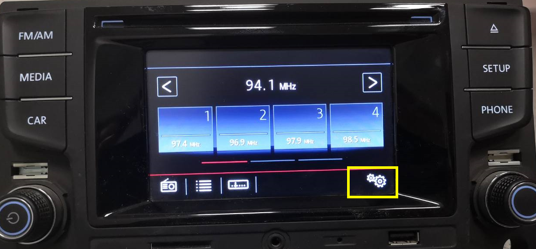
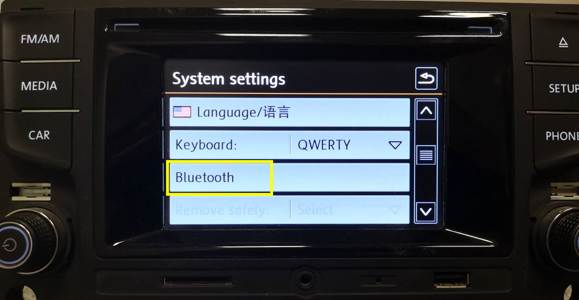
- On the System settings screen, touch Bluetooth to access the Bluetooth settings screen.
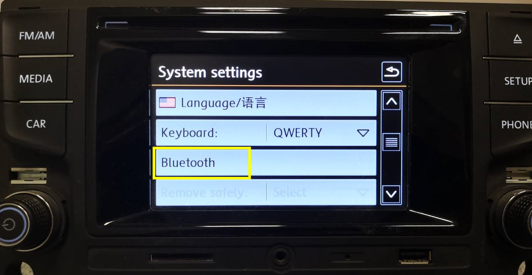
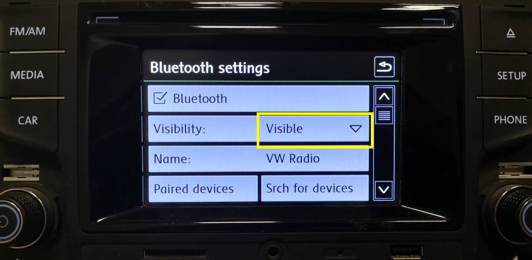
- On the Bluetooth settings screen, set Visibility to Visible. Then touch Srch for devices. Before searching for Bluetooth devices, ensure that your phone is powered on, Bluetooth is enabled, and the Bluetooth settings screen is displayed.
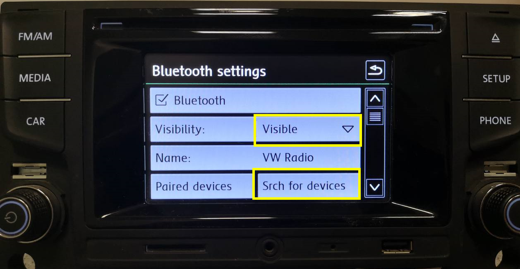
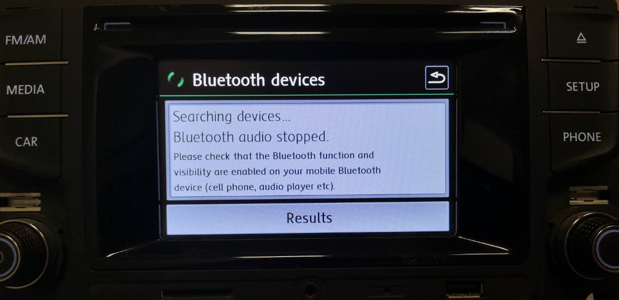
- Your car kit will start searching for devices. Wait until your phone's Bluetooth name is displayed on the in-car display and then touch the icon of your phone and follow the onscreen instructions to pair and connect your car kit with your phone. After the connection is established, the in-car display will automatically switch to the Bluetooth music screen. You can open a music app on your phone and music will be played on the car kit.
Method 2: Initiate a Bluetooth connection on your phone.
- Power on the car kit and touch the setup icon in the lower right corner of the in-car display to access the System settings screen.
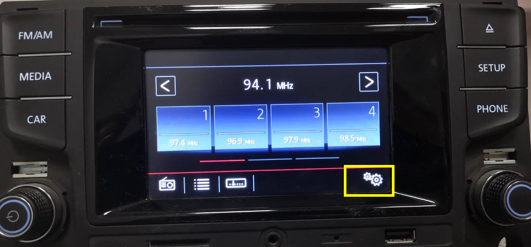
- On the System settings screen, touch Bluetooth to access the Bluetooth settings screen.
- On the Bluetooth settings screen, set Visibility to Visible.
- Enable Bluetooth and start searching for devices on your phone. Touch the Bluetooth device icon with the same name on the in-car display and follow the onscreen instructions to pair and connect your phone with your car kit. After the connection is established, the in-car display will automatically switch to the Bluetooth music screen. You can open a music app on your phone and music will be played on the car kit.

The two methods are applied to the following car models: 2017 Skoda Rapid, 2017 Skoda Rapid Spaceback, 2016 Skoda Octavia, 2015 Skoda Superb, 2015 Skoda Fabia, 2015 Skoda Rapid, 2015 Skoda Octavia, 2014 Skoda Octavia, and 2013 Skoda Octavia.
微信扫描二维码分享文章
Thank you for helping us grow better!
Your response has been submitted successfully!





