


 More Products
 Compare










我的荣耀 开启荣耀之旅
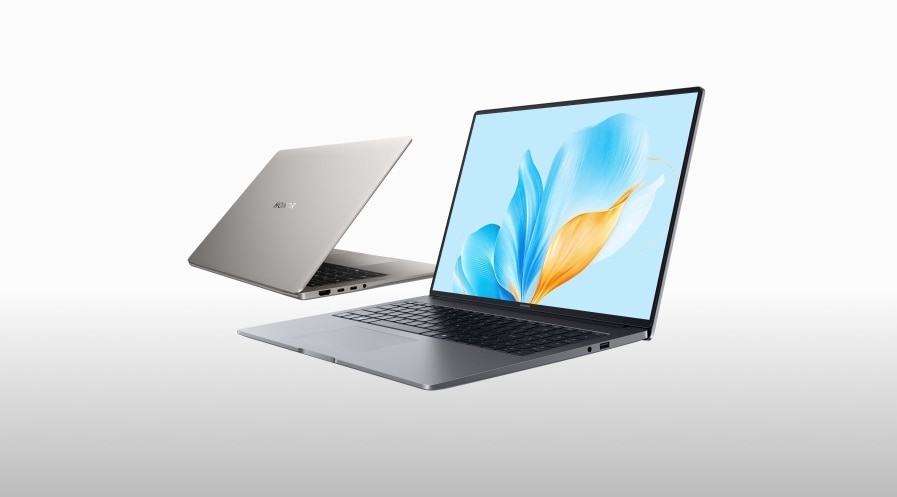
Best Laptop for Gaming and Work: Complete Buyer’s Guide
Table of Contents
If you’re on your laptop all day for work, you already know the little stuff matters. Too many apps running? Things slow down fast. A dull screen? It makes long hours feel longer.
And if you want to game after? That’s another story. A basic work laptop just can’t keep up. You need something that pulls double duty—smooth at work and solid for play.
That’s why we pulled this guide together. We tested and picked three of the best laptops for gaming and work that feel good to use, handle real work, and run games without a fuss. Read on to see what makes them stand out.
What to Look for When Choosing Work Laptops That Can Run Games?
Before we share our picks, it helps to know what makes a true best laptop for work and gaming. Keep these in mind when comparing your options:
1. CPU and GPU
Both productivity tasks and gaming demand smooth performance and stable frame rates. Look for laptops equipped with a high-performance CPU and GPU. If you're unsure whether a device meets your needs, check the system requirements of your favorite games and compare them with the laptop's CPU and GPU specs.
2. Display
For office work, you'll need accurate colors and crisp visuals, while gaming benefits from high refresh rates for fluid motion. Prioritize screens with at least 1080p resolution and a 120Hz–144Hz refresh rate. As for size, consider your personal preference along with the laptop's portability and weight.
3. Memory and Storage
For a smooth multitasking experience, a laptop for everyday use and gaming should come with at least 16GB of RAM. If you plan to edit videos, render graphics, or play AAA titles, 32GB is ideal. On the storage side, SSDs are highly recommended since they significantly reduce boot and load times.
4. Design and Portability
Think about where you'll use your laptop most often. If you travel frequently, opt for a lighter device with longer battery life, though this may mean some trade-offs in performance. If your laptop mostly stays at home, you can prioritize power and performance, even if the device is bulkier.
5. Keyboard and Ports
A comfortable keyboard is critical for productivity, so test it before you buy. Also, assess how many external devices you'll need to connect. Ensure the laptop has enough USB, HDMI, or even Thunderbolt ports to cover your setup.
Best Laptops for Work and Gaming in 2026
Now it’s time to look at three of the best laptops for work from home and gaming. Each one brings its own strengths, so you can see which fits your needs and matches your standards best.
HONOR MagicBook Art 14 2025
For users who frequently travel for business or carry their laptop on the go, the HONOR MagicBook Art 14 2025 is a perfect match. Its design stands out with the innovative Luban architecture, weighing just 1kg and measuring only 1cm thick. The sleek curves and durable finish make it both stylish and comfortable to use.
Despite its ultra-slim frame, performance is not compromised. The display delivers up to 1600 nits peak brightness, ensuring clarity even under direct sunlight. With professionally tuned colors, the visual experience is on par with cinema-level screens.
At its core, the MagicBook Art 14 2025 is powered by the Intel® Core™ Ultra 7 255H processor, paired with 32GB of RAM and a 1TB SSD. Based on the earlier selection criteria, this setup easily handles video rendering and demanding games.
Battery life is equally impressive, with a 60Wh cell providing up to 10 hours of office use. Plus, HONOR Share allows seamless file transfers and screen sharing across laptops, smartphones, and tablets.
Who It Is for
For professionals who value portability while demanding excellent visuals and smooth performance, the HONOR MagicBook Art 14 2025 is the best laptop for productivity and gaming.
HONOR MagicBook Pro 14
If gaming performance is your top priority, then the HONOR MagicBook Pro 14 might be the better choice for you. This laptop supports advanced GPU-level technologies such as ray tracing and XeSS, delivering noticeably smoother frame rates and optimized visuals in AAA games.
Of course, its capabilities in professional work are just as impressive. With a maximum performance output of 115W, it handles demanding tasks like 3D modeling, video rendering, and professional design with ease.
In terms of endurance, the HONOR MagicBook Pro 14 packs a 92Wh battery that lasts up to 12 hours on a single charge. Despite its power, it remains portable, weighing only 1.39kg with a slim 15.9mm profile.
At its core, it is equipped with the Intel® Core™ Ultra 9 Processor 285H paired with Intel Arc graphics. Along with a 1TB SSD and 32GB of RAM, this laptop is built to meet both productivity and entertainment demands.
Who It Is for
For users who work from home but also want to enjoy AAA gaming during downtime, the HONOR MagicBook Pro 14 is undoubtedly the best laptop for multitasking and gaming.
HONOR MagicBook X 16 2024
Looking for a larger screen to boost your viewing experience? Then check out the 16-inch HONOR MagicBook X16 2024.
Powered by a 12th Generation Intel® Core™ i5-12450H Processor, it comes with 8GB RAM and a 512GB SSD. This setup delivers enough performance for most office software, multitasking, and light gaming.
The display adopts a 16:10 aspect ratio with ultra-narrow bezels, ensuring you won't miss a single detail. As one of the best laptops for everyday use and gaming, it has also passed TÜV Rheinland Low Blue Light and Flicker-Free certifications to protect your eyes during long sessions.
Another highlight is its full-size keyboard. The regular keys feature a 1.5mm travel distance, while the space bar extends to 1.6mm, offering excellent tactile feedback with a quiet design, perfect for both typing and in-game controls.
Need external connections? The HONOR MagicBook X16 2024 comes with a versatile USB-C port, dual USB-A 3.2 Gen1 ports, an HDMI port, and a 3.5mm headphone/mic combo jack, supporting fast charging, data transfer, and expansion.
Who It Is for
If you're searching for a laptop that balances work productivity, eye comfort, and the ability to handle casual gaming or light creative tasks, the HONOR MagicBook X16 2024 is your best gaming work laptop.
Conclusion
Picking the best laptop for both gaming and work means finding a balance. You want good speed, clear visuals, and a design that’s easy to carry. That way, it handles your job during the day and gives smooth gaming at night.
Look for a strong processor, a solid graphics card, enough memory, and a screen that responds quickly. With these basics, you’ll be set for both work and play. HONOR builds laptops that cover both needs, so you don’t have to choose one over the other.
FAQs
Is a gaming laptop also good for work?
Yes, a gaming laptop is usually very powerful, equipped with high-performance CPUs and dedicated GPUs. This means it can not only handle AAA games smoothly but is also ideal for multitasking, video editing, 3D modeling, and other demanding work tasks.
The only trade-offs are that gaming laptops tend to be heavier and have shorter battery life compared to standard business laptops.
What is the #1 best gaming laptop?
Choosing the #1 best gaming laptop depends on your personal needs. In terms of overall performance, cooling, display quality, and portability, one of the best laptops for everyday use and gaming is the HONOR MagicBook Pro 14. Its powerful core easily runs AAA games while also handling intensive design, photo editing, and video production tasks.
Which laptop plays GTA V?
To run GTA V smoothly, a laptop should have at least an Intel Core i5 or AMD Ryzen 5 processor paired with an NVIDIA GTX 1650 or better GPU. While 8GB RAM is the minimum requirement, 16GB is recommended for better stability, faster load times, and a more enjoyable gaming experience.
How much RAM to get?
For everyday office work or light gaming, 16GB of RAM is usually sufficient to keep things running smoothly.
However, if you plan to juggle multiple demanding applications, handle video rendering, or play modern AAA games, 32GB is highly recommended, offering faster multitasking and overall system responsiveness.
Are gaming laptops bad for work productivity?
Not necessarily. While gaming laptops are often more expensive, heavier, and have shorter battery life, their high-performance hardware significantly boosts productivity.
Tasks like video rendering, graphic design, and multitasking run much more smoothly than on standard office laptops. The main factors to consider are portability and battery life, which depend on your work habits and environment.
Source: HONOR Club
Products Recommend
Latest Blogs



