More Products
 Compare






































Why can't I scan for Wi-Fi networks nearby after I enable the approximate location function?
| Why can't I scan for Wi-Fi networks nearby after I enable the approximate location function? |
Problem:
I cannot scan for Wi-Fi networks nearby after I enable the approximate location function and nearby Wi-Fi hotspots are not displayed on the Wi-Fi scan page.
Cause:
- If the phone is allowed to scan for surrounding Wi-Fi networks, an application may expose a user's precise location via a Wi-Fi scan.
- When you enable the approximate location function, there is a certain distance deviation between the approximate location and the precise location.Therefore, surrounding Wi-Fi information cannot be scanned.
Solution:
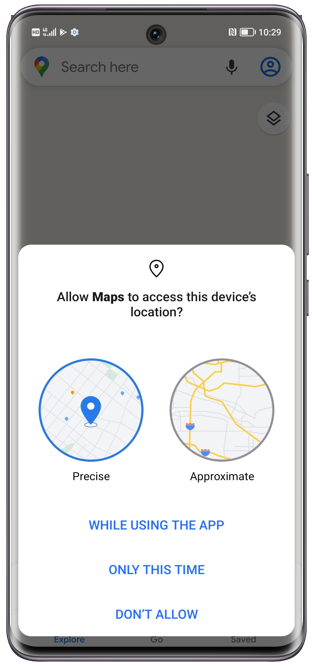
It is recommended that you enable the precise location function.to obtain Wi-Fi hotspot information. Enabling method:
- On the page, tap the application.
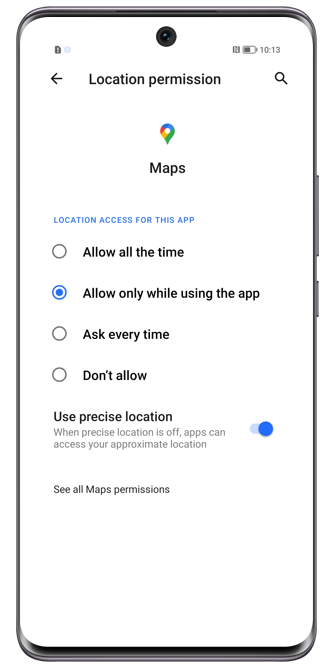
- Select Precise location when applying the location authorization for the application.
微信扫描二维码分享文章
Thank you for helping us grow better!
Your response has been submitted successfully!
- Hotline
- Live Chat
-
WhatsApp
9am – 9pm
English and Arabic Language - ae.support@hihonor.com
More Support

Hotline Support
Hotline:
80004444408

Email Support